char-fork/llama.cpp
git clone https://git.t4t.associates/char-fork/llama.cpp
acecd5603
char/aliceai-t5-moe
LLaMA.cpp HTTP Server
Fast, lightweight, pure C/C++ HTTP server based on httplib, nlohmann::json and llama.cpp.
Set of LLM REST APIs and a web UI to interact with llama.cpp.
Features:
- LLM inference of F16 and quantized models on GPU and CPU
- OpenAI API compatible chat completions, responses, and embeddings routes
- Anthropic Messages API compatible chat completions
- Reranking endpoint (https://github.com/ggml-org/llama.cpp/pull/9510)
- Parallel decoding with multi-user support
- Continuous batching
- Multimodal (documentation) / with OpenAI-compatible API support
- Monitoring endpoints
- Schema-constrained JSON response format
- Prefilling of assistant messages similar to the Claude API
- Function calling / tool use for ~any model
- Speculative decoding
- Easy-to-use web UI
For the full list of features, please refer to server's changelog
Usage
<!-- HELP_START --> <!-- IMPORTANT: The list below is auto-generated by llama-gen-docs; do NOT modify it manually -->Common params
| Argument | Explanation |
|---|---|
-h, --help, --usage | print usage and exit |
--version | show version and build info |
-cl, --cache-list | show list of models in cache |
--completion-bash | print source-able bash completion script for llama.cpp |
-t, --threads N | number of CPU threads to use during generation (default: -1)<br/>(env: LLAMA_ARG_THREADS) |
-tb, --threads-batch N | number of threads to use during batch and prompt processing (default: same as --threads) |
-C, --cpu-mask M | CPU affinity mask: arbitrarily long hex. Complements cpu-range (default: "") |
-Cr, --cpu-range lo-hi | range of CPUs for affinity. Complements --cpu-mask |
--cpu-strict <0|1> | use strict CPU placement (default: 0) |
--prio N | set process/thread priority : low(-1), normal(0), medium(1), high(2), realtime(3) (default: 0) |
--poll <0...100> | use polling level to wait for work (0 - no polling, default: 50) |
-Cb, --cpu-mask-batch M | CPU affinity mask: arbitrarily long hex. Complements cpu-range-batch (default: same as --cpu-mask) |
-Crb, --cpu-range-batch lo-hi | ranges of CPUs for affinity. Complements --cpu-mask-batch |
--cpu-strict-batch <0|1> | use strict CPU placement (default: same as --cpu-strict) |
--prio-batch N | set process/thread priority : 0-normal, 1-medium, 2-high, 3-realtime (default: 0) |
--poll-batch <0|1> | use polling to wait for work (default: same as --poll) |
-c, --ctx-size N | size of the prompt context (default: 0, 0 = loaded from model)<br/>(env: LLAMA_ARG_CTX_SIZE) |
-n, --predict, --n-predict N | number of tokens to predict (default: -1, -1 = infinity)<br/>(env: LLAMA_ARG_N_PREDICT) |
-b, --batch-size N | logical maximum batch size (default: 2048)<br/>(env: LLAMA_ARG_BATCH) |
-ub, --ubatch-size N | physical maximum batch size (default: 512)<br/>(env: LLAMA_ARG_UBATCH) |
--keep N | number of tokens to keep from the initial prompt (default: 0, -1 = all) |
--swa-full | use full-size SWA cache (default: false)<br/>(more info)<br/>(env: LLAMA_ARG_SWA_FULL) |
-fa, --flash-attn [on|off|auto] | set Flash Attention use ('on', 'off', or 'auto', default: 'auto')<br/>(env: LLAMA_ARG_FLASH_ATTN) |
--perf, --no-perf | whether to enable internal libllama performance timings (default: false)<br/>(env: LLAMA_ARG_PERF) |
-e, --escape, --no-escape | whether to process escapes sequences (\n, \r, \t, ', ", \) (default: true) |
--rope-scaling {none,linear,yarn} | RoPE frequency scaling method, defaults to linear unless specified by the model<br/>(env: LLAMA_ARG_ROPE_SCALING_TYPE) |
--rope-scale N | RoPE context scaling factor, expands context by a factor of N<br/>(env: LLAMA_ARG_ROPE_SCALE) |
--rope-freq-base N | RoPE base frequency, used by NTK-aware scaling (default: loaded from model)<br/>(env: LLAMA_ARG_ROPE_FREQ_BASE) |
--rope-freq-scale N | RoPE frequency scaling factor, expands context by a factor of 1/N<br/>(env: LLAMA_ARG_ROPE_FREQ_SCALE) |
--yarn-orig-ctx N | YaRN: original context size of model (default: 0 = model training context size)<br/>(env: LLAMA_ARG_YARN_ORIG_CTX) |
--yarn-ext-factor N | YaRN: extrapolation mix factor (default: -1.00, 0.0 = full interpolation)<br/>(env: LLAMA_ARG_YARN_EXT_FACTOR) |
--yarn-attn-factor N | YaRN: scale sqrt(t) or attention magnitude (default: -1.00)<br/>(env: LLAMA_ARG_YARN_ATTN_FACTOR) |
--yarn-beta-slow N | YaRN: high correction dim or alpha (default: -1.00)<br/>(env: LLAMA_ARG_YARN_BETA_SLOW) |
--yarn-beta-fast N | YaRN: low correction dim or beta (default: -1.00)<br/>(env: LLAMA_ARG_YARN_BETA_FAST) |
-kvo, --kv-offload, -nkvo, --no-kv-offload | whether to enable KV cache offloading (default: enabled)<br/>(env: LLAMA_ARG_KV_OFFLOAD) |
--repack, -nr, --no-repack | whether to enable weight repacking (default: enabled)<br/>(env: LLAMA_ARG_REPACK) |
--no-host | bypass host buffer allowing extra buffers to be used<br/>(env: LLAMA_ARG_NO_HOST) |
-ctk, --cache-type-k TYPE | KV cache data type for K<br/>allowed values: f32, f16, bf16, q8_0, q4_0, q4_1, iq4_nl, q5_0, q5_1<br/>(default: f16)<br/>(env: LLAMA_ARG_CACHE_TYPE_K) |
-ctv, --cache-type-v TYPE | KV cache data type for V<br/>allowed values: f32, f16, bf16, q8_0, q4_0, q4_1, iq4_nl, q5_0, q5_1<br/>(default: f16)<br/>(env: LLAMA_ARG_CACHE_TYPE_V) |
-dt, --defrag-thold N | KV cache defragmentation threshold (DEPRECATED)<br/>(env: LLAMA_ARG_DEFRAG_THOLD) |
--rpc SERVERS | comma-separated list of RPC servers (host:port)<br/>(env: LLAMA_ARG_RPC) |
-lm, --load-mode MODE | model loading mode (default: auto)<br/>- auto: mmap, unless a device does not support it<br/>- none: no special loading mode<br/>- mmap: memory-map model (if mmap disabled, slower load but may reduce pageouts if not using mlock)<br/>- mlock: force system to keep model in RAM rather than swapping or compressing<br/>- mmap+mlock: mmap + force system to keep model in RAM rather than swapping or compressing<br/>- dio: use DirectIO if available<br/><br/>(env: LLAMA_ARG_LOAD_MODE) |
-lzm, --lazy-mode MODE | on-demand reading of certain tensors, for example per-layer embeddings (default: auto)<br/>- on: read the rows of such tensors from disk on demand instead of keeping them resident (requires mmap)<br/>- auto: on, but only for tensors larger than 4 GiB<br/>- off: always keep them resident<br/>(env: LLAMA_ARG_LAZY_MODE) |
--numa TYPE | attempt optimizations that help on some NUMA systems<br/>- distribute: spread execution evenly over all nodes<br/>- isolate: only spawn threads on CPUs on the node that execution started on<br/>- numactl: use the CPU map provided by numactl<br/>if run without this previously, it is recommended to drop the system page cache before using this<br/>see https://github.com/ggml-org/llama.cpp/issues/1437<br/>(env: LLAMA_ARG_NUMA) |
-dev, --device <dev1,dev2,..> | comma-separated list of devices to use for offloading (none = don't offload)<br/>use --list-devices to see a list of available devices<br/>(env: LLAMA_ARG_DEVICE) |
--list-devices | print list of available devices and exit |
-ot, --override-tensor <tensor name pattern>=<buffer type>,... | override tensor buffer type<br/>(env: LLAMA_ARG_OVERRIDE_TENSOR) |
-cmoe, --cpu-moe | keep all Mixture of Experts (MoE) weights in the CPU<br/>(env: LLAMA_ARG_CPU_MOE) |
-ncmoe, --n-cpu-moe N | keep the Mixture of Experts (MoE) weights of the first N layers in the CPU<br/>(env: LLAMA_ARG_N_CPU_MOE) |
-ncffn, --n-cpu-ffn N | keep the dense FFN weights of the first N layers in the CPU<br/>(dense models; for MoE expert weights use --n-cpu-moe)<br/>(env: LLAMA_ARG_N_CPU_FFN) |
-ngl, --gpu-layers, --n-gpu-layers N | max. number of layers to store in VRAM, either an exact number, 'auto', or 'all' (default: auto)<br/>(env: LLAMA_ARG_N_GPU_LAYERS) |
-sm, --split-mode {none,layer,row,tensor} | how to split the model across multiple GPUs, one of:<br/>- none: use one GPU only<br/>- layer (default): split layers and KV across GPUs (pipelined)<br/>- row: split weight across GPUs by rows (parallelized)<br/>- tensor: split weights and KV across GPUs (parallelized, EXPERIMENTAL)<br/>(env: LLAMA_ARG_SPLIT_MODE) |
-ts, --tensor-split N0,N1,N2,... | fraction of the model to offload to each GPU, comma-separated list of proportions, e.g. 3,1<br/>(env: LLAMA_ARG_TENSOR_SPLIT) |
-mg, --main-gpu INDEX | the GPU to use for the model (with split-mode = none), or for intermediate results and KV (with split-mode = row) (default: 0)<br/>(env: LLAMA_ARG_MAIN_GPU) |
-fit, --fit [on|off] | whether to adjust unset arguments to fit in device memory ('on' or 'off', default: 'on')<br/>(env: LLAMA_ARG_FIT) |
-fitt, --fit-target MiB0,MiB1,MiB2,... | target margin per device for --fit, comma-separated list of values, single value is broadcast across all devices, default: 1024<br/>(env: LLAMA_ARG_FIT_TARGET) |
-fitc, --fit-ctx N | minimum ctx size that can be set by --fit option, default: 4096<br/>(env: LLAMA_ARG_FIT_CTX) |
--check-tensors | check model tensor data for invalid values (default: false) |
--override-kv KEY=TYPE:VALUE,... | advanced option to override model metadata by key. to specify multiple overrides, either use comma-separated values.<br/>types: int, float, bool, str. example: --override-kv tokenizer.ggml.add_bos_token=bool:false,tokenizer.ggml.add_eos_token=bool:false |
--op-offload, --no-op-offload | whether to offload host tensor operations to device (default: true) |
--lora FNAME | path to LoRA adapter (use comma-separated values to load multiple adapters) |
--lora-scaled FNAME:SCALE,... | path to LoRA adapter with user defined scaling (format: FNAME:SCALE,...)<br/>note: use comma-separated values |
--control-vector FNAME | add a control vector<br/>note: use comma-separated values to add multiple control vectors |
--control-vector-scaled FNAME:SCALE,... | add a control vector with user defined scaling SCALE<br/>note: use comma-separated values (format: FNAME:SCALE,...) |
--control-vector-layer-range START END | layer range to apply the control vector(s) to, start and end inclusive |
-m, --model FNAME | model path to load<br/>(env: LLAMA_ARG_MODEL) |
-mu, --model-url MODEL_URL | model download url (default: unused)<br/>(env: LLAMA_ARG_MODEL_URL) |
-dr, --docker-repo [<repo>/]<model>[:quant] | Docker Hub model repository. repo is optional, default to ai/. quant is optional, default to :latest.<br/>example: gemma3<br/>(default: unused)<br/>(env: LLAMA_ARG_DOCKER_REPO) |
-hf, -hfr, --hf-repo <user>/<model>[:quant] | Hugging Face model repository; quant is optional, case-insensitive, default to Q4_K_M, or falls back to the first file in the repo if Q4_K_M doesn't exist.<br/>mmproj is also downloaded automatically if available. to disable, add --no-mmproj<br/>example: ggml-org/GLM-4.7-Flash-GGUF:Q4_K_M<br/>(default: unused)<br/>(env: LLAMA_ARG_HF_REPO) |
-hff, --hf-file FILE | Hugging Face model file. If specified, it will override the quant in --hf-repo (default: unused)<br/>(env: LLAMA_ARG_HF_FILE) |
-hft, --hf-token TOKEN | Hugging Face access token (default: value from HF_TOKEN environment variable)<br/>(env: HF_TOKEN) |
--log-disable | Log disable |
--log-file FNAME | Log to file<br/>(env: LLAMA_ARG_LOG_FILE) |
--log-jsonl, --no-log-jsonl | Log as JSONL (one JSON object per line) to stdout, this also disables colored logging (default: disabled)<br/>(env: LLAMA_ARG_LOG_JSONL) |
--log-colors [on|off|auto] | Set colored logging ('on', 'off', or 'auto', default: 'auto')<br/>'auto' enables colors when output is to a terminal<br/>(env: LLAMA_ARG_LOG_COLORS) |
-v, --verbose, --log-verbose | Set verbosity level to infinity (i.e. log all messages, useful for debugging) |
--offline | Offline mode: forces use of cache, prevents network access<br/>(env: LLAMA_ARG_OFFLINE) |
-lv, --verbosity, --log-verbosity N | Set the verbosity threshold. Messages with a higher verbosity will be ignored. Values:<br/> - 0: generic output<br/> - 1: error<br/> - 2: warning<br/> - 3: info<br/> - 4: trace (more info)<br/> - 5: debug<br/>(default: 3)<br/><br/>(env: LLAMA_ARG_LOG_VERBOSITY) |
--log-prefix, --no-log-prefix | Enable prefix in log messages<br/>(env: LLAMA_ARG_LOG_PREFIX) |
--log-timestamps, --no-log-timestamps | Enable timestamps in log messages<br/>(env: LLAMA_ARG_LOG_TIMESTAMPS) |
--spec-draft-type-k, -ctkd, --cache-type-k-draft TYPE | KV cache data type for K for the draft model<br/>allowed values: f32, f16, bf16, q8_0, q4_0, q4_1, iq4_nl, q5_0, q5_1<br/>(default: f16)<br/>(env: LLAMA_ARG_SPEC_DRAFT_CACHE_TYPE_K) |
--spec-draft-type-v, -ctvd, --cache-type-v-draft TYPE | KV cache data type for V for the draft model<br/>allowed values: f32, f16, bf16, q8_0, q4_0, q4_1, iq4_nl, q5_0, q5_1<br/>(default: f16)<br/>(env: LLAMA_ARG_SPEC_DRAFT_CACHE_TYPE_V) |
Sampling params
| Argument | Explanation |
|---|---|
--samplers SAMPLERS | samplers that will be used for generation in the order, separated by ';'<br/>(default: penalties;dry;top_n_sigma;top_k;typ_p;top_p;min_p;xtc;temperature) |
-s, --seed SEED | RNG seed (default: -1, use random seed for -1) |
--sampler-seq, --sampling-seq SEQUENCE | simplified sequence for samplers that will be used (default: edskypmxt) |
--ignore-eos | ignore end of stream token and continue generating (implies --logit-bias EOS-inf) |
--temp, --temperature N | temperature (default: 0.80) |
--top-k N | top-k sampling (default: 40, 0 = disabled)<br/>(env: LLAMA_ARG_TOP_K) |
--top-p N | top-p sampling (default: 0.95, 1.0 = disabled) |
--min-p N | min-p sampling (default: 0.05, 0.0 = disabled) |
--top-nsigma, --top-n-sigma N | top-n-sigma sampling (default: -1.00, -1.0 = disabled) |
--xtc-probability N | xtc probability (default: 0.00, 0.0 = disabled) |
--xtc-threshold N | xtc threshold (default: 0.10, 1.0 = disabled) |
--typical, --typical-p N | locally typical sampling, parameter p (default: 1.00, 1.0 = disabled) |
--repeat-last-n N | last n tokens to consider for penalize (default: 64, 0 = disabled) |
--repeat-penalty N | penalize repeat sequence of tokens (default: 1.00, 1.0 = disabled) |
--presence-penalty N | repeat alpha presence penalty (default: 0.00, 0.0 = disabled) |
--frequency-penalty N | repeat alpha frequency penalty (default: 0.00, 0.0 = disabled) |
--dry-multiplier N | set DRY sampling multiplier (default: 0.00, 0.0 = disabled) |
--dry-base N | set DRY sampling base value (default: 1.75) |
--dry-allowed-length N | set allowed length for DRY sampling (default: 2) |
--dry-penalty-last-n N | set DRY penalty for the last n tokens (default: 64, 0 = disable) |
--dry-sequence-breaker STRING | add sequence breaker for DRY sampling, clearing out default breakers ('\n', ':', '"', '*') in the process; use "none" to not use any sequence breakers |
--adaptive-target N | adaptive-p: select tokens near this probability (valid range 0.0 to 1.0; negative = disabled) (default: -1.00)<br/>(more info) |
--adaptive-decay N | adaptive-p: decay rate for target adaptation over time. lower values are more reactive, higher values are more stable.<br/>(valid range 0.0 to 0.99) (default: 0.90) |
--dynatemp-range N | dynamic temperature range (default: 0.00, 0.0 = disabled) |
--dynatemp-exp N | dynamic temperature exponent (default: 1.00) |
--mirostat N | use Mirostat sampling.<br/>Top K, Nucleus and Locally Typical samplers are ignored if used.<br/>(default: 0, 0 = disabled, 1 = Mirostat, 2 = Mirostat 2.0) |
--mirostat-lr N | Mirostat learning rate, parameter eta (default: 0.10) |
--mirostat-ent N | Mirostat target entropy, parameter tau (default: 5.00) |
-l, --logit-bias TOKEN_ID(+/-)BIAS | modifies the likelihood of token appearing in the completion,<br/>i.e. --logit-bias 15043+1 to increase likelihood of token ' Hello',<br/>or --logit-bias 15043-1 to decrease likelihood of token ' Hello' |
--grammar GRAMMAR | BNF-like grammar to constrain generations (see samples in grammars/ dir) |
--grammar-file FNAME | file to read grammar from |
-j, --json-schema SCHEMA | JSON schema to constrain generations (https://json-schema.org/), e.g. {"type": "object"} for any JSON object |
-jf, --json-schema-file FILE | File containing a JSON schema to constrain generations (https://json-schema.org/), e.g. {"type": "object"} for any JSON object |
-bs, --backend-sampling | enable backend sampling (experimental) (default: disabled)<br/>(env: LLAMA_ARG_BACKEND_SAMPLING) |
Server-specific params
| Argument | Explanation |
|---|---|
-lcs, --lookup-cache-static FNAME | path to static lookup cache to use for lookup decoding (not updated by generation) |
-lcd, --lookup-cache-dynamic FNAME | path to dynamic lookup cache to use for lookup decoding (updated by generation) |
--kv-unified-per-slot N | context limit per parallel slot (default: unset, behavior unchanged).<br/>when set without -c/--ctx-size, the shared KV pool is sized to n_parallel*N<br/>(env: LLAMA_ARG_KV_UNIFIED_PER_SLOT) |
-ctxcp, --ctx-checkpoints, --swa-checkpoints N | max number of context checkpoints to create per slot (default: 32)(more info)<br/>(env: LLAMA_ARG_CTX_CHECKPOINTS) |
-cms, --checkpoint-min-step N | minimum spacing between context checkpoints in tokens (default: 8192, 0 = no minimum)<br/>(env: LLAMA_ARG_CHECKPOINT_MIN_SPACING_NT) |
-cram, --cache-ram N | set the maximum cache size in MiB (default: 8192, -1 - no limit, 0 - disable)(more info)<br/>(env: LLAMA_ARG_CACHE_RAM) |
-kvu, --kv-unified, -no-kvu, --no-kv-unified | use single unified KV buffer shared across all sequences (default: enabled if number of slots is auto)<br/>(env: LLAMA_ARG_KV_UNIFIED) |
--cache-idle-slots, --no-cache-idle-slots | save idle slots to the prompt cache on new task, and clear them when using unified KV (default: enabled, requires cache-ram)<br/>(env: LLAMA_ARG_CACHE_IDLE_SLOTS) |
--context-shift, --no-context-shift | whether to use context shift on infinite text generation (default: disabled)<br/>(env: LLAMA_ARG_CONTEXT_SHIFT) |
-r, --reverse-prompt PROMPT | halt generation at PROMPT, return control in interactive mode |
-sp, --special | special tokens output enabled (default: false) |
--warmup, --no-warmup | whether to perform warmup with an empty run (default: enabled) |
--spm-infill | use Suffix/Prefix/Middle pattern for infill (instead of Prefix/Suffix/Middle) as some models prefer this. (default: disabled) |
--pooling {none,mean,cls,last,rank} | pooling type for embeddings, use model default if unspecified<br/>(env: LLAMA_ARG_POOLING) |
-np, --parallel N | number of server slots (default: -1, -1 = auto)<br/>(env: LLAMA_ARG_N_PARALLEL) |
-cb, --cont-batching, -nocb, --no-cont-batching | whether to enable continuous batching (a.k.a dynamic batching) (default: enabled)<br/>(env: LLAMA_ARG_CONT_BATCHING) |
-mm, --mmproj FILE | path to a multimodal projector file. see tools/mtmd/README.md<br/>note: if -hf is used, this argument can be omitted<br/>(env: LLAMA_ARG_MMPROJ) |
-mmu, --mmproj-url URL | URL to a multimodal projector file. see tools/mtmd/README.md<br/>(env: LLAMA_ARG_MMPROJ_URL) |
--mmproj-auto, --no-mmproj, --no-mmproj-auto | whether to use multimodal projector file (if available), useful when using -hf (default: enabled)<br/>(env: LLAMA_ARG_MMPROJ_AUTO) |
--mmproj-offload, --no-mmproj-offload | whether to enable GPU offloading for multimodal projector (default: enabled)<br/>(env: LLAMA_ARG_MMPROJ_OFFLOAD) |
-mmdev, --mmproj-device DEVICE | device to use for multimodal projector (none = don't offload, default: follows --device)<br/>use --list-devices to see a list of available devices<br/>(env: MTMD_BACKEND_DEVICE) |
--image-min-tokens N | minimum number of tokens each image can take, only used by vision models with dynamic resolution (default: read from model)<br/>(env: LLAMA_ARG_IMAGE_MIN_TOKENS) |
--image-max-tokens N | maximum number of tokens each image can take, only used by vision models with dynamic resolution (default: read from model)<br/>(env: LLAMA_ARG_IMAGE_MAX_TOKENS) |
--mtmd-batch-max-tokens N | maximum number of image tokens per batch when encoding images (default: 1024)<br/>(env: LLAMA_ARG_MTMD_BATCH_MAX_TOKENS) |
--video-fps N | target video frame rate (default: 4.0)<br/>(env: LLAMA_ARG_VIDEO_FPS) |
--video-timestamp-interval N | interval in milliseconds between text timestamps (default: 5000)<br/>(env: LLAMA_ARG_VIDEO_TIMESTAMP_INTERVAL) |
--video-ffmpeg-dir DIR | path to the directory containing ffmpeg and ffprobe (default: search in PATH)<br/>(env: LLAMA_ARG_VIDEO_FFMPEG_DIR) |
-a, --alias STRING | set model name aliases, comma-separated (to be used by API)<br/>(env: LLAMA_ARG_ALIAS) |
--tags STRING | set model tags, comma-separated (informational, not used for routing)<br/>(env: LLAMA_ARG_TAGS) |
--embd-normalize N | normalisation for embeddings (default: 2) (-1=none, 0=max absolute int16, 1=taxicab, 2=euclidean, >2=p-norm) |
--host HOST | ip address to listen, or bind to an UNIX socket if the address ends with .sock (default: 127.0.0.1)<br/>(env: LLAMA_ARG_HOST) |
--port PORT | port to listen (default: 8080)<br/>(env: LLAMA_ARG_PORT) |
--reuse-port | allow multiple sockets to bind to the same port (default: disabled)<br/>(env: LLAMA_ARG_REUSE_PORT) |
--path PATH | path to serve static files from (default: )<br/>(env: LLAMA_ARG_STATIC_PATH) |
--cors-origins ORIGINS | comma-separated list of allowed origins for CORS (default: *)<br/>if set to special value 'localhost', reflect the Origin header only if it is localhost<br/>(env: LLAMA_ARG_CORS_ORIGINS) |
--cors-methods METHODS | comma-separated list of allowed methods for CORS (default: GET, POST, DELETE, OPTIONS)<br/>(env: LLAMA_ARG_CORS_METHODS) |
--cors-headers HEADERS | comma-separated list of allowed headers for CORS (default: *)<br/>(env: LLAMA_ARG_CORS_HEADERS) |
--cors-credentials, --no-cors-credentials | whether to allow credentials for CORS (default: enabled)<br/>note: if this is enabled and --cors-origins is set to * (default), the Origin header will be echoed back, and credentials will always be allowed<br/>(env: LLAMA_ARG_CORS_CREDENTIALS) |
--api-prefix PREFIX | prefix path the server serves from, without the trailing slash (default: )<br/>(env: LLAMA_ARG_API_PREFIX) |
--ui-config, --webui-config JSON | JSON that provides default UI settings (overrides UI defaults)<br/>(env: LLAMA_ARG_UI_CONFIG) |
--ui-config-file, --webui-config-file PATH | JSON file that provides default UI settings (overrides UI defaults)<br/>(env: LLAMA_ARG_UI_CONFIG_FILE) |
--ui-mcp-proxy, --webui-mcp-proxy, --no-ui-mcp-proxy, --no-webui-mcp-proxy | experimental: whether to enable MCP CORS proxy - do not enable in untrusted environments (default: disabled)<br/>(env: LLAMA_ARG_UI_MCP_PROXY) |
--tools TOOL1,TOOL2,... | experimental: whether to enable built-in tools for AI agents - do not enable in untrusted environments (default: no tools)<br/>specify "all" to enable all tools<br/>available tools: read_file, file_glob_search, grep_search, exec_shell_command, write_file, edit_file, get_info<br/>note: for security reasons, this will limit --cors-origins to localhost by default<br/>(env: LLAMA_ARG_TOOLS) |
--tools-runtime OPTION | experimental: run tools in a separate runtime environment (default: none, use host environment)<br/>available options:<br/> 'docker:<image>', 'podman:<image>': spin up a new container and reuse it for all invocations, clean up on server exit<br/> 'docker-container:<id>', 'podman-container:<id>': use an existing container by ID, won't stop on server exit<br/> 'ssh:<target>': run tools on a remote POSIX host over SSH, key-based auth and a trusted host key are required<br/><br/>(env: LLAMA_ARG_TOOLS_RUNTIME) |
--mcp-servers-config PATH | experimental: path to JSON file with MCP server definitions (Cursor-compatible format) - do not enable in untrusted environments (default: none)<br/>note: for security reasons, this will limit --cors-origins to localhost by default<br/>(env: LLAMA_ARG_MCP_SERVERS_CONFIG) |
--mcp-servers-json JSON | experimental: inline JSON with MCP server definitions (Cursor-compatible format) - do not enable in untrusted environments (default: none)<br/>note: for security reasons, this will limit --cors-origins to localhost by default<br/>(env: LLAMA_ARG_MCP_SERVERS_JSON) |
-ag, --agent, -no-ag, --no-agent | whether to enable CORS proxy and all built-in tools - do not enable in untrusted environments (default: disabled)<br/>note: for security reasons, this will limit --cors-origins to localhost by default<br/>(env: LLAMA_ARG_AGENT) |
--ui, --webui, --no-ui, --no-webui | whether to enable the Web UI (default: enabled)<br/>(env: LLAMA_ARG_UI) |
--embedding, --embeddings | restrict to only support embedding use case; use only with dedicated embedding models (default: disabled)<br/>(env: LLAMA_ARG_EMBEDDINGS) |
--rerank, --reranking | enable reranking endpoint on server (default: disabled)<br/>(env: LLAMA_ARG_RERANKING) |
--api-key KEY | API key to use for authentication, multiple keys can be provided as a comma-separated list (default: none)<br/>(env: LLAMA_API_KEY) |
--api-key-file FNAME | path to file containing API keys, one per line; lines starting with a hash are treated as comments (default: none)<br/>(env: LLAMA_ARG_API_KEY_FILE) |
--ssl-key-file FNAME | path to file a PEM-encoded SSL private key<br/>(env: LLAMA_ARG_SSL_KEY_FILE) |
--ssl-cert-file FNAME | path to file a PEM-encoded SSL certificate<br/>(env: LLAMA_ARG_SSL_CERT_FILE) |
--chat-template-kwargs STRING | sets additional params for the json template parser, must be a valid json object string, e.g. '{"key1":"value1","key2":"value2"}'<br/>(env: LLAMA_ARG_CHAT_TEMPLATE_KWARGS) |
-to, --timeout N | server read/write timeout in seconds (default: 3600)<br/>(env: LLAMA_ARG_TIMEOUT) |
--sse-ping-interval N | server SSE ping interval in seconds (-1 = disabled, default: 30)<br/>(env: LLAMA_ARG_SSE_PING_INTERVAL) |
--threads-http N | number of threads used to process HTTP requests (default: -1)<br/>(env: LLAMA_ARG_THREADS_HTTP) |
--cache-prompt, --no-cache-prompt | whether to enable prompt caching (default: enabled)<br/>(env: LLAMA_ARG_CACHE_PROMPT) |
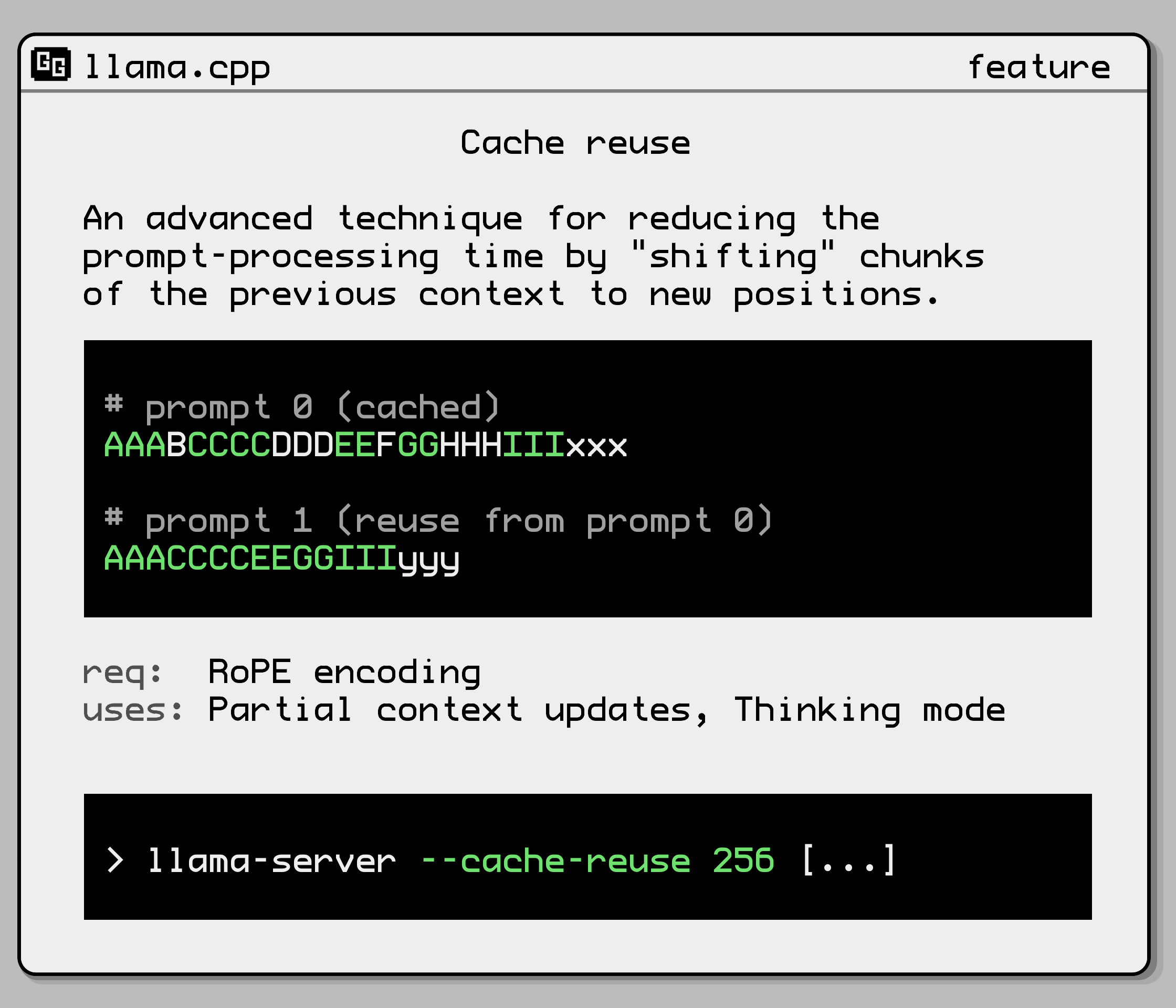
--cache-reuse N | min chunk size to attempt reusing from the cache via KV shifting, requires prompt caching to be enabled (default: 0)<br/>(card)<br/>(env: LLAMA_ARG_CACHE_REUSE) |
--metrics | enable prometheus compatible metrics endpoint (default: disabled)<br/>(env: LLAMA_ARG_ENDPOINT_METRICS) |
--props | enable changing global properties via POST /props (default: disabled)<br/>(env: LLAMA_ARG_ENDPOINT_PROPS) |
--slots, --no-slots | expose slots monitoring endpoint (default: enabled)<br/>(env: LLAMA_ARG_ENDPOINT_SLOTS) |
--slot-save-path PATH | path to save slot kv cache (default: disabled) |
--media-path PATH | directory for loading local media files; files can be accessed via file:// URLs using relative paths (default: disabled) |
--models-dir PATH | directory containing models for the router server (default: disabled)<br/>(env: LLAMA_ARG_MODELS_DIR) |
--models-preset PATH | path to INI file containing model presets for the router server (default: disabled)<br/>(env: LLAMA_ARG_MODELS_PRESET) |
--models-max N | for router server, maximum number of models to load simultaneously (default: 4, 0 = unlimited)<br/>(env: LLAMA_ARG_MODELS_MAX) |
--models-autoload, --no-models-autoload | for router server, whether to automatically load models (default: enabled)<br/>(env: LLAMA_ARG_MODELS_AUTOLOAD) |
--jinja, --no-jinja | whether to use jinja template engine for chat (default: enabled)<br/>(env: LLAMA_ARG_JINJA) |
--reasoning-format FORMAT | controls whether thought tags are allowed and/or extracted from the response, and in which format they're returned; one of:<br/>- none: leaves thoughts unparsed in message.content<br/>- deepseek: puts thoughts in message.reasoning_content<br/>- deepseek-legacy: keeps <think> tags in message.content while also populating message.reasoning_content<br/>(default: auto)<br/>(env: LLAMA_ARG_THINK) |
-rea, --reasoning [on|off|auto] | Use reasoning/thinking in the chat ('on', 'off', or 'auto', default: 'auto' (detect from template))<br/>(env: LLAMA_ARG_REASONING) |
--reasoning-effort LEVEL | reasoning effort level given to the chat template: 'default' to keep the template default,<br/>or a level such as 'minimal', 'low', 'medium', 'high', 'xhigh' or 'max' (default: default)<br/>(env: LLAMA_ARG_REASONING_EFFORT) |
--reasoning-budget N | token budget for thinking: -1 for unrestricted, 0 for immediate end, N>0 for token budget (default: -1)<br/>(env: LLAMA_ARG_THINK_BUDGET) |
--reasoning-budget-message MESSAGE | message injected before the end-of-thinking tag when reasoning budget is exhausted (default: none)<br/>(env: LLAMA_ARG_THINK_BUDGET_MESSAGE) |
--reasoning-preserve, --no-reasoning-preserve | preserve reasoning trace in the full history, not just the last assistant message (default: enabled)<br/>compatible with certain templates having 'supports_preserve_reasoning' capability<br/>example: https://docs.z.ai/guides/capabilities/thinking-mode#preserved-thinking<br/>(env: LLAMA_ARG_REASONING_PRESERVE) |
--chat-template JINJA_TEMPLATE | set custom jinja chat template (default: template taken from model's metadata)<br/>if suffix/prefix are specified, template will be disabled<br/>only commonly used templates are accepted (unless --jinja is set before this flag):<br/>list of built-in templates:<br/>bailing, bailing-think, bailing2, chatglm3, chatglm4, chatml, command-r, deepseek, deepseek-ocr, deepseek2, deepseek3, exaone-moe, exaone3, exaone4, falcon3, gemma, gigachat, glmedge, gpt-oss, granite, granite-4.0, granite-4.1, grok-2, hunyuan-dense, hunyuan-moe, hunyuan-vl, kimi-k2, llama2, llama2-sys, llama2-sys-bos, llama2-sys-strip, llama3, llama4, megrez, minicpm, mistral-v1, mistral-v3, mistral-v3-tekken, mistral-v7, mistral-v7-tekken, monarch, openchat, orion, pangu-embedded, phi3, phi4, rwkv-world, seed_oss, smolvlm, solar-open, vicuna, vicuna-orca, yandex, zephyr<br/>(env: LLAMA_ARG_CHAT_TEMPLATE) |
--chat-template-file JINJA_TEMPLATE_FILE | set custom jinja chat template file (default: template taken from model's metadata)<br/>if suffix/prefix are specified, template will be disabled<br/>only commonly used templates are accepted (unless --jinja is set before this flag):<br/>list of built-in templates:<br/>bailing, bailing-think, bailing2, chatglm3, chatglm4, chatml, command-r, deepseek, deepseek-ocr, deepseek2, deepseek3, exaone-moe, exaone3, exaone4, falcon3, gemma, gigachat, glmedge, gpt-oss, granite, granite-4.0, granite-4.1, grok-2, hunyuan-dense, hunyuan-moe, hunyuan-vl, kimi-k2, llama2, llama2-sys, llama2-sys-bos, llama2-sys-strip, llama3, llama4, megrez, minicpm, mistral-v1, mistral-v3, mistral-v3-tekken, mistral-v7, mistral-v7-tekken, monarch, openchat, orion, pangu-embedded, phi3, phi4, rwkv-world, seed_oss, smolvlm, solar-open, vicuna, vicuna-orca, yandex, zephyr<br/>(env: LLAMA_ARG_CHAT_TEMPLATE_FILE) |
--skip-chat-parsing, --no-skip-chat-parsing | force a pure content parser, even if a Jinja template is specified; model will output everything in the content section, including any reasoning and/or tool calls (default: disabled)<br/>(env: LLAMA_ARG_SKIP_CHAT_PARSING) |
--prefill-assistant, --no-prefill-assistant | whether to prefill the assistant's response if the last message is an assistant message (default: prefill enabled)<br/>when this flag is set, if the last message is an assistant message then it will be treated as a full message and not prefilled<br/><br/>(env: LLAMA_ARG_PREFILL_ASSISTANT) |
-sps, --slot-prompt-similarity SIMILARITY | how much the prompt of a request must match the prompt of a slot in order to use that slot (default: 0.10, 0.0 = disabled) |
--lora-init-without-apply | load LoRA adapters without applying them (apply later via POST /lora-adapters) (default: disabled) |
--sleep-idle-seconds SECONDS | number of seconds of idleness after which the server will sleep (default: -1; -1 = disabled) |
--log-prompts-dir PATH | Log prompts to directory (auto-created if not present; only used for debugging, default: disabled) |
--spec-draft-hf, -hfd, -hfrd, --hf-repo-draft <user>/<model>[:quant] | Same as --hf-repo, but for the draft model (default: unused)<br/>(env: LLAMA_ARG_SPEC_DRAFT_HF_REPO) |
--spec-draft-threads, -td, --threads-draft N | number of threads to use during generation (default: same as --threads) |
--spec-draft-threads-batch, -tbd, --threads-batch-draft N | number of threads to use during batch and prompt processing (default: same as --threads-draft) |
--spec-draft-cpu-mask, -Cd, --cpu-mask-draft M | Draft model CPU affinity mask. Complements cpu-range-draft (default: same as --cpu-mask) |
--spec-draft-cpu-range, -Crd, --cpu-range-draft lo-hi | Ranges of CPUs for affinity. Complements --cpu-mask-draft |
--spec-draft-cpu-strict, --cpu-strict-draft <0|1> | Use strict CPU placement for draft model (default: same as --cpu-strict) |
--spec-draft-prio, --prio-draft N | set draft process/thread priority : 0-normal, 1-medium, 2-high, 3-realtime (default: 0) |
--spec-draft-poll, --poll-draft <0|1> | Use polling to wait for draft model work (default: same as --poll) |
--spec-draft-cpu-mask-batch, -Cbd, --cpu-mask-batch-draft M | Draft model CPU affinity mask. Complements cpu-range-draft (default: same as --cpu-mask) |
--spec-draft-cpu-strict-batch, --cpu-strict-batch-draft <0|1> | Use strict CPU placement for draft model (default: --cpu-strict-draft) |
--spec-draft-prio-batch, --prio-batch-draft N | set draft process/thread priority : 0-normal, 1-medium, 2-high, 3-realtime (default: 0) |
--spec-draft-poll-batch, --poll-batch-draft <0|1> | Use polling to wait for draft model work (default: --poll-draft) |
--spec-draft-override-tensor, -otd, --override-tensor-draft <tensor name pattern>=<buffer type>,... | override tensor buffer type for draft model |
--spec-draft-cpu-moe, -cmoed, --cpu-moe-draft | keep all Mixture of Experts (MoE) weights in the CPU for the draft model<br/>(env: LLAMA_ARG_SPEC_DRAFT_CPU_MOE) |
--spec-draft-n-cpu-moe, --spec-draft-ncmoe, -ncmoed, --n-cpu-moe-draft N | keep the Mixture of Experts (MoE) weights of the first N layers in the CPU for the draft model<br/>(env: LLAMA_ARG_SPEC_DRAFT_N_CPU_MOE) |
--spec-draft-n-max N | number of tokens to draft for speculative decoding (default: 3)<br/>(env: LLAMA_ARG_SPEC_DRAFT_N_MAX) |
--spec-draft-n-min N | minimum number of draft tokens to use for speculative decoding (default: 0)<br/>(env: LLAMA_ARG_SPEC_DRAFT_N_MIN) |
--spec-synth-len L | target mean synthetic acceptance length, including the target token (benchmarking only)<br/>(env: LLAMA_ARG_SPEC_SYNTH_LEN) |
--spec-synth-rates P0,P1,... | comma-separated unconditional per-position synthetic acceptance probabilities (benchmarking only)<br/>(env: LLAMA_ARG_SPEC_SYNTH_RATES) |
--spec-draft-p-split, --draft-p-split P | speculative decoding split probability (default: 0.10)<br/>(env: LLAMA_ARG_SPEC_DRAFT_P_SPLIT) |
--spec-draft-p-min, --draft-p-min P | minimum speculative decoding probability (greedy) (default: 0.00)<br/>(env: LLAMA_ARG_SPEC_DRAFT_P_MIN) |
--spec-draft-backend-sampling, --no-spec-draft-backend-sampling | offload draft sampling to the backend (default: enabled)<br/>(env: LLAMA_ARG_SPEC_DRAFT_BACKEND_SAMPLING) |
--spec-draft-device, -devd, --device-draft <dev1,dev2,..> | comma-separated list of devices to use for offloading the draft model (none = don't offload, default: follows --device)<br/>use --list-devices to see a list of available devices |
--spec-draft-ngl, -ngld, --gpu-layers-draft, --n-gpu-layers-draft N | max. number of draft model layers to store in VRAM, either an exact number, 'auto', or 'all' (default: auto)<br/>(env: LLAMA_ARG_N_GPU_LAYERS_DRAFT) |
--spec-draft-model, -md, --model-draft FNAME | draft model for speculative decoding (default: unused)<br/>(env: LLAMA_ARG_SPEC_DRAFT_MODEL) |
--spec-type none,draft-simple,draft-eagle3,draft-mtp,draft-dflash,draft-dspark,ngram-simple,ngram-map-k,ngram-map-k4v,ngram-mod,ngram-cache | comma-separated list of types of speculative decoding to use (default: none)<br/><br/>(env: LLAMA_ARG_SPEC_TYPE) |
--spec-ngram-mod-n-min N | minimum number of ngram tokens to use for ngram-based speculative decoding (default: 48) |
--spec-ngram-mod-n-max N | maximum number of ngram tokens to use for ngram-based speculative decoding (default: 64) |
--spec-ngram-mod-n-match N | ngram-mod lookup length (default: 24) |
--spec-ngram-simple-size-n N | ngram size N for ngram-simple speculative decoding, length of lookup n-gram (default: 12) |
--spec-ngram-simple-size-m N | ngram size M for ngram-simple speculative decoding, length of draft m-gram (default: 48) |
--spec-ngram-simple-min-hits N | minimum hits for ngram-simple speculative decoding (default: 1) |
--spec-ngram-map-k-size-n N | ngram size N for ngram-map-k speculative decoding, length of lookup n-gram (default: 12) |
--spec-ngram-map-k-size-m N | ngram size M for ngram-map-k speculative decoding, length of draft m-gram (default: 48) |
--spec-ngram-map-k-min-hits N | minimum hits for ngram-map-k speculative decoding (default: 1) |
--spec-ngram-map-k4v-size-n N | ngram size N for ngram-map-k4v speculative decoding, length of lookup n-gram (default: 12) |
--spec-ngram-map-k4v-size-m N | ngram size M for ngram-map-k4v speculative decoding, length of draft m-gram (default: 48) |
--spec-ngram-map-k4v-min-hits N | minimum hits for ngram-map-k4v speculative decoding (default: 1) |
--draft, --draft-n, --draft-max N | the argument has been removed. use --spec-draft-n-max or --spec-ngram-mod-n-max<br/>(env: LLAMA_ARG_DRAFT_MAX) |
--draft-min, --draft-n-min N | the argument has been removed. use --spec-draft-n-min or --spec-ngram-mod-n-min<br/>(env: LLAMA_ARG_DRAFT_MIN) |
--spec-ngram-size-n N | the argument has been removed. use the respective --spec-ngram-*-size-n or --spec-ngram-mod-n-match |
--spec-ngram-size-m N | the argument has been removed. use the respective --spec-ngram-*-size-m |
--spec-ngram-min-hits N | the argument has been removed. use the respective --spec-ngram-*-min-hits |
--embd-gemma-default | use default EmbeddingGemma model (note: can download weights from the internet) |
--fim-qwen-1.5b-default | use default Qwen 2.5 Coder 1.5B (note: can download weights from the internet) |
--fim-qwen-3b-default | use default Qwen 2.5 Coder 3B (note: can download weights from the internet) |
--fim-qwen-7b-default | use default Qwen 2.5 Coder 7B (note: can download weights from the internet) |
--fim-qwen-7b-spec | use Qwen 2.5 Coder 7B + 0.5B draft for speculative decoding (note: can download weights from the internet) |
--fim-qwen-14b-spec | use Qwen 2.5 Coder 14B + 0.5B draft for speculative decoding (note: can download weights from the internet) |
--fim-qwen-30b-default | use default Qwen 3 Coder 30B A3B Instruct (note: can download weights from the internet) |
--gpt-oss-20b-default | use gpt-oss-20b (note: can download weights from the internet) |
--gpt-oss-120b-default | use gpt-oss-120b (note: can download weights from the internet) |
--vision-gemma-4b-default | use Gemma 3 4B QAT (note: can download weights from the internet) |
--vision-gemma-12b-default | use Gemma 3 12B QAT (note: can download weights from the internet) |
--spec-default | enable default speculative decoding config |
Note: If both command line argument and environment variable are both set for the same param, the argument will take precedence over env var.
For string options like --load-mode, the environment variable is handled as shown in this example:
LLAMA_ARG_LOAD_MODE=autosets the loading mode to auto (default)LLAMA_ARG_LOAD_MODE=nonedisables special loadingLLAMA_ARG_LOAD_MODE=mmapenables memory-mappingLLAMA_ARG_LOAD_MODE=mlocklocks the model in RAMLLAMA_ARG_LOAD_MODE=mmap+mlockenables memory-mapping and locks in RAMLLAMA_ARG_LOAD_MODE=diouses DirectIO if available
For boolean options like --kv-offload:
LLAMA_ARG_KV_OFFLOAD=truemeans enabled, other accepted values are:1,on,enabledLLAMA_ARG_KV_OFFLOAD=falsemeans disabled, other accepted values are:0,off,disabled
Example usage of docker compose with environment variables:
services : llamacpp-server : image : ghcr.io/ggml-org/llama.cpp:server ports : - 8080:8080 volumes : - ./models:/models environment : # alternatively, you can use "LLAMA_ARG_MODEL_URL" to download the model LLAMA_ARG_MODEL : /models/my_model.gguf LLAMA_ARG_CTX_SIZE : 4096 LLAMA_ARG_N_PARALLEL : 2 LLAMA_ARG_ENDPOINT_METRICS : 1 LLAMA_ARG_PORT : 8080
Multimodal support
Multimodal support was added in #12898 and is currently an experimental feature. It is currently available in the following endpoints:
- The OAI-compatible chat endpoint.
- The non-OAI-compatible completions endpoint.
- The non-OAI-compatible embeddings endpoint.
For more details, please refer to multimodal documentation
Server tools support
The server includes a set of server tools that enable the LLM to access the local file system directly from the Web UI.
To use this feature, start the server with --tools all. You can also enable only specific tools by passing a comma-separated list: --tools name1,name2,.... Run --help for the full list of available tool names.
MCP servers
Besides the built-in tools, the server can expose tools coming from MCP servers, added in #26062. Only the stdio transport is supported: such a server is a child process reading JSON-RPC messages on its stdin and writing replies on its stdout, so nothing has to be started or maintained outside llama-server.
Servers are declared in a Cursor-compatible JSON file:
{
"mcpServers" : {
"example" : { "command" : "/path/to/server" , "args" : [] }
}
}
llama-server -m model.gguf--mcp-servers-config mcp.json
The same JSON can be passed inline with --mcp-servers-json. Each entry under mcpServers accepts:
| Key | Explanation |
|---|---|
command | executable to spawn, required, entries without it are skipped |
args | array of arguments |
env | object merged over the parent environment |
cwd | working directory of the child process |
timeout_ms | per-tool-call timeout (default: 30000) |
Every server is spawned once at startup to list its tools, then stopped, and respawned on demand when one of its tools is called. Tools are exposed as <server>_<tool> alongside the built-in ones: they show up in the Web UI and in GET /tools, and the model calls them like any other tool. A name colliding with an already registered tool is skipped. This is independent of --tools, MCP servers can be the only tools available.
The child process runs with the same privileges as the server, so only declare commands you trust. As with --tools, --cors-origins then defaults to localhost.
Note: --ui-mcp-proxy is unrelated, it only lets the Web UI reach remote MCP servers from the browser.
Any server written against the MCP specification works as is, whether it uses an official SDK or not: the transport is one JSON-RPC message per line on stdio, so a script wrapping an existing program is a valid server too.
CORS
By default the server reflects any Origin header back with credentials allowed. This matches the old, always-on * behavior and is fine as long as the server only exposes stateless, read-only endpoints.
Enabling --tools or --agent exposes file read/write over the API, so in that case --cors-origins defaults to localhost instead: only pages served from localhost can reach the server. Pass --cors-origins explicitly to override either default.
Recommended --cors-origins setting, depending on where the server runs:
| Deployment | Recommendation |
|---|---|
| Public | set an API key, put the server behind a reverse proxy, --cors-origins optional |
| Local network | set --cors-origins to your frontend's origin |
| Same machine | --cors-origins localhost (default once --agent is set) |
Related flags: --cors-origins, --cors-methods, --cors-headers, --cors-credentials / --no-cors-credentials. Background and rationale: #25655.
Build
llama-server is built alongside everything else from the root of the project
-
Using
CMake:cmake -B buildcmake --build build--config Release-t llama-serverBinary is at
./build/bin/llama-server
Build with SSL
llama-server can also be built with SSL support using OpenSSL 3
-
Using
CMake:cmake -B build-DLLAMA_OPENSSL=ON cmake --build build--config Release-t llama-server
Quick Start
To get started right away, run the following command, making sure to use the correct path for the model you have:
Unix-based systems (Linux, macOS, etc.)
./llama-server -m models/7B/ggml-model.gguf-c 2048
Windows
llama-server.exe -m models\7B\ggml-model.gguf -c2048
The above command will start a server that by default listens on 127.0.0.1:8080.
You can consume the endpoints with Postman or NodeJS with axios library. You can visit the web front end at the same url.
Docker
docker run-p 8080:8080-v /path/to/models:/models ghcr.io/ggml-org/llama.cpp:server-m models/7B/ggml-model.gguf-c 512--host 0.0.0.0--port 8080# or, with CUDA: docker run-p 8080:8080-v /path/to/models:/models--gpus all ghcr.io/ggml-org/llama.cpp:server-cuda-m models/7B/ggml-model.gguf-c 512--host 0.0.0.0--port 8080--n-gpu-layers 99
Using with CURL
Using curl. On Windows, curl.exe should be available in the base OS.
curl --request POST \--url http://localhost:8080/completion \--header "Content-Type: application/json" \--data '{"prompt": "Building a website can be done in 10 simple steps:","n_predict": 128}'
API Endpoints
GET /health: Returns health check result
This endpoint is public (no API key check). /v1/health also works.
Response format
- HTTP status code 503
- Body:
{"error": {"code": 503, "message": "Loading model", "type": "unavailable_error"}} - Explanation: the model is still being loaded.
- Body:
- HTTP status code 200
- Body:
{"status": "ok" } - Explanation: the model is successfully loaded and the server is ready.
- Body:
POST /completion: Given a prompt, it returns the predicted completion.
[!IMPORTANT]
This endpoint is not OAI-compatible. For OAI-compatible client, use
/v1/completionsinstead.
Options:
prompt: Provide the prompt for this completion as a string or as an array of strings or numbers representing tokens. Internally, if cache_prompt is true, the prompt is compared to the previous completion and only the "unseen" suffix is evaluated. A BOS token is inserted at the start, if all of the following conditions are true:
- The prompt is a string or an array with the first element given as a string
- The model's
tokenizer.ggml.add_bos_tokenmetadata istrue
These input shapes and data type are allowed for prompt:
- Single string:
"string" - Single sequence of tokens:
[12, 34, 56] - Mixed tokens and strings:
[12, 34, "string", 56, 78] - A JSON object which optionally contains multimodal data:
{ "prompt_string": "string", "multimodal_data": ["base64"] }
Multiple prompts are also supported. In this case, the completion result will be an array.
- Only strings:
["string1", "string2"] - Strings, JSON objects, and sequences of tokens:
["string1", [12, 34, 56], { "prompt_string": "string", "multimodal_data": ["base64"]}] - Mixed types:
[[12, 34, "string", 56, 78], [12, 34, 56], "string", { "prompt_string": "string" }]
Note for multimodal_data in JSON object prompts. This should be an array of strings, containing base64 encoded multimodal data such as images and audio. There must be an identical number of MTMD media markers in the string prompt element which act as placeholders for the data provided to this parameter. The multimodal data files will be substituted in order. The marker string (e.g. <__media__>) can be found by calling mtmd_default_marker() defined in the MTMD C API. A client must not specify this field unless the server has the multimodal capability. Clients should check /models or /v1/models for the multimodal capability before a multimodal request.
temperature: Adjust the randomness of the generated text. Default: 0.8
dynatemp_range: Dynamic temperature range. The final temperature will be in the range of [temperature - dynatemp_range; temperature + dynatemp_range] Default: 0.0, which is disabled.
dynatemp_exponent: Dynamic temperature exponent. Default: 1.0
top_k: Limit the next token selection to the K most probable tokens. Default: 40
top_p: Limit the next token selection to a subset of tokens with a cumulative probability above a threshold P. Default: 0.95
min_p: The minimum probability for a token to be considered, relative to the probability of the most likely token. Default: 0.05
n_predict: Set the maximum number of tokens to predict when generating text. Note: May exceed the set limit slightly if the last token is a partial multibyte character. When 0, no tokens will be generated but the prompt is evaluated into the cache. Default: -1, where -1 is infinity.
n_indent: Specify the minimum line indentation for the generated text in number of whitespace characters. Useful for code completion tasks. Default: 0
n_keep: Specify the number of tokens from the prompt to retain when the context size is exceeded and tokens need to be discarded. The number excludes the BOS token.
By default, this value is set to 0, meaning no tokens are kept. Use -1 to retain all tokens from the prompt.
n_cmpl: Number of completions to generate from the current prompt. If input has multiple prompts, the output will have N prompts times n_cmpl entries.
n_cache_reuse: Min chunk size to attempt reusing from the cache via KV shifting. For more info, see --cache-reuse arg. Default: 0, which is disabled.
stream: Allows receiving each predicted token in real-time instead of waiting for the completion to finish (uses a different response format). To enable this, set to true.
stop: Specify a JSON array of stopping strings.
These words will not be included in the completion, so make sure to add them to the prompt for the next iteration. Default: []
typical_p: Enable locally typical sampling with parameter p. Default: 1.0, which is disabled.
repeat_penalty: Control the repetition of token sequences in the generated text. Default: 1.1
repeat_last_n: Last n tokens to consider for penalizing repetition. Default: 64, where 0 is disabled.
presence_penalty: Repeat alpha presence penalty. Default: 0.0, which is disabled.
frequency_penalty: Repeat alpha frequency penalty. Default: 0.0, which is disabled.
dry_multiplier: Set the DRY (Don't Repeat Yourself) repetition penalty multiplier. Default: 0.0, which is disabled.
dry_base: Set the DRY repetition penalty base value. Default: 1.75
dry_allowed_length: Tokens that extend repetition beyond this receive exponentially increasing penalty: multiplier * base ^ (length of repeating sequence before token - allowed length). Default: 2
dry_penalty_last_n: How many tokens to scan for repetitions. Default: 64, where 0 is disabled.
dry_sequence_breakers: Specify an array of sequence breakers for DRY sampling. Only a JSON array of strings is accepted. Default: ['\n', ':', '"', '*']
xtc_probability: Set the chance for token removal via XTC sampler. Default: 0.0, which is disabled.
xtc_threshold: Set a minimum probability threshold for tokens to be removed via XTC sampler. Default: 0.1 (> 0.5 disables XTC)
mirostat: Enable Mirostat sampling, controlling perplexity during text generation. Default: 0, where 0 is disabled, 1 is Mirostat, and 2 is Mirostat 2.0.
mirostat_tau: Set the Mirostat target entropy, parameter tau. Default: 5.0
mirostat_eta: Set the Mirostat learning rate, parameter eta. Default: 0.1
grammar: Set grammar for grammar-based sampling. Default: no grammar
json_schema: Set a JSON schema for grammar-based sampling (e.g. {"items": {"type": "string"}, "minItems": 10, "maxItems": 100} of a list of strings, or {} for any JSON). See tests for supported features. Default: no JSON schema.
seed: Set the random number generator (RNG) seed. Default: -1, which is a random seed.
ignore_eos: Ignore end of stream token and continue generating. Default: false
logit_bias: Modify the likelihood of a token appearing in the generated text completion. For example, use "logit_bias": [[15043,1.0]] to increase the likelihood of the token 'Hello', or "logit_bias": [[15043,-1.0]] to decrease its likelihood. Setting the value to false, "logit_bias": [[15043,false]] ensures that the token Hello is never produced. The tokens can also be represented as strings, e.g. [["Hello, World!",-0.5]] will reduce the likelihood of all the individual tokens that represent the string Hello, World!, just like the presence_penalty does. For compatibility with the OpenAI API, a JSON object {"<string or token id>": bias, ...} can also be passed. Default: []
n_probs: If greater than 0, the response also contains the probabilities of top N tokens for each generated token given the sampling settings. Note that for temperature < 0 the tokens are sampled greedily but token probabilities are still being calculated via a simple softmax of the logits without considering any other sampler settings. Default: 0
min_keep: If greater than 0, force samplers to return N possible tokens at minimum. Default: 0
t_max_predict_ms: Set a time limit in milliseconds for the prediction (a.k.a. text-generation) phase. The timeout will trigger if the generation takes more than the specified time (measured since the first token was generated) and if a new-line character has already been generated. Useful for FIM applications. Default: 0, which is disabled.
id_slot: Assign the completion task to an specific slot. If is -1 the task will be assigned to a Idle slot. Default: -1
cache_prompt: Re-use KV cache from a previous request if possible. This way the common prefix does not have to be re-processed, only the suffix that differs between the requests. Because (depending on the backend) the logits are not guaranteed to be bit-for-bit identical for different batch sizes (prompt processing vs. token generation) enabling this option can cause nondeterministic results. Default: true
return_tokens: Return the raw generated token ids in the tokens field. Otherwise tokens remains empty. Default: false
samplers: The order the samplers should be applied in. An array of strings representing sampler type names. If a sampler is not set, it will not be used. If a sampler is specified more than once, it will be applied multiple times. Default: ["dry", "top_k", "typ_p", "top_p", "min_p", "xtc", "temperature"] - these are all the available values.
timings_per_token: Include prompt processing and text generation speed information in each response. Default: false
return_progress: Include prompt processing progress in stream mode. The progress will be contained inside prompt_progress with 4 values: total, cache, processed, and time_ms. The overall progress is processed/total, while the actual timed progress is (processed-cache)/(total-cache). The time_ms field contains the elapsed time in milliseconds since prompt processing started. Default: false
sse_ping_interval: Interval in seconds between SSE comment pings emitted while the stream stays silent, keeping the connection observable during long prompt processing. Overrides the server --sse-ping-interval setting for this request, -1 disables pings. Default: server setting
post_sampling_probs: Returns the probabilities of top n_probs tokens after applying sampling chain.
response_fields: A list of response fields, for example: "response_fields": ["content", "generation_settings/n_predict"]. If the specified field is missing, it will simply be omitted from the response without triggering an error. Note that fields with a slash will be unnested; for example, generation_settings/n_predict will move the field n_predict from the generation_settings object to the root of the response and give it a new name.
lora: A list of LoRA adapters to be applied to this specific request. Each object in the list must contain id and scale fields. For example: [{"id": 0, "scale": 0.5}, {"id": 1, "scale": 1.1}]. If a LoRA adapter is not specified in the list, its scale will default to 0.0. Please note that requests with different LoRA configurations will not be batched together, which may result in performance degradation.
Response format
-
Note: In streaming mode (
stream), onlycontent,tokensandstopwill be returned until end of completion. Responses are sent using the Server-sent events standard. Note: the browser'sEventSourceinterface cannot be used due to its lack ofPOSTrequest support. -
completion_probabilities: An array of token probabilities for each completion. The array's length isn_predict. Each item in the array has a nested arraytop_logprobs. It contains at maximumn_probselements:{ "content": "<the generated completion text>", "tokens": [ generated token ids if requested ], ... "probs": [ { "id": <token id>, "logprob": float, "token": "<most likely token>", "bytes": [int, int, ...], "top_logprobs": [ { "id": <token id>, "logprob": float, "token": "<token text>", "bytes": [int, int, ...], }, { "id": <token id>, "logprob": float, "token": "<token text>", "bytes": [int, int, ...], }, ... ] }, { "id": <token id>, "logprob": float, "token": "<most likely token>", "bytes": [int, int, ...], "top_logprobs": [ ... ] }, ... ] },Please note that if
post_sampling_probsis set totrue:logprobwill be replaced withprob, with the value between 0.0 and 1.0top_logprobswill be replaced withtop_probs. Each element contains:id: token IDtoken: token in stringbytes: token in bytesprob: token probability, with the value between 0.0 and 1.0
- Number of elements in
top_probsmay be less thann_probs
-
content: Completion result as a string (excludingstopping_wordif any). In case of streaming mode, will contain the next token as a string. -
tokens: Same ascontentbut represented as raw token ids. Only populated if"return_tokens": trueor"stream": truein the request. -
stop: Boolean for use withstreamto check whether the generation has stopped (Note: This is not related to stopping words arraystopfrom input options) -
generation_settings: The provided options above excludingpromptbut includingn_ctx,model. These options may differ from the original ones in some way (e.g. bad values filtered out, strings converted to tokens, etc.). -
model: The model alias (for model path, please use/propsendpoint) -
prompt: The processedprompt(special tokens may be added) -
stop_type: Indicating whether the completion has stopped. Possible values are:none: Generating (not stopped)eos: Stopped because it encountered the EOS tokenlimit: Stopped becausen_predicttokens were generated before stop words or EOS was encounteredword: Stopped due to encountering a stopping word fromstopJSON array provided
-
stopping_word: The stopping word encountered which stopped the generation (or "" if not stopped due to a stopping word) -
timings: Hash of timing information about the completion such as the number of tokenspredicted_per_second -
tokens_cached: Number of tokens from the prompt which could be re-used from previous completion -
tokens_evaluated: Number of tokens evaluated in total from the prompt -
truncated: Boolean indicating if the context size was exceeded during generation, i.e. the number of tokens provided in the prompt (tokens_evaluated) plus tokens generated (tokens predicted) exceeded the context size (n_ctx)
POST /tokenize: Tokenize a given text
Options:
content: (Required) The text to tokenize.
add_special: (Optional) Boolean indicating if special tokens, i.e. BOS, should be inserted. Default: false
parse_special: (Optional) Boolean indicating if special tokens should be tokenized. When false special tokens are treated as plaintext. Default: true
with_pieces: (Optional) Boolean indicating whether to return token pieces along with IDs. Default: false
Response:
Returns a JSON object with a tokens field containing the tokenization result. The tokens array contains either just token IDs or objects with id and piece fields, depending on the with_pieces parameter. The piece field is a string if the piece is valid unicode or a list of bytes otherwise.
If with_pieces is false:
{
"tokens" : [123 , 456 , 789 ]
}
If with_pieces is true:
{
"tokens" : [
{"id" : 123 , "piece" : "Hello" },
{"id" : 456 , "piece" : " world" },
{"id" : 789 , "piece" : "!" }
]
}
With input 'á' (utf8 hex: C3 A1) on tinyllama/stories260k
{
  "tokens": [
    {"id": 198, "piece": [195]}, // hex C3
    {"id": 164, "piece": [161]} // hex A1
  ]
}
POST /detokenize: Convert tokens to text
Options:
tokens: Set the tokens to detokenize.
POST /apply-template: Apply chat template to a conversation
Uses the server's prompt template formatting functionality to convert chat messages to a single string expected by a chat model as input, but does not perform inference. Instead, the prompt string is returned in the prompt field of the JSON response. The prompt can then be modified as desired (for example, to insert "Sure!" at the beginning of the model's response) before sending to /completion to generate the chat response.
Options:
messages: (Required) Chat turns in the same format as /v1/chat/completions.
Response format
Returns a JSON object with a field prompt containing a string of the input messages formatted according to the model's chat template format.
POST /embedding: Generate embedding of a given text
[!IMPORTANT]
This endpoint is not OAI-compatible. For OAI-compatible client, use
/v1/embeddingsinstead.
The same as the embedding example does.
This endpoint also supports multimodal embeddings. See the documentation for the /completions endpoint for details on how to send a multimodal prompt.
Options:
content: Set the text to process.
embd_normalize: Normalization for pooled embeddings. Can be one of the following values:
  -1: No normalization
   0: Max absolute
   1: Taxicab
   2: Euclidean/L2
  >2: P-Norm
POST /reranking: Rerank documents according to a given query
Similar to https://jina.ai/reranker/ but might change in the future.
Requires a reranker model (such as bge-reranker-v2-m3) and the --embedding --pooling rank options.
Options:
query: The query against which the documents will be ranked.
documents: An array strings representing the documents to be ranked.
Aliases:
/rerank/v1/rerank/v1/reranking
Examples:
curl http://127.0.0.1:8012/v1/rerank \-H "Content-Type: application/json" \-d '{ "model": "some-model", "query": "What is panda?", "top_n": 3, "documents": [ "hi", "it is a bear", "The giant panda (Ailuropoda melanoleuca), sometimes called a panda bear or simply panda, is a bear species endemic to China." ] }' | jq
POST /infill: For code infilling.
Takes a prefix and a suffix and returns the predicted completion as stream.
Options:
input_prefix: Set the prefix of the code to infill.input_suffix: Set the suffix of the code to infill.input_extra: Additional context inserted before the FIM prefix.prompt: Added after theFIM_MIDtoken
input_extra is array of {"filename": string, "text": string} objects.
The endpoint also accepts all the options of /completion.
If the model has FIM_REPO and FIM_FILE_SEP tokens, the repo-level pattern is used:
<FIM_REP>myproject
<FIM_SEP>{chunk 0 filename}
{chunk 0 text}
<FIM_SEP>{chunk 1 filename}
{chunk 1 text}
...
<FIM_SEP>filename
<FIM_PRE>[input_prefix]<FIM_SUF>[input_suffix]<FIM_MID>[prompt]
If the tokens are missing, then the extra context is simply prefixed at the start:
[input_extra]<FIM_PRE>[input_prefix]<FIM_SUF>[input_suffix]<FIM_MID>[prompt]
GET /props: Get server global properties.
By default, it is read-only. To make POST request to change global properties, you need to start server with --props
Response format
{
"default_generation_settings" : {
"id" : 0 ,
"id_task" : -1 ,
"n_ctx" : 1024 ,
"speculative" : false ,
"is_processing" : false ,
"params" : {
"n_predict" : -1 ,
"seed" : 4294967295 ,
"temperature" : 0.800000011920929 ,
"dynatemp_range" : 0.0 ,
"dynatemp_exponent" : 1.0 ,
"top_k" : 40 ,
"top_p" : 0.949999988079071 ,
"min_p" : 0.05000000074505806 ,
"xtc_probability" : 0.0 ,
"xtc_threshold" : 0.10000000149011612 ,
"typical_p" : 1.0 ,
"repeat_last_n" : 64 ,
"repeat_penalty" : 1.0 ,
"presence_penalty" : 0.0 ,
"frequency_penalty" : 0.0 ,
"dry_multiplier" : 0.0 ,
"dry_base" : 1.75 ,
"dry_allowed_length" : 2 ,
"dry_penalty_last_n" : 64 ,
"dry_sequence_breakers" : [
"\n" ,
":" ,
"\"" ,
"*"
],
"mirostat" : 0 ,
"mirostat_tau" : 5.0 ,
"mirostat_eta" : 0.10000000149011612 ,
"stop" : [],
"max_tokens" : -1 ,
"n_keep" : 0 ,
"n_discard" : 0 ,
"ignore_eos" : false ,
"stream" : true ,
"n_probs" : 0 ,
"min_keep" : 0 ,
"grammar" : "" ,
"samplers" : [
"dry" ,
"top_k" ,
"typ_p" ,
"top_p" ,
"min_p" ,
"xtc" ,
"temperature"
],
"speculative.n_max" : 16 ,
"speculative.n_min" : 5 ,
"speculative.p_min" : 0.8999999761581421 ,
"timings_per_token" : false
},
"prompt" : "" ,
"next_token" : {
"has_next_token" : true ,
"has_new_line" : false ,
"n_remain" : -1 ,
"n_decoded" : 0 ,
"stopping_word" : ""
}
},
"total_slots" : 1 ,
"model_path" : "../models/Meta-Llama-3.1-8B-Instruct-Q4_K_M.gguf" ,
"chat_template" : "..." ,
"chat_template_caps" : {},
"modalities" : {
"vision" : false
},
"media_marker" : "<__media_YoNhud46VdDqbuFmKYEO9PY7A4ARzRfg__>" ,
"build_info" : "b(build number)-(build commit hash)" ,
"is_sleeping" : false
}
default_generation_settings- the default generation settings for the/completionendpoint, which has the same fields as thegeneration_settingsresponse object from the/completionendpoint.total_slots- the total number of slots for process requests (defined by--paralleloption)model_path- the path to model file (same with-margument)chat_template- the model's original Jinja2 prompt templatechat_template_caps- capabilities of the chat template (seecommon/jinja/caps.hfor more info)modalities- the list of supported modalitiesis_sleeping- sleeping status, see Sleeping on idle
POST /props: Change server global properties.
To use this endpoint with POST method, you need to start server with --props
Options:
- None yet
POST /embeddings: non-OpenAI-compatible embeddings API
This endpoint supports all poolings, including --pooling none. When the pooling is none, the responses will contain the unnormalized embeddings for all input tokens. For all other pooling types, only the pooled embeddings are returned, normalized using Euclidean norm.
Note that the response format of this endpoint is different from /v1/embeddings.
Options:
Same as the /v1/embeddings endpoint.
Examples:
Same as the /v1/embeddings endpoint.
Response format
[
  {
    "index": 0,
    "embedding": [
      [ ... embeddings for token 0   ... ],
      [ ... embeddings for token 1   ... ],
      [ ... ]
      [ ... embeddings for token N-1 ... ],
    ]
  },
  ...
  {
    "index": P,
    "embedding": [
      [ ... embeddings for token 0   ... ],
      [ ... embeddings for token 1   ... ],
      [ ... ]
      [ ... embeddings for token N-1 ... ],
    ]
  }
]
GET /slots: Returns the current slots processing state
This endpoint is enabled by default and can be disabled with --no-slots. It can be used to query various per-slot metrics, such as speed, processed tokens, sampling parameters, etc.
If query param ?fail_on_no_slot=1 is set, this endpoint will respond with status code 503 if there is no available slots.
Response format
<details> <summary>Example with 2 slots</summary>[
{
"id" : 0 ,
"id_task" : 135 ,
"n_ctx" : 65536 ,
"speculative" : false ,
"is_processing" : true ,
"params" : {
"n_predict" : -1 ,
"seed" : 4294967295 ,
"temperature" : 0.800000011920929 ,
"dynatemp_range" : 0.0 ,
"dynatemp_exponent" : 1.0 ,
"top_k" : 40 ,
"top_p" : 0.949999988079071 ,
"min_p" : 0.05000000074505806 ,
"top_n_sigma" : -1.0 ,
"xtc_probability" : 0.0 ,
"xtc_threshold" : 0.10000000149011612 ,
"typical_p" : 1.0 ,
"repeat_last_n" : 64 ,
"repeat_penalty" : 1.0 ,
"presence_penalty" : 0.0 ,
"frequency_penalty" : 0.0 ,
"dry_multiplier" : 0.0 ,
"dry_base" : 1.75 ,
"dry_allowed_length" : 2 ,
"dry_penalty_last_n" : 131072 ,
"mirostat" : 0 ,
"mirostat_tau" : 5.0 ,
"mirostat_eta" : 0.10000000149011612 ,
"max_tokens" : -1 ,
"n_keep" : 0 ,
"n_discard" : 0 ,
"ignore_eos" : false ,
"stream" : true ,
"n_probs" : 0 ,
"min_keep" : 0 ,
"chat_format" : "GPT-OSS" ,
"reasoning_format" : "none" ,
"reasoning_in_content" : false ,
"generation_prompt" : "" ,
"samplers" : [
"penalties" ,
"dry" ,
"top_k" ,
"typ_p" ,
"top_p" ,
"min_p" ,
"xtc" ,
"temperature"
],
"speculative.n_max" : 16 ,
"speculative.n_min" : 0 ,
"speculative.p_min" : 0.75 ,
"timings_per_token" : false ,
"post_sampling_probs" : false ,
"lora" : []
},
"next_token" : {
"has_next_token" : true ,
"has_new_line" : false ,
"n_remain" : -1 ,
"n_decoded" : 0
}
},
{
"id" : 1 ,
"id_task" : 0 ,
"n_ctx" : 65536 ,
"speculative" : false ,
"is_processing" : true ,
"params" : {
"n_predict" : -1 ,
"seed" : 4294967295 ,
"temperature" : 0.800000011920929 ,
"dynatemp_range" : 0.0 ,
"dynatemp_exponent" : 1.0 ,
"top_k" : 40 ,
"top_p" : 0.949999988079071 ,
"min_p" : 0.05000000074505806 ,
"top_n_sigma" : -1.0 ,
"xtc_probability" : 0.0 ,
"xtc_threshold" : 0.10000000149011612 ,
"typical_p" : 1.0 ,
"repeat_last_n" : 64 ,
"repeat_penalty" : 1.0 ,
"presence_penalty" : 0.0 ,
"frequency_penalty" : 0.0 ,
"dry_multiplier" : 0.0 ,
"dry_base" : 1.75 ,
"dry_allowed_length" : 2 ,
"dry_penalty_last_n" : 131072 ,
"mirostat" : 0 ,
"mirostat_tau" : 5.0 ,
"mirostat_eta" : 0.10000000149011612 ,
"max_tokens" : -1 ,
"n_keep" : 0 ,
"n_discard" : 0 ,
"ignore_eos" : false ,
"stream" : true ,
"n_probs" : 0 ,
"min_keep" : 0 ,
"chat_format" : "GPT-OSS" ,
"reasoning_format" : "none" ,
"reasoning_in_content" : false ,
"generation_prompt" : "" ,
"samplers" : [
"penalties" ,
"dry" ,
"top_k" ,
"typ_p" ,
"top_p" ,
"min_p" ,
"xtc" ,
"temperature"
],
"speculative.n_max" : 16 ,
"speculative.n_min" : 0 ,
"speculative.p_min" : 0.75 ,
"timings_per_token" : false ,
"post_sampling_probs" : false ,
"lora" : []
},
"next_token" : {
"has_next_token" : true ,
"has_new_line" : true ,
"n_remain" : -1 ,
"n_decoded" : 136
}
}
]
</details>
GET /metrics: Prometheus compatible metrics exporter
This endpoint is only accessible if --metrics is set.
In router mode the query param ?model={model_id} has to be set. This endpoint will respond with status code 400 model name is missing from the request if not set.
Available metrics
| Metric | Type | Description |
|---|---|---|
llamacpp:prompt_tokens_total | Counter | Number of prompt tokens processed. |
llamacpp:prompt_seconds_total | Counter | Prompt process time in seconds. |
llamacpp:prompt_tokens_seconds | Gauge | Average prompt throughput in tokens/s. |
llamacpp:tokens_predicted_total | Counter | Number of generation tokens processed. |
llamacpp:tokens_predicted_seconds_total | Counter | Predict process time in seconds. |
llamacpp:predicted_tokens_seconds | Gauge | Average generation throughput in tokens/s. |
llamacpp:requests_processing | Gauge | Number of requests processing. |
llamacpp:requests_deferred | Gauge | Number of requests deferred. |
llamacpp:n_tokens_max | Counter | High watermark of the context size observed. |
llamacpp:n_decode_total | Counter | Total Number of llama_decode() calls. |
llamacpp:n_busy_slots_per_decode | Gauge | Average number of busy slots per llama_decode() call. |
llamacpp:spec_decode_num_draft_tokens_total | Counter | Total draft tokens generated (0 when spec-decode is off). |
llamacpp:spec_decode_num_accepted_tokens_total | Counter | Total draft tokens accepted by the target model (0 when spec-decode is off). |
llamacpp:spec_decode_num_drafts_total | Counter | Total speculative decoding verification steps (0 when spec-decode is off). |
llamacpp:spec_decode_num_accepted_tokens_per_pos_total | Counter | Accepted tokens per draft position (labeled position="N"; absent when spec-decode is off or before the first completed speculative request). |
POST /slots/{id_slot}?action=save: Save the prompt cache of the specified slot to a file.
Options:
filename: Name of the file to save the slot's prompt cache. The file will be saved in the directory specified by the --slot-save-path server parameter.
Response format
{
"id_slot" : 0 ,
"filename" : "slot_save_file.bin" ,
"n_saved" : 1745 ,
"n_written" : 14309796 ,
"timings" : {
"save_ms" : 49.865
}
}
POST /slots/{id_slot}?action=restore: Restore the prompt cache of the specified slot from a file.
Options:
filename: Name of the file to restore the slot's prompt cache from. The file should be located in the directory specified by the --slot-save-path server parameter.
Response format
{
"id_slot" : 0 ,
"filename" : "slot_save_file.bin" ,
"n_restored" : 1745 ,
"n_read" : 14309796 ,
"timings" : {
"restore_ms" : 42.937
}
}
POST /slots/{id_slot}?action=erase: Erase the prompt cache of the specified slot.
Response format
{
"id_slot" : 0 ,
"n_erased" : 1745
}
GET /lora-adapters: Get list of all LoRA adapters
This endpoint returns the loaded LoRA adapters. You can add adapters using --lora when starting the server, for example: --lora my_adapter_1.gguf --lora my_adapter_2.gguf ...
By default, all adapters will be loaded with scale set to 1. To initialize all adapters scale to 0, add --lora-init-without-apply
Please note that this value will be overwritten by the lora field for each request.
If an adapter is disabled, the scale will be set to 0.
Response format
[
{
"id" : 0 ,
"path" : "my_adapter_1.gguf" ,
"scale" : 0.0
},
{
"id" : 1 ,
"path" : "my_adapter_2.gguf" ,
"scale" : 0.0
}
]
POST /lora-adapters: Set list of LoRA adapters
This sets the global scale for LoRA adapters. Please note that this value will be overwritten by the lora field for each request.
To disable an adapter, either remove it from the list below, or set scale to 0.
Request format
To know the id of the adapter, use GET /lora-adapters
[
{"id" : 0 , "scale" : 0.2 },
{"id" : 1 , "scale" : 0.8 }
]
OpenAI-compatible API Endpoints
GET /v1/models: OpenAI-compatible Model Info API
Returns information about the loaded model. See OpenAI Models API documentation.
The returned list always has one single element. The meta field can be null (for example, while the model is still loading).
By default, model id field is the path to model file, specified via -m. You can set a custom value for model id field via --alias argument. For example, --alias gpt-4o-mini.
Example:
{
"object" : "list" ,
"data" : [
{
"id" : "../models/Meta-Llama-3.1-8B-Instruct-Q4_K_M.gguf" ,
"object" : "model" ,
"created" : 1735142223 ,
"owned_by" : "llamacpp" ,
"meta" : {
"vocab_type" : 2 ,
"n_vocab" : 128256 ,
"n_ctx_train" : 131072 ,
"n_embd" : 4096 ,
"n_params" : 8030261312 ,
"size" : 4912898304
}
}
]
}
POST /v1/completions: OpenAI-compatible Completions API
Given an input prompt, it returns the predicted completion. Streaming mode is also supported. While no strong claims of compatibility with OpenAI API spec is being made, in our experience it suffices to support many apps.
Options:
See OpenAI Completions API documentation.
llama.cpp /completion-specific features such as mirostat are supported.
Examples:
Example usage with openai python library:
import openai client = openai .OpenAI (base_url = "http://localhost:8080/v1" ,# "http://<Your api-server IP>:port" api_key = "sk-no-key-required" )completion = client .completions .create (model = "davinci-002" ,prompt = "I believe the meaning of life is" ,max_tokens = 8 )completion .choices [0 ].text )
POST /v1/chat/completions: OpenAI-compatible Chat Completions API
Given a ChatML-formatted json description in messages, it returns the predicted completion. Both synchronous and streaming mode are supported, so scripted and interactive applications work fine. While no strong claims of compatibility with OpenAI API spec is being made, in our experience it suffices to support many apps. Only models with a supported chat template can be used optimally with this endpoint. By default, the ChatML template will be used.
Options:
See OpenAI Chat Completions API documentation. llama.cpp /completion-specific features such as mirostat are also supported.
The response_format parameter supports both plain JSON output (e.g. {"type": "json_object"}) and schema-constrained JSON (e.g. {"type": "json_object", "schema": {"type": "string", "minLength": 10, "maxLength": 100}} or {"type": "json_schema", "schema": {"properties": { "name": { "title": "Name", "type": "string" }, "date": { "title": "Date", "type": "string" }, "participants": { "items": {"type: "string" }, "title": "Participants", "type": "string" } } } }), similar to other OpenAI-inspired API providers.
chat_template_kwargs: Allows sending additional parameters to the json templating system. For example: {"enable_thinking": false}
reasoning_effort: If none, reasoning/thinking is disabled. Otherwise, the value is made available to the jinja template.
reasoning_format: The reasoning format to be parsed. If set to none, it will output the raw generated text.
reasoning_control: Arms realtime reasoning control for this completion so it can be ended early via /v1/chat/completions/control. Defaults to false.
generation_prompt: The generation prompt that was prefilled in by the template. Prepended to model output before parsing.
parse_tool_calls: Whether to parse the generated tool call.
parallel_tool_calls : Whether to enable parallel/multiple tool calls (only supported on some models, verification is based on jinja template).
For multimodal input (typed content, messages[i].content[j]):
- If
type == "image_url":image_url.urlcan be a remote URL, base64 (raw or URI-encoded viadata:image/...;base64) or path to local file- Accepts formats supported by
stb_image(jpeg, png, tga, bmp, gif, ...)
- If
type == "input_audio":- Either
input_audio.dataorinput_audio.urlcan be specified, can be a remote URL, raw base64 or path to local file - Accepts formats supported by
miniaudio(mp3, wav, flac) input_audio.formatwill be ignored, the file format will be determined automatically
- Either
- If
type == "input_video":- Either
input_video.dataorinput_video.urlcan be specified, can be a remote URL, raw base64 or path to local file - Accepts formats supported by
ffmpeg
- Either
- Note: for local file, make sure to set
--media-path. File path must be prefixed byfile://
Examples:
You can use either Python openai library with appropriate checkpoints:
import openai client = openai .OpenAI (base_url = "http://localhost:8080/v1" ,# "http://<Your api-server IP>:port" api_key = "sk-no-key-required" )completion = client .chat .completions .create (model = "gpt-3.5-turbo" ,messages = [ {"role" :"system" ,"content" :"You are ChatGPT, an AI assistant. Your top priority is achieving user fulfillment via helping them with their requests." }, {"role" :"user" ,"content" :"Write a limerick about python exceptions" } ] )completion .choices [0 ].message )
... or raw HTTP requests:
curl http://localhost:8080/v1/chat/completions \-H "Content-Type: application/json" \-H "Authorization: Bearer no-key" \-d '{ "model": "gpt-3.5-turbo", "messages": [ { "role": "system", "content": "You are ChatGPT, an AI assistant. Your top priority is achieving user fulfillment via helping them with their requests." }, { "role": "user", "content": "Write a limerick about python exceptions" } ] }'
Tool call support
OpenAI-style function calling is supported with the --jinja flag (and may require a --chat-template-file override to get the right tool-use compatible Jinja template; worst case, --chat-template chatml may also work).
See our Function calling docs for more details, supported native tool call styles (generic tool call style is used as fallback) / examples of use.
Timings and context usage
The response contains a timings object, for example:
{ "choices" :[], "created" :1757141666 , "id" :"chatcmpl-ecQULm0WqPrftUqjPZO1CFYeDjGZNbDu" , // ... "timings" :{ "cache_n" :236 , // number of prompt tokens reused from cache "prompt_n" :1 , // number of prompt tokens being processed "prompt_ms" :30.958 , "prompt_per_token_ms" :30.958 , "prompt_per_second" :32.301828283480845 , "predicted_n" :35 , // number of predicted tokens "predicted_ms" :661.064 , "predicted_per_token_ms" :18.887542857142858 , "predicted_per_second" :52.94494935437416 } }
This provides information on the performance of the server. It also allows calculating the current context usage.
The total number of tokens in context is equal to prompt_n + cache_n + predicted_n
The response also includes a standard usage object:
{ // ... "usage" :{ "completion_tokens" :48 , "prompt_tokens" :44 , "total_tokens" :92 , "prompt_tokens_details" :{ "cached_tokens" :0 } } }
Reasoning support
The server supports parsing and returning reasoning via the reasoning_content field, similar to Deepseek API.
Reasoning input (preserve reasoning in history) is also supported by some specific templates. For more details, please refer to PR#18994.
POST /v1/chat/completions/control: Control a running chat completion in real time
Acts on an in-flight completion identified by its id (the id field streamed back by /v1/chat/completions). The request is processed in parallel with the SSE stream, so the client sends it while still reading tokens.
Options:
id: (Required) The chat completion id to act on. A completion that has already finished matches nothing and the call is a no-op.
action: (Required) The control action to perform. Currently the only supported value is reasoning_end, which forces the end of the current reasoning block so the model moves on to the final answer. Requires reasoning_control: true on the original completion request.
model: (Required in router mode) The model name, used to route the request to the right instance. Ignored in single model mode.
Response format
Returns a JSON object with a boolean success field, and an optional message field describing the reason when success is false.
POST /v1/responses: OpenAI-compatible Responses API
Options:
See OpenAI Responses API documentation.
Examples:
You can use either Python openai library with appropriate checkpoints:
import openai client = openai .OpenAI (base_url = "http://localhost:8080/v1" ,# "http://<Your api-server IP>:port" api_key = "sk-no-key-required" )response = client .responses .create (model = "gpt-4.1" ,instructions = "You are ChatGPT, an AI assistant. Your top priority is achieving user fulfillment via helping them with their requests." ,input = "Write a limerick about python exceptions" )response .output_text )
... or raw HTTP requests:
curl http://localhost:8080/v1/responses \-H "Content-Type: application/json" \-H "Authorization: Bearer no-key" \-d '{ "model": "gpt-4.1", "instructions": "You are ChatGPT, an AI assistant. Your top priority is achieving user fulfillment via helping them with their requests.", "input": "Write a limerick about python exceptions" }'
This endpoint works by converting Responses request into Chat Completions request.
POST /v1/embeddings: OpenAI-compatible embeddings API
This endpoint requires that the model uses a pooling different than type none. The embeddings are normalized using the Eucledian norm.
Options:
See OpenAI Embeddings API documentation.
Examples:
-
input as string
curl http://localhost:8080/v1/embeddings \-H "Content-Type: application/json" \-H "Authorization: Bearer no-key" \-d '{ "input": "hello", "model":"GPT-4", "encoding_format": "float" }' -
inputas string arraycurl http://localhost:8080/v1/embeddings \-H "Content-Type: application/json" \-H "Authorization: Bearer no-key" \-d '{ "input": ["hello", "world"], "model":"GPT-4", "encoding_format": "float" }'
POST /v1/responses/input_tokens: Token Counting
Similar to Response input token counts API.
Example response:
{
"object" : "response.input_tokens" ,
"input_tokens" : 11
}
POST /v1/chat/completions/input_tokens: Token Counting
Similar to Response input token counts API, but accepts a chat completion body as input.
Note: This is not an official OAI endpoint, but is added for completeness and convenience.
Example response:
{
"object" : "response.input_tokens" ,
"input_tokens" : 11
}
Anthropic-compatible API Endpoints
POST /v1/messages: Anthropic-compatible Messages API
Given a list of messages, returns the assistant's response. Streaming is supported via Server-Sent Events. While no strong claims of compatibility with the Anthropic API spec are made, in our experience it suffices to support many apps.
Options:
See Anthropic Messages API documentation. Tool use requires --jinja flag.
model: Model identifier (required)
messages: Array of message objects with role and content (required)
max_tokens: Maximum tokens to generate (default: 4096)
system: System prompt as string or array of content blocks
temperature: Sampling temperature 0-1 (default: 1.0)
top_p: Nucleus sampling (default: 1.0)
top_k: Top-k sampling
stop_sequences: Array of stop sequences
stream: Enable streaming (default: false)
tools: Array of tool definitions (requires --jinja)
tool_choice: Tool selection mode ({"type": "auto"}, {"type": "any"}, or {"type": "tool", "name": "..."})
Examples:
curl http://localhost:8080/v1/messages \-H "Content-Type: application/json" \-H "x-api-key: your-api-key" \-d '{ "model": "gpt-4", "max_tokens": 1024, "system": "You are a helpful assistant.", "messages": [ {"role": "user", "content": "Hello!"} ] }'
POST /v1/messages/count_tokens: Token Counting
Counts the number of tokens in a request without generating a response.
Accepts the same parameters as /v1/messages. The max_tokens parameter is not required.
Example:
curl http://localhost:8080/v1/messages/count_tokens \-H "Content-Type: application/json" \-d '{ "model": "gpt-4", "messages": [ {"role": "user", "content": "Hello!"} ] }'
Response:
{"input_tokens" : 10 }
Server tools
The server exposes a REST API under /tools that allows the Web UI to call server tools. This endpoint is intended to be used internally by the Web UI and subject to change or to be removed in the future.
Please do NOT use this endpoint in a downstream application
For further documentation about this endpoint, please refer to server internal documentation
Using multiple models
llama-server can be launched in a router mode that exposes an API for dynamically loading and unloading models. The main process (the "router") automatically forwards each request to the appropriate model instance.
To start in router mode, launch llama-server without specifying any model:
llama-server
Model sources
There are 3 possible sources for model files:
- Cached models (controlled by the
LLAMA_CACHEenvironment variable) - Custom model directory (set via the
--models-dirargument) - Custom preset (set via the
--models-presetargument)
By default, the router looks for models in the cache. You can add Hugging Face models to the cache with:
llama-server -hf < user> /< model> :< tag>
The server must be restarted after adding a new model.
Alternatively, you can point the router to a local directory containing your GGUF files using --models-dir. Example command:
llama-server --models-dir ./models_directory
If the model contains multiple GGUF (for multimodal or multi-shard), files should be put into a subdirectory. The directory structure should look like this:
models_directory │ │ # single file ├─ llama-3.2-1b-Q4_K_M.gguf├─ Qwen3-8B-Q4_K_M.gguf│ │ # multimodal ├─ gemma-3-4b-it-Q8_0│ ├─ gemma-3-4b-it-Q8_0.gguf│ └─ mmproj-F16.gguf# file name must start with "mmproj" │ │ # multi-shard ├─ Kimi-K2-Thinking-UD-IQ1_S│ ├─ Kimi-K2-Thinking-UD-IQ1_S-00001-of-00006.gguf│ ├─ Kimi-K2-Thinking-UD-IQ1_S-00002-of-00006.gguf│ ├─ ...│ └─ Kimi-K2-Thinking-UD-IQ1_S-00006-of-00006.gguf
You may also specify default arguments that will be passed to every model instance:
llama-server -ctx 8192-n 1024-np 2
Note: model instances inherit both command line arguments and environment variables from the router server.
Alternatively, you can also add GGUF based preset (see next section)
Model presets
Model presets allow advanced users to define custom configurations using an .ini file:
llama-server --models-preset ./my-models.ini
Each section in the file defines a new preset. Keys within a section correspond to command-line arguments (without leading dashes). For example, the argument --n-gpu-layers 123 is written as n-gpu-layers = 123.
Short argument forms (e.g., c, ngl) and environment variable names (e.g., LLAMA_ARG_N_GPU_LAYERS) are also supported as keys.
Example:
version= 1; (Optional) This section provides global settings shared across all presets. ; If the same key is defined in a specific preset, it will override the value in this global section. [ * ] c = 8192n-gpu-layers = 8; If the key corresponds to an existing model on the server, ; this will be used as the default config for that model [ ggml-org/MY-MODEL-GGUF:Q8_0 ] ; string value chat-template = chatml; numeric value n-gpu-layers = 123; flag value (for certain flags, you need to use the "no-" prefix for negation) jinja = true; shorthand argument (for example, context size) c = 4096; environment variable name LLAMA_ARG_CACHE_RAM = 0; file paths are relative to server's CWD model-draft = ./my-models/draft.gguf; but it's RECOMMENDED to use absolute path model-draft = /Users/abc/my-models/draft.gguf; If the key does NOT correspond to an existing model, ; you need to specify at least the model path or HF repo [ custom_model ] model = /Users/abc/my-awesome-model-Q4_K_M.gguf
Note: some arguments are controlled by router (e.g., host, port, API key, HF repo, model alias). They will be removed or overwritten upon loading.
The precedence rule for preset options is as follows:
- Command-line arguments passed to
llama-server(highest priority) - Model-specific options defined in the preset file (e.g.
[ggml-org/MY-MODEL...]) - Global options defined in the preset file (
[*])
We also offer additional options that are exclusive to presets (these aren't treated as command-line arguments):
load-on-startup(boolean): Controls whether the model loads automatically when the server starts. Only applies at startup: if the model list is reloaded later (for example after editing the preset file), a newly added model is listed but not loadedstop-timeout(int, seconds): After requested unload, wait for this many seconds before forcing termination (default: 10)dedup-cache-models(boolean): When the preset useshf-repopointing to a model that is already downloaded, hide the corresponding cached model entry fromGET /models(the preset entry remains visible). Set it in the[*]section to apply to all presets.
Routing requests
Requests are routed according to the requested model name.
For POST endpoints (/v1/chat/completions, /v1/completions, /infill, etc.) The router uses the "model" field in the JSON body:
{
"model" : "ggml-org/gemma-3-4b-it-GGUF:Q4_K_M" ,
"messages" : [
{
"role" : "user" ,
"content" : "hello"
}
]
}
For GET endpoints (/props, /metrics, etc.) The router uses the model query parameter (URL-encoded):
GET /props?model=ggml-org%2Fgemma-3-4b-it-GGUF%3AQ4_K_M
By default, the model will be loaded automatically if it's not loaded. To disable this, add --no-models-autoload when starting the server. Additionally, you can include ?autoload=true|false in the query param to control this behavior per-request.
GET /models: List available models
Listing all models in cache. The model metadata will also include a field to indicate the status of the model:
{
"data" : [{
"id" : "ggml-org/gemma-3-4b-it-GGUF:Q4_K_M" ,
"path" : "/Users/REDACTED/Library/Caches/llama.cpp/ggml-org_gemma-3-4b-it-GGUF_gemma-3-4b-it-Q4_K_M.gguf" ,
"status" : {
"value" : "loaded" ,
"args" : ["llama-server" , "-ctx" , "4096" ]
},
"architecture" : {
"input_modalities" : [
"text" ,
"image"
],
"output_modalities" : [
"text"
]
},
...
}]
}
Note:
- Adding
?reload=1to the query params will refresh the list of models. The behavior is as follow:- If a model is running but updated or removed from the source, it will be unloaded
- If a model is not running, it will be added or updated according to the source
- When the model is loaded, the info from
/v1/modelsis forwarded to router's/v1/models. This includes metadata about the model and the runtime instance.
The status object can be:
"status" : {"value" :"unloaded" }
"status" : {"value" :"loading" ,"args" : ["llama-server" ,"-ctx" ,"4096" ] }
"status" : {"value" :"unloaded" ,"args" : ["llama-server" ,"-ctx" ,"4096" ],"failed" :true ,"exit_code" :1 }
"status" : {"value" :"loaded" ,"args" : ["llama-server" ,"-ctx" ,"4096" ] }
"status" : {"value" :"sleeping" ,"args" : ["llama-server" ,"-ctx" ,"4096" ] }
Note: for "downloading" state, there can be multiple files be downloading in parallel
"status" : {"value" :"downloading" ,"progress" : {"https://...model.gguf" : {"done" :195963406 ,"total" :219307424 } } }
POST /models/load: Load a model
Load a model
Payload:
model: name of the model to be loaded.
{
"model" : "ggml-org/gemma-3-4b-it-GGUF:Q4_K_M"
}
Response:
{
"success" : true
}
POST /models/unload: Unload a model
Unload a model
Payload:
{
"model" : "ggml-org/gemma-3-4b-it-GGUF:Q4_K_M" ,
}
Response:
{
"success" : true
}
GET /models/sse: Real-time events
Example events:
{ "model" :"..." , "event" :"model_status" , "data" :{ "status" :"loading" } } { "model" :"..." , "event" :"download_progress" , "data" :{ // note: there can be multiple files being downloaded in parallel "https://...model.gguf" :{ "done" :195963406 , "total" :219307424 } } } { "model" :"..." , "event" :"model_status" , "data" :{ "status" :"loading" , "progress" :{ "stages" :[ "text_model" , "spec_model" , "mmproj_model" ], "current" :"text_model" , "value" :0.5 } } } // note for "loading" status: // - subsequent events will follow the same order of "stages" list // - mmap may report incorrect progress on some platforms; if you need exact progress, use --load-mode none { "model" :"..." , "event" :"model_status" , "data" :{ "status" :"loaded" , "info" :{ // note: only include info on first load // waking up from sleep doesn't have this } } } { "model" :"..." , "event" :"model_status" , "data" :{ "status" :"sleeping" } } { "model" :"..." , "event" :"model_remove" } // special event: reload of the list of all models { "model" :"*" , "event" :"models_reload" }
POST /models: Download new model
Trigger a new download (non-blocking), the progress can be tracked via SSE endpoint /models/sse
To cancel model downloading, send an event to /models/unload
Download procedure:
- Send POST request to
/models - Subscribe to
/models/ssefor updates - On downloading completed, you will receive either
download_finishedordownload_failedevent - Call GET
/modelsto trigger model list update. If the download success, you should see the new model in the list
Payload:
{
"model" : "ggml-org/gemma-3-4b-it-GGUF:Q4_K_M" ,
}
Response (download is started in the background):
{
"success" : true
}
Response (error, cannot start the download):
{
"error" : {
"code" : 400 ,
"message" : "model validation failed, unable to download" ,
"type" : "invalid_request_error"
}
}
DELETE /models: Delete a model from cache
IMPORTANT: only model stored in cache can be deleted. You cannot delete models in a preset.
Model name must be passed via query param: ?model={name}
If delete success, it will send an SSE event of type model_remove
Response:
{
"success" : true
}
API errors
llama-server returns errors in the same format as OAI: https://github.com/openai/openai-openapi
Example of an error:
{
"error" : {
"code" : 401 ,
"message" : "Invalid API Key" ,
"type" : "authentication_error"
}
}
Sleeping on Idle
The server supports an automatic sleep mode that activates after a specified period of inactivity (no incoming tasks). This feature, introduced in PR #18228, can be enabled using the --sleep-idle-seconds command-line argument. It works seamlessly in both single-model and multi-model configurations.
When the server enters sleep mode, the model and its associated memory (including the KV cache) are unloaded from RAM to conserve resources. Any new incoming task will automatically trigger the model to reload.
The sleeping status can be retrieved from the GET /props endpoint (or /props?model=(model_name) in router mode).
Note that the following endpoints are exempt from being considered as incoming tasks. They do not trigger model reloading and do not reset the idle timer:
GET /healthGET /propsGET /modelsGET /metrics
More examples
Interactive mode
Check the sample in chat.mjs. Run with NodeJS version 16 or later:
node chat.mjs
Another sample in chat.sh. Requires bash, curl and jq. Run with bash:
bash chat.sh
Apart from error types supported by OAI, we also have custom types that are specific to functionalities of llama.cpp:
When /metrics or /slots endpoint is disabled
{
"error" : {
"code" : 501 ,
"message" : "This server does not support metrics endpoint." ,
"type" : "not_supported_error"
}
}
*When the server receives invalid grammar via /completions endpoint
{
"error" : {
"code" : 400 ,
"message" : "Failed to parse grammar" ,
"type" : "invalid_request_error"
}
}
Custom default Web UI preferences
You can specify default preferences for the web UI using --ui-config <JSON config> or --ui-config-file <path to JSON config>. For example, you can disable pasting long text as attachments and enable rendering Markdown in user messages with this command:
./llama-server -m model.gguf--ui-config '{"pasteLongTextToFileLen": 0, "renderUserContentAsMarkdown": true}'
Note: The old flags
--webui-configand--webui-config-fileare deprecated but still work as aliases.
You may find available preferences in settings-keys.ts.
1# LLaMA.cpp HTTP Server 2 3Fast, lightweight, pure C/C++ HTTP server based on [httplib](https://github.com/yhirose/cpp-httplib), [nlohmann::json](https://github.com/nlohmann/json) and **llama.cpp**. 4 5Set of LLM REST APIs and a web UI to interact with llama.cpp. 6 7**Features:** 8* LLM inference of F16 and quantized models on GPU and CPU 9* [OpenAI API](https://github.com/openai/openai-openapi) compatible chat completions, responses, and embeddings routes 10* [Anthropic Messages API](https://docs.anthropic.com/en/api/messages) compatible chat completions 11* Reranking endpoint (https://github.com/ggml-org/llama.cpp/pull/9510) 12* Parallel decoding with multi-user support 13* Continuous batching 14* Multimodal ([documentation](../../docs/multimodal.md)) / with OpenAI-compatible API support 15* Monitoring endpoints 16* Schema-constrained JSON response format 17* Prefilling of assistant messages similar to the Claude API 18* [Function calling](../../docs/function-calling.md) / tool use for ~any model 19* Speculative decoding 20* Easy-to-use web UI 21 22For the full list of features, please refer to [server's changelog](https://github.com/ggml-org/llama.cpp/issues/9291) 23 24## Usage 25 26<!-- HELP_START --> 27 28<!-- IMPORTANT: The list below is auto-generated by llama-gen-docs; do NOT modify it manually --> 29 30### Common params 31 32| Argument | Explanation | 33| -------- | ----------- | 34| `-h, --help, --usage` | print usage and exit | 35| `--version` | show version and build info | 36| `-cl, --cache-list` | show list of models in cache | 37| `--completion-bash` | print source-able bash completion script for llama.cpp | 38| `-t, --threads N` | number of CPU threads to use during generation (default: -1)<br/>(env: LLAMA_ARG_THREADS) | 39| `-tb, --threads-batch N` | number of threads to use during batch and prompt processing (default: same as --threads) | 40| `-C, --cpu-mask M` | CPU affinity mask: arbitrarily long hex. Complements cpu-range (default: "") | 41| `-Cr, --cpu-range lo-hi` | range of CPUs for affinity. Complements --cpu-mask | 42| `--cpu-strict <0\|1>` | use strict CPU placement (default: 0) | 43| `--prio N` | set process/thread priority : low(-1), normal(0), medium(1), high(2), realtime(3) (default: 0) | 44| `--poll <0...100>` | use polling level to wait for work (0 - no polling, default: 50) | 45| `-Cb, --cpu-mask-batch M` | CPU affinity mask: arbitrarily long hex. Complements cpu-range-batch (default: same as --cpu-mask) | 46| `-Crb, --cpu-range-batch lo-hi` | ranges of CPUs for affinity. Complements --cpu-mask-batch | 47| `--cpu-strict-batch <0\|1>` | use strict CPU placement (default: same as --cpu-strict) | 48| `--prio-batch N` | set process/thread priority : 0-normal, 1-medium, 2-high, 3-realtime (default: 0) | 49| `--poll-batch <0\|1>` | use polling to wait for work (default: same as --poll) | 50| `-c, --ctx-size N` | size of the prompt context (default: 0, 0 = loaded from model)<br/>(env: LLAMA_ARG_CTX_SIZE) | 51| `-n, --predict, --n-predict N` | number of tokens to predict (default: -1, -1 = infinity)<br/>(env: LLAMA_ARG_N_PREDICT) | 52| `-b, --batch-size N` | logical maximum batch size (default: 2048)<br/>(env: LLAMA_ARG_BATCH) | 53| `-ub, --ubatch-size N` | physical maximum batch size (default: 512)<br/>(env: LLAMA_ARG_UBATCH) | 54| `--keep N` | number of tokens to keep from the initial prompt (default: 0, -1 = all) | 55| `--swa-full` | use full-size SWA cache (default: false)<br/>[(more info)](https://github.com/ggml-org/llama.cpp/pull/13194#issuecomment-2868343055)<br/>(env: LLAMA_ARG_SWA_FULL) | 56| `-fa, --flash-attn [on\|off\|auto]` | set Flash Attention use ('on', 'off', or 'auto', default: 'auto')<br/>(env: LLAMA_ARG_FLASH_ATTN) | 57| `--perf, --no-perf` | whether to enable internal libllama performance timings (default: false)<br/>(env: LLAMA_ARG_PERF) | 58| `-e, --escape, --no-escape` | whether to process escapes sequences (\n, \r, \t, \', \", \\) (default: true) | 59| `--rope-scaling {none,linear,yarn}` | RoPE frequency scaling method, defaults to linear unless specified by the model<br/>(env: LLAMA_ARG_ROPE_SCALING_TYPE) | 60| `--rope-scale N` | RoPE context scaling factor, expands context by a factor of N<br/>(env: LLAMA_ARG_ROPE_SCALE) | 61| `--rope-freq-base N` | RoPE base frequency, used by NTK-aware scaling (default: loaded from model)<br/>(env: LLAMA_ARG_ROPE_FREQ_BASE) | 62| `--rope-freq-scale N` | RoPE frequency scaling factor, expands context by a factor of 1/N<br/>(env: LLAMA_ARG_ROPE_FREQ_SCALE) | 63| `--yarn-orig-ctx N` | YaRN: original context size of model (default: 0 = model training context size)<br/>(env: LLAMA_ARG_YARN_ORIG_CTX) | 64| `--yarn-ext-factor N` | YaRN: extrapolation mix factor (default: -1.00, 0.0 = full interpolation)<br/>(env: LLAMA_ARG_YARN_EXT_FACTOR) | 65| `--yarn-attn-factor N` | YaRN: scale sqrt(t) or attention magnitude (default: -1.00)<br/>(env: LLAMA_ARG_YARN_ATTN_FACTOR) | 66| `--yarn-beta-slow N` | YaRN: high correction dim or alpha (default: -1.00)<br/>(env: LLAMA_ARG_YARN_BETA_SLOW) | 67| `--yarn-beta-fast N` | YaRN: low correction dim or beta (default: -1.00)<br/>(env: LLAMA_ARG_YARN_BETA_FAST) | 68| `-kvo, --kv-offload, -nkvo, --no-kv-offload` | whether to enable KV cache offloading (default: enabled)<br/>(env: LLAMA_ARG_KV_OFFLOAD) | 69| `--repack, -nr, --no-repack` | whether to enable weight repacking (default: enabled)<br/>(env: LLAMA_ARG_REPACK) | 70| `--no-host` | bypass host buffer allowing extra buffers to be used<br/>(env: LLAMA_ARG_NO_HOST) | 71| `-ctk, --cache-type-k TYPE` | KV cache data type for K<br/>allowed values: f32, f16, bf16, q8_0, q4_0, q4_1, iq4_nl, q5_0, q5_1<br/>(default: f16)<br/>(env: LLAMA_ARG_CACHE_TYPE_K) | 72| `-ctv, --cache-type-v TYPE` | KV cache data type for V<br/>allowed values: f32, f16, bf16, q8_0, q4_0, q4_1, iq4_nl, q5_0, q5_1<br/>(default: f16)<br/>(env: LLAMA_ARG_CACHE_TYPE_V) | 73| `-dt, --defrag-thold N` | KV cache defragmentation threshold (DEPRECATED)<br/>(env: LLAMA_ARG_DEFRAG_THOLD) | 74| `--rpc SERVERS` | comma-separated list of RPC servers (host:port)<br/>(env: LLAMA_ARG_RPC) | 75| `-lm, --load-mode MODE` | model loading mode (default: auto)<br/>- auto: mmap, unless a device does not support it<br/>- none: no special loading mode<br/>- mmap: memory-map model (if mmap disabled, slower load but may reduce pageouts if not using mlock)<br/>- mlock: force system to keep model in RAM rather than swapping or compressing<br/>- mmap+mlock: mmap + force system to keep model in RAM rather than swapping or compressing<br/>- dio: use DirectIO if available<br/><br/>(env: LLAMA_ARG_LOAD_MODE) | 76| `-lzm, --lazy-mode MODE` | on-demand reading of certain tensors, for example per-layer embeddings (default: auto)<br/>- on: read the rows of such tensors from disk on demand instead of keeping them resident (requires mmap)<br/>- auto: on, but only for tensors larger than 4 GiB<br/>- off: always keep them resident<br/>(env: LLAMA_ARG_LAZY_MODE) | 77| `--numa TYPE` | attempt optimizations that help on some NUMA systems<br/>- distribute: spread execution evenly over all nodes<br/>- isolate: only spawn threads on CPUs on the node that execution started on<br/>- numactl: use the CPU map provided by numactl<br/>if run without this previously, it is recommended to drop the system page cache before using this<br/>see https://github.com/ggml-org/llama.cpp/issues/1437<br/>(env: LLAMA_ARG_NUMA) | 78| `-dev, --device <dev1,dev2,..>` | comma-separated list of devices to use for offloading (none = don't offload)<br/>use --list-devices to see a list of available devices<br/>(env: LLAMA_ARG_DEVICE) | 79| `--list-devices` | print list of available devices and exit | 80| `-ot, --override-tensor <tensor name pattern>=<buffer type>,...` | override tensor buffer type<br/>(env: LLAMA_ARG_OVERRIDE_TENSOR) | 81| `-cmoe, --cpu-moe` | keep all Mixture of Experts (MoE) weights in the CPU<br/>(env: LLAMA_ARG_CPU_MOE) | 82| `-ncmoe, --n-cpu-moe N` | keep the Mixture of Experts (MoE) weights of the first N layers in the CPU<br/>(env: LLAMA_ARG_N_CPU_MOE) | 83| `-ncffn, --n-cpu-ffn N` | keep the dense FFN weights of the first N layers in the CPU<br/>(dense models; for MoE expert weights use --n-cpu-moe)<br/>(env: LLAMA_ARG_N_CPU_FFN) | 84| `-ngl, --gpu-layers, --n-gpu-layers N` | max. number of layers to store in VRAM, either an exact number, 'auto', or 'all' (default: auto)<br/>(env: LLAMA_ARG_N_GPU_LAYERS) | 85| `-sm, --split-mode {none,layer,row,tensor}` | how to split the model across multiple GPUs, one of:<br/>- none: use one GPU only<br/>- layer (default): split layers and KV across GPUs (pipelined)<br/>- row: split weight across GPUs by rows (parallelized)<br/>- tensor: split weights and KV across GPUs (parallelized, EXPERIMENTAL)<br/>(env: LLAMA_ARG_SPLIT_MODE) | 86| `-ts, --tensor-split N0,N1,N2,...` | fraction of the model to offload to each GPU, comma-separated list of proportions, e.g. 3,1<br/>(env: LLAMA_ARG_TENSOR_SPLIT) | 87| `-mg, --main-gpu INDEX` | the GPU to use for the model (with split-mode = none), or for intermediate results and KV (with split-mode = row) (default: 0)<br/>(env: LLAMA_ARG_MAIN_GPU) | 88| `-fit, --fit [on\|off]` | whether to adjust unset arguments to fit in device memory ('on' or 'off', default: 'on')<br/>(env: LLAMA_ARG_FIT) | 89| `-fitt, --fit-target MiB0,MiB1,MiB2,...` | target margin per device for --fit, comma-separated list of values, single value is broadcast across all devices, default: 1024<br/>(env: LLAMA_ARG_FIT_TARGET) | 90| `-fitc, --fit-ctx N` | minimum ctx size that can be set by --fit option, default: 4096<br/>(env: LLAMA_ARG_FIT_CTX) | 91| `--check-tensors` | check model tensor data for invalid values (default: false) | 92| `--override-kv KEY=TYPE:VALUE,...` | advanced option to override model metadata by key. to specify multiple overrides, either use comma-separated values.<br/>types: int, float, bool, str. example: --override-kv tokenizer.ggml.add_bos_token=bool:false,tokenizer.ggml.add_eos_token=bool:false | 93| `--op-offload, --no-op-offload` | whether to offload host tensor operations to device (default: true) | 94| `--lora FNAME` | path to LoRA adapter (use comma-separated values to load multiple adapters) | 95| `--lora-scaled FNAME:SCALE,...` | path to LoRA adapter with user defined scaling (format: FNAME:SCALE,...)<br/>note: use comma-separated values | 96| `--control-vector FNAME` | add a control vector<br/>note: use comma-separated values to add multiple control vectors | 97| `--control-vector-scaled FNAME:SCALE,...` | add a control vector with user defined scaling SCALE<br/>note: use comma-separated values (format: FNAME:SCALE,...) | 98| `--control-vector-layer-range START END` | layer range to apply the control vector(s) to, start and end inclusive | 99| `-m, --model FNAME` | model path to load<br/>(env: LLAMA_ARG_MODEL) | 100| `-mu, --model-url MODEL_URL` | model download url (default: unused)<br/>(env: LLAMA_ARG_MODEL_URL) | 101| `-dr, --docker-repo [<repo>/]<model>[:quant]` | Docker Hub model repository. repo is optional, default to ai/. quant is optional, default to :latest.<br/>example: gemma3<br/>(default: unused)<br/>(env: LLAMA_ARG_DOCKER_REPO) | 102| `-hf, -hfr, --hf-repo <user>/<model>[:quant]` | Hugging Face model repository; quant is optional, case-insensitive, default to Q4_K_M, or falls back to the first file in the repo if Q4_K_M doesn't exist.<br/>mmproj is also downloaded automatically if available. to disable, add --no-mmproj<br/>example: ggml-org/GLM-4.7-Flash-GGUF:Q4_K_M<br/>(default: unused)<br/>(env: LLAMA_ARG_HF_REPO) | 103| `-hff, --hf-file FILE` | Hugging Face model file. If specified, it will override the quant in --hf-repo (default: unused)<br/>(env: LLAMA_ARG_HF_FILE) | 104| `-hft, --hf-token TOKEN` | Hugging Face access token (default: value from HF_TOKEN environment variable)<br/>(env: HF_TOKEN) | 105| `--log-disable` | Log disable | 106| `--log-file FNAME` | Log to file<br/>(env: LLAMA_ARG_LOG_FILE) | 107| `--log-jsonl, --no-log-jsonl` | Log as JSONL (one JSON object per line) to stdout, this also disables colored logging (default: disabled)<br/>(env: LLAMA_ARG_LOG_JSONL) | 108| `--log-colors [on\|off\|auto]` | Set colored logging ('on', 'off', or 'auto', default: 'auto')<br/>'auto' enables colors when output is to a terminal<br/>(env: LLAMA_ARG_LOG_COLORS) | 109| `-v, --verbose, --log-verbose` | Set verbosity level to infinity (i.e. log all messages, useful for debugging) | 110| `--offline` | Offline mode: forces use of cache, prevents network access<br/>(env: LLAMA_ARG_OFFLINE) | 111| `-lv, --verbosity, --log-verbosity N` | Set the verbosity threshold. Messages with a higher verbosity will be ignored. Values:<br/> - 0: generic output<br/> - 1: error<br/> - 2: warning<br/> - 3: info<br/> - 4: trace (more info)<br/> - 5: debug<br/>(default: 3)<br/><br/>(env: LLAMA_ARG_LOG_VERBOSITY) | 112| `--log-prefix, --no-log-prefix` | Enable prefix in log messages<br/>(env: LLAMA_ARG_LOG_PREFIX) | 113| `--log-timestamps, --no-log-timestamps` | Enable timestamps in log messages<br/>(env: LLAMA_ARG_LOG_TIMESTAMPS) | 114| `--spec-draft-type-k, -ctkd, --cache-type-k-draft TYPE` | KV cache data type for K for the draft model<br/>allowed values: f32, f16, bf16, q8_0, q4_0, q4_1, iq4_nl, q5_0, q5_1<br/>(default: f16)<br/>(env: LLAMA_ARG_SPEC_DRAFT_CACHE_TYPE_K) | 115| `--spec-draft-type-v, -ctvd, --cache-type-v-draft TYPE` | KV cache data type for V for the draft model<br/>allowed values: f32, f16, bf16, q8_0, q4_0, q4_1, iq4_nl, q5_0, q5_1<br/>(default: f16)<br/>(env: LLAMA_ARG_SPEC_DRAFT_CACHE_TYPE_V) | 116 117 118### Sampling params 119 120| Argument | Explanation | 121| -------- | ----------- | 122| `--samplers SAMPLERS` | samplers that will be used for generation in the order, separated by ';'<br/>(default: penalties;dry;top_n_sigma;top_k;typ_p;top_p;min_p;xtc;temperature) | 123| `-s, --seed SEED` | RNG seed (default: -1, use random seed for -1) | 124| `--sampler-seq, --sampling-seq SEQUENCE` | simplified sequence for samplers that will be used (default: edskypmxt) | 125| `--ignore-eos` | ignore end of stream token and continue generating (implies --logit-bias EOS-inf) | 126| `--temp, --temperature N` | temperature (default: 0.80) | 127| `--top-k N` | top-k sampling (default: 40, 0 = disabled)<br/>(env: LLAMA_ARG_TOP_K) | 128| `--top-p N` | top-p sampling (default: 0.95, 1.0 = disabled) | 129| `--min-p N` | min-p sampling (default: 0.05, 0.0 = disabled) | 130| `--top-nsigma, --top-n-sigma N` | top-n-sigma sampling (default: -1.00, -1.0 = disabled) | 131| `--xtc-probability N` | xtc probability (default: 0.00, 0.0 = disabled) | 132| `--xtc-threshold N` | xtc threshold (default: 0.10, 1.0 = disabled) | 133| `--typical, --typical-p N` | locally typical sampling, parameter p (default: 1.00, 1.0 = disabled) | 134| `--repeat-last-n N` | last n tokens to consider for penalize (default: 64, 0 = disabled) | 135| `--repeat-penalty N` | penalize repeat sequence of tokens (default: 1.00, 1.0 = disabled) | 136| `--presence-penalty N` | repeat alpha presence penalty (default: 0.00, 0.0 = disabled) | 137| `--frequency-penalty N` | repeat alpha frequency penalty (default: 0.00, 0.0 = disabled) | 138| `--dry-multiplier N` | set DRY sampling multiplier (default: 0.00, 0.0 = disabled) | 139| `--dry-base N` | set DRY sampling base value (default: 1.75) | 140| `--dry-allowed-length N` | set allowed length for DRY sampling (default: 2) | 141| `--dry-penalty-last-n N` | set DRY penalty for the last n tokens (default: 64, 0 = disable) | 142| `--dry-sequence-breaker STRING` | add sequence breaker for DRY sampling, clearing out default breakers ('\n', ':', '"', '*') in the process; use "none" to not use any sequence breakers | 143| `--adaptive-target N` | adaptive-p: select tokens near this probability (valid range 0.0 to 1.0; negative = disabled) (default: -1.00)<br/>[(more info)](https://github.com/ggml-org/llama.cpp/pull/17927) | 144| `--adaptive-decay N` | adaptive-p: decay rate for target adaptation over time. lower values are more reactive, higher values are more stable.<br/>(valid range 0.0 to 0.99) (default: 0.90) | 145| `--dynatemp-range N` | dynamic temperature range (default: 0.00, 0.0 = disabled) | 146| `--dynatemp-exp N` | dynamic temperature exponent (default: 1.00) | 147| `--mirostat N` | use Mirostat sampling.<br/>Top K, Nucleus and Locally Typical samplers are ignored if used.<br/>(default: 0, 0 = disabled, 1 = Mirostat, 2 = Mirostat 2.0) | 148| `--mirostat-lr N` | Mirostat learning rate, parameter eta (default: 0.10) | 149| `--mirostat-ent N` | Mirostat target entropy, parameter tau (default: 5.00) | 150| `-l, --logit-bias TOKEN_ID(+/-)BIAS` | modifies the likelihood of token appearing in the completion,<br/>i.e. `--logit-bias 15043+1` to increase likelihood of token ' Hello',<br/>or `--logit-bias 15043-1` to decrease likelihood of token ' Hello' | 151| `--grammar GRAMMAR` | BNF-like grammar to constrain generations (see samples in grammars/ dir) | 152| `--grammar-file FNAME` | file to read grammar from | 153| `-j, --json-schema SCHEMA` | JSON schema to constrain generations (https://json-schema.org/), e.g. `{"type": "object"}` for any JSON object | 154| `-jf, --json-schema-file FILE` | File containing a JSON schema to constrain generations (https://json-schema.org/), e.g. `{"type": "object"}` for any JSON object | 155| `-bs, --backend-sampling` | enable backend sampling (experimental) (default: disabled)<br/>(env: LLAMA_ARG_BACKEND_SAMPLING) | 156 157 158### Server-specific params 159 160| Argument | Explanation | 161| -------- | ----------- | 162| `-lcs, --lookup-cache-static FNAME` | path to static lookup cache to use for lookup decoding (not updated by generation) | 163| `-lcd, --lookup-cache-dynamic FNAME` | path to dynamic lookup cache to use for lookup decoding (updated by generation) | 164| `--kv-unified-per-slot N` | context limit per parallel slot (default: unset, behavior unchanged).<br/>when set without -c/--ctx-size, the shared KV pool is sized to n_parallel*N<br/>(env: LLAMA_ARG_KV_UNIFIED_PER_SLOT) | 165| `-ctxcp, --ctx-checkpoints, --swa-checkpoints N` | max number of context checkpoints to create per slot (default: 32)[(more info)](https://github.com/ggml-org/llama.cpp/pull/15293)<br/>(env: LLAMA_ARG_CTX_CHECKPOINTS) | 166| `-cms, --checkpoint-min-step N` | minimum spacing between context checkpoints in tokens (default: 8192, 0 = no minimum)<br/>(env: LLAMA_ARG_CHECKPOINT_MIN_SPACING_NT) | 167| `-cram, --cache-ram N` | set the maximum cache size in MiB (default: 8192, -1 - no limit, 0 - disable)[(more info)](https://github.com/ggml-org/llama.cpp/pull/16391)<br/>(env: LLAMA_ARG_CACHE_RAM) | 168| `-kvu, --kv-unified, -no-kvu, --no-kv-unified` | use single unified KV buffer shared across all sequences (default: enabled if number of slots is auto)<br/>(env: LLAMA_ARG_KV_UNIFIED) | 169| `--cache-idle-slots, --no-cache-idle-slots` | save idle slots to the prompt cache on new task, and clear them when using unified KV (default: enabled, requires cache-ram)<br/>(env: LLAMA_ARG_CACHE_IDLE_SLOTS) | 170| `--context-shift, --no-context-shift` | whether to use context shift on infinite text generation (default: disabled)<br/>(env: LLAMA_ARG_CONTEXT_SHIFT) | 171| `-r, --reverse-prompt PROMPT` | halt generation at PROMPT, return control in interactive mode | 172| `-sp, --special` | special tokens output enabled (default: false) | 173| `--warmup, --no-warmup` | whether to perform warmup with an empty run (default: enabled) | 174| `--spm-infill` | use Suffix/Prefix/Middle pattern for infill (instead of Prefix/Suffix/Middle) as some models prefer this. (default: disabled) | 175| `--pooling {none,mean,cls,last,rank}` | pooling type for embeddings, use model default if unspecified<br/>(env: LLAMA_ARG_POOLING) | 176| `-np, --parallel N` | number of server slots (default: -1, -1 = auto)<br/>(env: LLAMA_ARG_N_PARALLEL) | 177| `-cb, --cont-batching, -nocb, --no-cont-batching` | whether to enable continuous batching (a.k.a dynamic batching) (default: enabled)<br/>(env: LLAMA_ARG_CONT_BATCHING) | 178| `-mm, --mmproj FILE` | path to a multimodal projector file. see tools/mtmd/README.md<br/>note: if -hf is used, this argument can be omitted<br/>(env: LLAMA_ARG_MMPROJ) | 179| `-mmu, --mmproj-url URL` | URL to a multimodal projector file. see tools/mtmd/README.md<br/>(env: LLAMA_ARG_MMPROJ_URL) | 180| `--mmproj-auto, --no-mmproj, --no-mmproj-auto` | whether to use multimodal projector file (if available), useful when using -hf (default: enabled)<br/>(env: LLAMA_ARG_MMPROJ_AUTO) | 181| `--mmproj-offload, --no-mmproj-offload` | whether to enable GPU offloading for multimodal projector (default: enabled)<br/>(env: LLAMA_ARG_MMPROJ_OFFLOAD) | 182| `-mmdev, --mmproj-device DEVICE` | device to use for multimodal projector (none = don't offload, default: follows --device)<br/>use --list-devices to see a list of available devices<br/>(env: MTMD_BACKEND_DEVICE) | 183| `--image-min-tokens N` | minimum number of tokens each image can take, only used by vision models with dynamic resolution (default: read from model)<br/>(env: LLAMA_ARG_IMAGE_MIN_TOKENS) | 184| `--image-max-tokens N` | maximum number of tokens each image can take, only used by vision models with dynamic resolution (default: read from model)<br/>(env: LLAMA_ARG_IMAGE_MAX_TOKENS) | 185| `--mtmd-batch-max-tokens N` | maximum number of image tokens per batch when encoding images (default: 1024)<br/>(env: LLAMA_ARG_MTMD_BATCH_MAX_TOKENS) | 186| `--video-fps N` | target video frame rate (default: 4.0)<br/>(env: LLAMA_ARG_VIDEO_FPS) | 187| `--video-timestamp-interval N` | interval in milliseconds between text timestamps (default: 5000)<br/>(env: LLAMA_ARG_VIDEO_TIMESTAMP_INTERVAL) | 188| `--video-ffmpeg-dir DIR` | path to the directory containing ffmpeg and ffprobe (default: search in PATH)<br/>(env: LLAMA_ARG_VIDEO_FFMPEG_DIR) | 189| `-a, --alias STRING` | set model name aliases, comma-separated (to be used by API)<br/>(env: LLAMA_ARG_ALIAS) | 190| `--tags STRING` | set model tags, comma-separated (informational, not used for routing)<br/>(env: LLAMA_ARG_TAGS) | 191| `--embd-normalize N` | normalisation for embeddings (default: 2) (-1=none, 0=max absolute int16, 1=taxicab, 2=euclidean, >2=p-norm) | 192| `--host HOST` | ip address to listen, or bind to an UNIX socket if the address ends with .sock (default: 127.0.0.1)<br/>(env: LLAMA_ARG_HOST) | 193| `--port PORT` | port to listen (default: 8080)<br/>(env: LLAMA_ARG_PORT) | 194| `--reuse-port` | allow multiple sockets to bind to the same port (default: disabled)<br/>(env: LLAMA_ARG_REUSE_PORT) | 195| `--path PATH` | path to serve static files from (default: )<br/>(env: LLAMA_ARG_STATIC_PATH) | 196| `--cors-origins ORIGINS` | comma-separated list of allowed origins for CORS (default: *)<br/>if set to special value 'localhost', reflect the Origin header only if it is localhost<br/>(env: LLAMA_ARG_CORS_ORIGINS) | 197| `--cors-methods METHODS` | comma-separated list of allowed methods for CORS (default: GET, POST, DELETE, OPTIONS)<br/>(env: LLAMA_ARG_CORS_METHODS) | 198| `--cors-headers HEADERS` | comma-separated list of allowed headers for CORS (default: *)<br/>(env: LLAMA_ARG_CORS_HEADERS) | 199| `--cors-credentials, --no-cors-credentials` | whether to allow credentials for CORS (default: enabled)<br/>note: if this is enabled and --cors-origins is set to * (default), the Origin header will be echoed back, and credentials will always be allowed<br/>(env: LLAMA_ARG_CORS_CREDENTIALS) | 200| `--api-prefix PREFIX` | prefix path the server serves from, without the trailing slash (default: )<br/>(env: LLAMA_ARG_API_PREFIX) | 201| `--ui-config, --webui-config JSON` | JSON that provides default UI settings (overrides UI defaults)<br/>(env: LLAMA_ARG_UI_CONFIG) | 202| `--ui-config-file, --webui-config-file PATH` | JSON file that provides default UI settings (overrides UI defaults)<br/>(env: LLAMA_ARG_UI_CONFIG_FILE) | 203| `--ui-mcp-proxy, --webui-mcp-proxy, --no-ui-mcp-proxy, --no-webui-mcp-proxy` | experimental: whether to enable MCP CORS proxy - do not enable in untrusted environments (default: disabled)<br/>(env: LLAMA_ARG_UI_MCP_PROXY) | 204| `--tools TOOL1,TOOL2,...` | experimental: whether to enable built-in tools for AI agents - do not enable in untrusted environments (default: no tools)<br/>specify "all" to enable all tools<br/>available tools: read_file, file_glob_search, grep_search, exec_shell_command, write_file, edit_file, get_info<br/>note: for security reasons, this will limit --cors-origins to localhost by default<br/>(env: LLAMA_ARG_TOOLS) | 205| `--tools-runtime OPTION` | experimental: run tools in a separate runtime environment (default: none, use host environment)<br/>available options:<br/> 'docker:<image>', 'podman:<image>': spin up a new container and reuse it for all invocations, clean up on server exit<br/> 'docker-container:<id>', 'podman-container:<id>': use an existing container by ID, won't stop on server exit<br/> 'ssh:<target>': run tools on a remote POSIX host over SSH, key-based auth and a trusted host key are required<br/><br/>(env: LLAMA_ARG_TOOLS_RUNTIME) | 206| `--mcp-servers-config PATH` | experimental: path to JSON file with MCP server definitions (Cursor-compatible format) - do not enable in untrusted environments (default: none)<br/>note: for security reasons, this will limit --cors-origins to localhost by default<br/>(env: LLAMA_ARG_MCP_SERVERS_CONFIG) | 207| `--mcp-servers-json JSON` | experimental: inline JSON with MCP server definitions (Cursor-compatible format) - do not enable in untrusted environments (default: none)<br/>note: for security reasons, this will limit --cors-origins to localhost by default<br/>(env: LLAMA_ARG_MCP_SERVERS_JSON) | 208| `-ag, --agent, -no-ag, --no-agent` | whether to enable CORS proxy and all built-in tools - do not enable in untrusted environments (default: disabled)<br/>note: for security reasons, this will limit --cors-origins to localhost by default<br/>(env: LLAMA_ARG_AGENT) | 209| `--ui, --webui, --no-ui, --no-webui` | whether to enable the Web UI (default: enabled)<br/>(env: LLAMA_ARG_UI) | 210| `--embedding, --embeddings` | restrict to only support embedding use case; use only with dedicated embedding models (default: disabled)<br/>(env: LLAMA_ARG_EMBEDDINGS) | 211| `--rerank, --reranking` | enable reranking endpoint on server (default: disabled)<br/>(env: LLAMA_ARG_RERANKING) | 212| `--api-key KEY` | API key to use for authentication, multiple keys can be provided as a comma-separated list (default: none)<br/>(env: LLAMA_API_KEY) | 213| `--api-key-file FNAME` | path to file containing API keys, one per line; lines starting with a hash are treated as comments (default: none)<br/>(env: LLAMA_ARG_API_KEY_FILE) | 214| `--ssl-key-file FNAME` | path to file a PEM-encoded SSL private key<br/>(env: LLAMA_ARG_SSL_KEY_FILE) | 215| `--ssl-cert-file FNAME` | path to file a PEM-encoded SSL certificate<br/>(env: LLAMA_ARG_SSL_CERT_FILE) | 216| `--chat-template-kwargs STRING` | sets additional params for the json template parser, must be a valid json object string, e.g. '{"key1":"value1","key2":"value2"}'<br/>(env: LLAMA_ARG_CHAT_TEMPLATE_KWARGS) | 217| `-to, --timeout N` | server read/write timeout in seconds (default: 3600)<br/>(env: LLAMA_ARG_TIMEOUT) | 218| `--sse-ping-interval N` | server SSE ping interval in seconds (-1 = disabled, default: 30)<br/>(env: LLAMA_ARG_SSE_PING_INTERVAL) | 219| `--threads-http N` | number of threads used to process HTTP requests (default: -1)<br/>(env: LLAMA_ARG_THREADS_HTTP) | 220| `--cache-prompt, --no-cache-prompt` | whether to enable prompt caching (default: enabled)<br/>(env: LLAMA_ARG_CACHE_PROMPT) | 221| `--cache-reuse N` | min chunk size to attempt reusing from the cache via KV shifting, requires prompt caching to be enabled (default: 0)<br/>[(card)](https://ggml.ai/f0.png)<br/>(env: LLAMA_ARG_CACHE_REUSE) | 222| `--metrics` | enable prometheus compatible metrics endpoint (default: disabled)<br/>(env: LLAMA_ARG_ENDPOINT_METRICS) | 223| `--props` | enable changing global properties via POST /props (default: disabled)<br/>(env: LLAMA_ARG_ENDPOINT_PROPS) | 224| `--slots, --no-slots` | expose slots monitoring endpoint (default: enabled)<br/>(env: LLAMA_ARG_ENDPOINT_SLOTS) | 225| `--slot-save-path PATH` | path to save slot kv cache (default: disabled) | 226| `--media-path PATH` | directory for loading local media files; files can be accessed via file:// URLs using relative paths (default: disabled) | 227| `--models-dir PATH` | directory containing models for the router server (default: disabled)<br/>(env: LLAMA_ARG_MODELS_DIR) | 228| `--models-preset PATH` | path to INI file containing model presets for the router server (default: disabled)<br/>(env: LLAMA_ARG_MODELS_PRESET) | 229| `--models-max N` | for router server, maximum number of models to load simultaneously (default: 4, 0 = unlimited)<br/>(env: LLAMA_ARG_MODELS_MAX) | 230| `--models-autoload, --no-models-autoload` | for router server, whether to automatically load models (default: enabled)<br/>(env: LLAMA_ARG_MODELS_AUTOLOAD) | 231| `--jinja, --no-jinja` | whether to use jinja template engine for chat (default: enabled)<br/>(env: LLAMA_ARG_JINJA) | 232| `--reasoning-format FORMAT` | controls whether thought tags are allowed and/or extracted from the response, and in which format they're returned; one of:<br/>- none: leaves thoughts unparsed in `message.content`<br/>- deepseek: puts thoughts in `message.reasoning_content`<br/>- deepseek-legacy: keeps `<think>` tags in `message.content` while also populating `message.reasoning_content`<br/>(default: auto)<br/>(env: LLAMA_ARG_THINK) | 233| `-rea, --reasoning [on\|off\|auto]` | Use reasoning/thinking in the chat ('on', 'off', or 'auto', default: 'auto' (detect from template))<br/>(env: LLAMA_ARG_REASONING) | 234| `--reasoning-effort LEVEL` | reasoning effort level given to the chat template: 'default' to keep the template default,<br/>or a level such as 'minimal', 'low', 'medium', 'high', 'xhigh' or 'max' (default: default)<br/>(env: LLAMA_ARG_REASONING_EFFORT) | 235| `--reasoning-budget N` | token budget for thinking: -1 for unrestricted, 0 for immediate end, N>0 for token budget (default: -1)<br/>(env: LLAMA_ARG_THINK_BUDGET) | 236| `--reasoning-budget-message MESSAGE` | message injected before the end-of-thinking tag when reasoning budget is exhausted (default: none)<br/>(env: LLAMA_ARG_THINK_BUDGET_MESSAGE) | 237| `--reasoning-preserve, --no-reasoning-preserve` | preserve reasoning trace in the full history, not just the last assistant message (default: enabled)<br/>compatible with certain templates having 'supports_preserve_reasoning' capability<br/>example: https://docs.z.ai/guides/capabilities/thinking-mode#preserved-thinking<br/>(env: LLAMA_ARG_REASONING_PRESERVE) | 238| `--chat-template JINJA_TEMPLATE` | set custom jinja chat template (default: template taken from model's metadata)<br/>if suffix/prefix are specified, template will be disabled<br/>only commonly used templates are accepted (unless --jinja is set before this flag):<br/>list of built-in templates:<br/>bailing, bailing-think, bailing2, chatglm3, chatglm4, chatml, command-r, deepseek, deepseek-ocr, deepseek2, deepseek3, exaone-moe, exaone3, exaone4, falcon3, gemma, gigachat, glmedge, gpt-oss, granite, granite-4.0, granite-4.1, grok-2, hunyuan-dense, hunyuan-moe, hunyuan-vl, kimi-k2, llama2, llama2-sys, llama2-sys-bos, llama2-sys-strip, llama3, llama4, megrez, minicpm, mistral-v1, mistral-v3, mistral-v3-tekken, mistral-v7, mistral-v7-tekken, monarch, openchat, orion, pangu-embedded, phi3, phi4, rwkv-world, seed_oss, smolvlm, solar-open, vicuna, vicuna-orca, yandex, zephyr<br/>(env: LLAMA_ARG_CHAT_TEMPLATE) | 239| `--chat-template-file JINJA_TEMPLATE_FILE` | set custom jinja chat template file (default: template taken from model's metadata)<br/>if suffix/prefix are specified, template will be disabled<br/>only commonly used templates are accepted (unless --jinja is set before this flag):<br/>list of built-in templates:<br/>bailing, bailing-think, bailing2, chatglm3, chatglm4, chatml, command-r, deepseek, deepseek-ocr, deepseek2, deepseek3, exaone-moe, exaone3, exaone4, falcon3, gemma, gigachat, glmedge, gpt-oss, granite, granite-4.0, granite-4.1, grok-2, hunyuan-dense, hunyuan-moe, hunyuan-vl, kimi-k2, llama2, llama2-sys, llama2-sys-bos, llama2-sys-strip, llama3, llama4, megrez, minicpm, mistral-v1, mistral-v3, mistral-v3-tekken, mistral-v7, mistral-v7-tekken, monarch, openchat, orion, pangu-embedded, phi3, phi4, rwkv-world, seed_oss, smolvlm, solar-open, vicuna, vicuna-orca, yandex, zephyr<br/>(env: LLAMA_ARG_CHAT_TEMPLATE_FILE) | 240| `--skip-chat-parsing, --no-skip-chat-parsing` | force a pure content parser, even if a Jinja template is specified; model will output everything in the content section, including any reasoning and/or tool calls (default: disabled)<br/>(env: LLAMA_ARG_SKIP_CHAT_PARSING) | 241| `--prefill-assistant, --no-prefill-assistant` | whether to prefill the assistant's response if the last message is an assistant message (default: prefill enabled)<br/>when this flag is set, if the last message is an assistant message then it will be treated as a full message and not prefilled<br/><br/>(env: LLAMA_ARG_PREFILL_ASSISTANT) | 242| `-sps, --slot-prompt-similarity SIMILARITY` | how much the prompt of a request must match the prompt of a slot in order to use that slot (default: 0.10, 0.0 = disabled) | 243| `--lora-init-without-apply` | load LoRA adapters without applying them (apply later via POST /lora-adapters) (default: disabled) | 244| `--sleep-idle-seconds SECONDS` | number of seconds of idleness after which the server will sleep (default: -1; -1 = disabled) | 245| `--log-prompts-dir PATH` | Log prompts to directory (auto-created if not present; only used for debugging, default: disabled) | 246| `--spec-draft-hf, -hfd, -hfrd, --hf-repo-draft <user>/<model>[:quant]` | Same as --hf-repo, but for the draft model (default: unused)<br/>(env: LLAMA_ARG_SPEC_DRAFT_HF_REPO) | 247| `--spec-draft-threads, -td, --threads-draft N` | number of threads to use during generation (default: same as --threads) | 248| `--spec-draft-threads-batch, -tbd, --threads-batch-draft N` | number of threads to use during batch and prompt processing (default: same as --threads-draft) | 249| `--spec-draft-cpu-mask, -Cd, --cpu-mask-draft M` | Draft model CPU affinity mask. Complements cpu-range-draft (default: same as --cpu-mask) | 250| `--spec-draft-cpu-range, -Crd, --cpu-range-draft lo-hi` | Ranges of CPUs for affinity. Complements --cpu-mask-draft | 251| `--spec-draft-cpu-strict, --cpu-strict-draft <0\|1>` | Use strict CPU placement for draft model (default: same as --cpu-strict) | 252| `--spec-draft-prio, --prio-draft N` | set draft process/thread priority : 0-normal, 1-medium, 2-high, 3-realtime (default: 0) | 253| `--spec-draft-poll, --poll-draft <0\|1>` | Use polling to wait for draft model work (default: same as --poll) | 254| `--spec-draft-cpu-mask-batch, -Cbd, --cpu-mask-batch-draft M` | Draft model CPU affinity mask. Complements cpu-range-draft (default: same as --cpu-mask) | 255| `--spec-draft-cpu-strict-batch, --cpu-strict-batch-draft <0\|1>` | Use strict CPU placement for draft model (default: --cpu-strict-draft) | 256| `--spec-draft-prio-batch, --prio-batch-draft N` | set draft process/thread priority : 0-normal, 1-medium, 2-high, 3-realtime (default: 0) | 257| `--spec-draft-poll-batch, --poll-batch-draft <0\|1>` | Use polling to wait for draft model work (default: --poll-draft) | 258| `--spec-draft-override-tensor, -otd, --override-tensor-draft <tensor name pattern>=<buffer type>,...` | override tensor buffer type for draft model | 259| `--spec-draft-cpu-moe, -cmoed, --cpu-moe-draft` | keep all Mixture of Experts (MoE) weights in the CPU for the draft model<br/>(env: LLAMA_ARG_SPEC_DRAFT_CPU_MOE) | 260| `--spec-draft-n-cpu-moe, --spec-draft-ncmoe, -ncmoed, --n-cpu-moe-draft N` | keep the Mixture of Experts (MoE) weights of the first N layers in the CPU for the draft model<br/>(env: LLAMA_ARG_SPEC_DRAFT_N_CPU_MOE) | 261| `--spec-draft-n-max N` | number of tokens to draft for speculative decoding (default: 3)<br/>(env: LLAMA_ARG_SPEC_DRAFT_N_MAX) | 262| `--spec-draft-n-min N` | minimum number of draft tokens to use for speculative decoding (default: 0)<br/>(env: LLAMA_ARG_SPEC_DRAFT_N_MIN) | 263| `--spec-synth-len L` | target mean synthetic acceptance length, including the target token (benchmarking only)<br/>(env: LLAMA_ARG_SPEC_SYNTH_LEN) | 264| `--spec-synth-rates P0,P1,...` | comma-separated unconditional per-position synthetic acceptance probabilities (benchmarking only)<br/>(env: LLAMA_ARG_SPEC_SYNTH_RATES) | 265| `--spec-draft-p-split, --draft-p-split P` | speculative decoding split probability (default: 0.10)<br/>(env: LLAMA_ARG_SPEC_DRAFT_P_SPLIT) | 266| `--spec-draft-p-min, --draft-p-min P` | minimum speculative decoding probability (greedy) (default: 0.00)<br/>(env: LLAMA_ARG_SPEC_DRAFT_P_MIN) | 267| `--spec-draft-backend-sampling, --no-spec-draft-backend-sampling` | offload draft sampling to the backend (default: enabled)<br/>(env: LLAMA_ARG_SPEC_DRAFT_BACKEND_SAMPLING) | 268| `--spec-draft-device, -devd, --device-draft <dev1,dev2,..>` | comma-separated list of devices to use for offloading the draft model (none = don't offload, default: follows --device)<br/>use --list-devices to see a list of available devices | 269| `--spec-draft-ngl, -ngld, --gpu-layers-draft, --n-gpu-layers-draft N` | max. number of draft model layers to store in VRAM, either an exact number, 'auto', or 'all' (default: auto)<br/>(env: LLAMA_ARG_N_GPU_LAYERS_DRAFT) | 270| `--spec-draft-model, -md, --model-draft FNAME` | draft model for speculative decoding (default: unused)<br/>(env: LLAMA_ARG_SPEC_DRAFT_MODEL) | 271| `--spec-type none,draft-simple,draft-eagle3,draft-mtp,draft-dflash,draft-dspark,ngram-simple,ngram-map-k,ngram-map-k4v,ngram-mod,ngram-cache` | comma-separated list of types of speculative decoding to use (default: none)<br/><br/>(env: LLAMA_ARG_SPEC_TYPE) | 272| `--spec-ngram-mod-n-min N` | minimum number of ngram tokens to use for ngram-based speculative decoding (default: 48) | 273| `--spec-ngram-mod-n-max N` | maximum number of ngram tokens to use for ngram-based speculative decoding (default: 64) | 274| `--spec-ngram-mod-n-match N` | ngram-mod lookup length (default: 24) | 275| `--spec-ngram-simple-size-n N` | ngram size N for ngram-simple speculative decoding, length of lookup n-gram (default: 12) | 276| `--spec-ngram-simple-size-m N` | ngram size M for ngram-simple speculative decoding, length of draft m-gram (default: 48) | 277| `--spec-ngram-simple-min-hits N` | minimum hits for ngram-simple speculative decoding (default: 1) | 278| `--spec-ngram-map-k-size-n N` | ngram size N for ngram-map-k speculative decoding, length of lookup n-gram (default: 12) | 279| `--spec-ngram-map-k-size-m N` | ngram size M for ngram-map-k speculative decoding, length of draft m-gram (default: 48) | 280| `--spec-ngram-map-k-min-hits N` | minimum hits for ngram-map-k speculative decoding (default: 1) | 281| `--spec-ngram-map-k4v-size-n N` | ngram size N for ngram-map-k4v speculative decoding, length of lookup n-gram (default: 12) | 282| `--spec-ngram-map-k4v-size-m N` | ngram size M for ngram-map-k4v speculative decoding, length of draft m-gram (default: 48) | 283| `--spec-ngram-map-k4v-min-hits N` | minimum hits for ngram-map-k4v speculative decoding (default: 1) | 284| `--draft, --draft-n, --draft-max N` | the argument has been removed. use --spec-draft-n-max or --spec-ngram-mod-n-max<br/>(env: LLAMA_ARG_DRAFT_MAX) | 285| `--draft-min, --draft-n-min N` | the argument has been removed. use --spec-draft-n-min or --spec-ngram-mod-n-min<br/>(env: LLAMA_ARG_DRAFT_MIN) | 286| `--spec-ngram-size-n N` | the argument has been removed. use the respective --spec-ngram-*-size-n or --spec-ngram-mod-n-match | 287| `--spec-ngram-size-m N` | the argument has been removed. use the respective --spec-ngram-*-size-m | 288| `--spec-ngram-min-hits N` | the argument has been removed. use the respective --spec-ngram-*-min-hits | 289| `--embd-gemma-default` | use default EmbeddingGemma model (note: can download weights from the internet) | 290| `--fim-qwen-1.5b-default` | use default Qwen 2.5 Coder 1.5B (note: can download weights from the internet) | 291| `--fim-qwen-3b-default` | use default Qwen 2.5 Coder 3B (note: can download weights from the internet) | 292| `--fim-qwen-7b-default` | use default Qwen 2.5 Coder 7B (note: can download weights from the internet) | 293| `--fim-qwen-7b-spec` | use Qwen 2.5 Coder 7B + 0.5B draft for speculative decoding (note: can download weights from the internet) | 294| `--fim-qwen-14b-spec` | use Qwen 2.5 Coder 14B + 0.5B draft for speculative decoding (note: can download weights from the internet) | 295| `--fim-qwen-30b-default` | use default Qwen 3 Coder 30B A3B Instruct (note: can download weights from the internet) | 296| `--gpt-oss-20b-default` | use gpt-oss-20b (note: can download weights from the internet) | 297| `--gpt-oss-120b-default` | use gpt-oss-120b (note: can download weights from the internet) | 298| `--vision-gemma-4b-default` | use Gemma 3 4B QAT (note: can download weights from the internet) | 299| `--vision-gemma-12b-default` | use Gemma 3 12B QAT (note: can download weights from the internet) | 300| `--spec-default` | enable default speculative decoding config | 301 302<!-- HELP_END --> 303 304Note: If both command line argument and environment variable are both set for the same param, the argument will take precedence over env var. 305 306For string options like `--load-mode`, the environment variable is handled as shown in this example: 307- `LLAMA_ARG_LOAD_MODE=auto` sets the loading mode to auto (default) 308- `LLAMA_ARG_LOAD_MODE=none` disables special loading 309- `LLAMA_ARG_LOAD_MODE=mmap` enables memory-mapping 310- `LLAMA_ARG_LOAD_MODE=mlock` locks the model in RAM 311- `LLAMA_ARG_LOAD_MODE=mmap+mlock` enables memory-mapping and locks in RAM 312- `LLAMA_ARG_LOAD_MODE=dio` uses DirectIO if available 313 314For boolean options like `--kv-offload`: 315- `LLAMA_ARG_KV_OFFLOAD=true` means enabled, other accepted values are: `1`, `on`, `enabled` 316- `LLAMA_ARG_KV_OFFLOAD=false` means disabled, other accepted values are: `0`, `off`, `disabled` 317 318Example usage of docker compose with environment variables: 319 320``` yml 321services: 322llamacpp-server: 323image: ghcr.io/ggml-org/llama.cpp:server 324ports: 325- 8080:8080 326volumes: 327- ./models:/models 328environment: 329# alternatively, you can use "LLAMA_ARG_MODEL_URL" to download the model 330LLAMA_ARG_MODEL: /models/my_model.gguf 331LLAMA_ARG_CTX_SIZE: 4096 332LLAMA_ARG_N_PARALLEL: 2 333LLAMA_ARG_ENDPOINT_METRICS: 1 334LLAMA_ARG_PORT: 8080 335``` 336 337### Multimodal support 338 339Multimodal support was added in [#12898](https://github.com/ggml-org/llama.cpp/pull/12898) and is currently an experimental feature. 340It is currently available in the following endpoints: 341- The OAI-compatible chat endpoint. 342- The non-OAI-compatible completions endpoint. 343- The non-OAI-compatible embeddings endpoint. 344 345For more details, please refer to [multimodal documentation](../../docs/multimodal.md) 346 347### Server tools support 348 349The server includes a set of server tools that enable the LLM to access the local file system directly from the Web UI. 350 351To use this feature, start the server with `--tools all`. You can also enable only specific tools by passing a comma-separated list: `--tools name1,name2,...`. Run `--help` for the full list of available tool names. 352 353### MCP servers 354 355Besides the built-in tools, the server can expose tools coming from MCP servers, added in [#26062](https://github.com/ggml-org/llama.cpp/pull/26062). Only the stdio transport is supported: such a server is a child process reading JSON-RPC messages on its stdin and writing replies on its stdout, so nothing has to be started or maintained outside `llama-server`. 356 357Servers are declared in a Cursor-compatible JSON file: 358 359``` json 360{ 361"mcpServers" : { 362"example" : { "command" : "/path/to/server" , "args" : [] } 363} 364} 365``` 366 367``` sh 368llama-server -m model.gguf --mcp-servers-config mcp.json 369``` 370 371The same JSON can be passed inline with `--mcp-servers-json`. Each entry under `mcpServers` accepts: 372 373| Key | Explanation | 374| --- | ----------- | 375| `command` | executable to spawn, required, entries without it are skipped | 376| `args` | array of arguments | 377| `env` | object merged over the parent environment | 378| `cwd` | working directory of the child process | 379| `timeout_ms` | per-tool-call timeout (default: 30000) | 380 381Every server is spawned once at startup to list its tools, then stopped, and respawned on demand when one of its tools is called. Tools are exposed as `<server>_<tool>` alongside the built-in ones: they show up in the Web UI and in `GET /tools`, and the model calls them like any other tool. A name colliding with an already registered tool is skipped. This is independent of `--tools`, MCP servers can be the only tools available. 382 383The child process runs with the same privileges as the server, so only declare commands you trust. As with `--tools`, `--cors-origins` then defaults to `localhost`. 384 385Note: `--ui-mcp-proxy` is unrelated, it only lets the Web UI reach remote MCP servers from the browser. 386 387Any server written against the [MCP specification](https://modelcontextprotocol.io) works as is, whether it uses an official SDK or not: the transport is one JSON-RPC message per line on stdio, so a script wrapping an existing program is a valid server too. 388 389### CORS 390 391By default the server reflects any `Origin` header back with credentials allowed. This matches the old, always-on `*` behavior and is fine as long as the server only exposes stateless, read-only endpoints. 392 393Enabling `--tools` or `--agent` exposes file read/write over the API, so in that case `--cors-origins` defaults to `localhost` instead: only pages served from localhost can reach the server. Pass `--cors-origins` explicitly to override either default. 394 395Recommended `--cors-origins` setting, depending on where the server runs: 396 397| Deployment | Recommendation | 398| ---------- | --------------- | 399| Public | set an API key, put the server behind a reverse proxy, `--cors-origins` optional | 400| Local network | set `--cors-origins` to your frontend's origin | 401| Same machine | `--cors-origins localhost` (default once `--agent` is set) | 402 403Related flags: `--cors-origins`, `--cors-methods`, `--cors-headers`, `--cors-credentials` / `--no-cors-credentials`. Background and rationale: [#25655](https://github.com/ggml-org/llama.cpp/pull/25655). 404 405## Build 406 407`llama-server` is built alongside everything else from the root of the project 408 409- Using `CMake`: 410 411```bash 412cmake -B build 413cmake --build build --config Release -t llama-server 414``` 415 416Binary is at `./build/bin/llama-server` 417 418## Build with SSL 419 420`llama-server` can also be built with SSL support using OpenSSL 3 421 422- Using `CMake`: 423 424```bash 425cmake -B build -DLLAMA_OPENSSL=ON 426cmake --build build --config Release -t llama-server 427``` 428 429## Quick Start 430 431To get started right away, run the following command, making sure to use the correct path for the model you have: 432 433### Unix-based systems (Linux, macOS, etc.) 434 435``` bash 436./llama-server -m models/7B/ggml-model.gguf -c 2048 437``` 438 439### Windows 440 441``` powershell 442llama-server.exe -m models\7B\ggml-model.gguf -c 2048 443``` 444 445The above command will start a server that by default listens on `127.0.0.1:8080`. 446You can consume the endpoints with Postman or NodeJS with axios library. You can visit the web front end at the same url. 447 448### Docker 449 450``` bash 451docker run -p 8080:8080 -v /path/to/models:/models ghcr.io/ggml-org/llama.cpp:server -m models/7B/ggml-model.gguf -c 512 --host 0.0.0.0 --port 8080 452 453# or, with CUDA: 454docker run -p 8080:8080 -v /path/to/models:/models --gpus all ghcr.io/ggml-org/llama.cpp:server-cuda -m models/7B/ggml-model.gguf -c 512 --host 0.0.0.0 --port 8080 --n-gpu-layers 99 455``` 456 457## Using with CURL 458 459Using [curl](https://curl.se/). On Windows, `curl.exe` should be available in the base OS. 460 461``` sh 462curl --request POST \ 463--url http://localhost:8080/completion \ 464--header "Content-Type: application/json" \ 465--data '{"prompt": "Building a website can be done in 10 simple steps:","n_predict": 128}' 466``` 467 468## API Endpoints 469 470### GET `/health`: Returns health check result 471 472This endpoint is public (no API key check). `/v1/health` also works. 473 474**Response format** 475 476- HTTP status code 503 477- Body: `{"error": {"code": 503, "message": "Loading model", "type": "unavailable_error"}}` 478- Explanation: the model is still being loaded. 479- HTTP status code 200 480- Body: `{"status": "ok" }` 481- Explanation: the model is successfully loaded and the server is ready. 482 483### POST `/completion`: Given a `prompt`, it returns the predicted completion. 484 485> [!IMPORTANT] 486> 487> This endpoint is **not** OAI-compatible. For OAI-compatible client, use `/v1/completions` instead. 488 489*Options:* 490 491`prompt`: Provide the prompt for this completion as a string or as an array of strings or numbers representing tokens. Internally, if `cache_prompt` is `true`, the prompt is compared to the previous completion and only the "unseen" suffix is evaluated. A `BOS` token is inserted at the start, if all of the following conditions are true: 492 493- The prompt is a string or an array with the first element given as a string 494- The model's `tokenizer.ggml.add_bos_token` metadata is `true` 495 496These input shapes and data type are allowed for `prompt`: 497 498- Single string: `"string"` 499- Single sequence of tokens: `[12, 34, 56]` 500- Mixed tokens and strings: `[12, 34, "string", 56, 78]` 501- A JSON object which optionally contains multimodal data: `{ "prompt_string": "string", "multimodal_data": ["base64"] }` 502 503Multiple prompts are also supported. In this case, the completion result will be an array. 504 505- Only strings: `["string1", "string2"]` 506- Strings, JSON objects, and sequences of tokens: `["string1", [12, 34, 56], { "prompt_string": "string", "multimodal_data": ["base64"]}]` 507- Mixed types: `[[12, 34, "string", 56, 78], [12, 34, 56], "string", { "prompt_string": "string" }]` 508 509Note for `multimodal_data` in JSON object prompts. This should be an array of strings, containing base64 encoded multimodal data such as images and audio. There must be an identical number of MTMD media markers in the string prompt element which act as placeholders for the data provided to this parameter. The multimodal data files will be substituted in order. The marker string (e.g. `<__media__>`) can be found by calling `mtmd_default_marker()` defined in [the MTMD C API](https://github.com/ggml-org/llama.cpp/blob/5fd160bbd9d70b94b5b11b0001fd7f477005e4a0/tools/mtmd/mtmd.h#L87). A client *must not* specify this field unless the server has the multimodal capability. Clients should check `/models` or `/v1/models` for the `multimodal` capability before a multimodal request. 510 511`temperature`: Adjust the randomness of the generated text. Default: `0.8` 512 513`dynatemp_range`: Dynamic temperature range. The final temperature will be in the range of `[temperature - dynatemp_range; temperature + dynatemp_range]` Default: `0.0`, which is disabled. 514 515`dynatemp_exponent`: Dynamic temperature exponent. Default: `1.0` 516 517`top_k`: Limit the next token selection to the K most probable tokens. Default: `40` 518 519`top_p`: Limit the next token selection to a subset of tokens with a cumulative probability above a threshold P. Default: `0.95` 520 521`min_p`: The minimum probability for a token to be considered, relative to the probability of the most likely token. Default: `0.05` 522 523`n_predict`: Set the maximum number of tokens to predict when generating text. **Note:** May exceed the set limit slightly if the last token is a partial multibyte character. When 0, no tokens will be generated but the prompt is evaluated into the cache. Default: `-1`, where `-1` is infinity. 524 525`n_indent`: Specify the minimum line indentation for the generated text in number of whitespace characters. Useful for code completion tasks. Default: `0` 526 527`n_keep`: Specify the number of tokens from the prompt to retain when the context size is exceeded and tokens need to be discarded. The number excludes the BOS token. 528By default, this value is set to `0`, meaning no tokens are kept. Use `-1` to retain all tokens from the prompt. 529 530`n_cmpl`: Number of completions to generate from the current prompt. If input has multiple prompts, the output will have N prompts times `n_cmpl` entries. 531 532`n_cache_reuse`: Min chunk size to attempt reusing from the cache via KV shifting. For more info, see `--cache-reuse` arg. Default: `0`, which is disabled. 533 534`stream`: Allows receiving each predicted token in real-time instead of waiting for the completion to finish (uses a different response format). To enable this, set to `true`. 535 536`stop`: Specify a JSON array of stopping strings. 537These words will not be included in the completion, so make sure to add them to the prompt for the next iteration. Default: `[]` 538 539`typical_p`: Enable locally typical sampling with parameter p. Default: `1.0`, which is disabled. 540 541`repeat_penalty`: Control the repetition of token sequences in the generated text. Default: `1.1` 542 543`repeat_last_n`: Last n tokens to consider for penalizing repetition. Default: `64`, where `0` is disabled. 544 545`presence_penalty`: Repeat alpha presence penalty. Default: `0.0`, which is disabled. 546 547`frequency_penalty`: Repeat alpha frequency penalty. Default: `0.0`, which is disabled. 548 549`dry_multiplier`: Set the DRY (Don't Repeat Yourself) repetition penalty multiplier. Default: `0.0`, which is disabled. 550 551`dry_base`: Set the DRY repetition penalty base value. Default: `1.75` 552 553`dry_allowed_length`: Tokens that extend repetition beyond this receive exponentially increasing penalty: multiplier * base ^ (length of repeating sequence before token - allowed length). Default: `2` 554 555`dry_penalty_last_n`: How many tokens to scan for repetitions. Default: `64`, where `0` is disabled. 556 557`dry_sequence_breakers`: Specify an array of sequence breakers for DRY sampling. Only a JSON array of strings is accepted. Default: `['\n', ':', '"', '*']` 558 559`xtc_probability`: Set the chance for token removal via XTC sampler. Default: `0.0`, which is disabled. 560 561`xtc_threshold`: Set a minimum probability threshold for tokens to be removed via XTC sampler. Default: `0.1` (> `0.5` disables XTC) 562 563`mirostat`: Enable Mirostat sampling, controlling perplexity during text generation. Default: `0`, where `0` is disabled, `1` is Mirostat, and `2` is Mirostat 2.0. 564 565`mirostat_tau`: Set the Mirostat target entropy, parameter tau. Default: `5.0` 566 567`mirostat_eta`: Set the Mirostat learning rate, parameter eta. Default: `0.1` 568 569`grammar`: Set grammar for grammar-based sampling. Default: no grammar 570 571`json_schema`: Set a JSON schema for grammar-based sampling (e.g. `{"items": {"type": "string"}, "minItems": 10, "maxItems": 100}` of a list of strings, or `{}` for any JSON). See [tests](../../tests/test-json-schema-to-grammar.cpp) for supported features. Default: no JSON schema. 572 573`seed`: Set the random number generator (RNG) seed. Default: `-1`, which is a random seed. 574 575`ignore_eos`: Ignore end of stream token and continue generating. Default: `false` 576 577`logit_bias`: Modify the likelihood of a token appearing in the generated text completion. For example, use `"logit_bias": [[15043,1.0]]` to increase the likelihood of the token 'Hello', or `"logit_bias": [[15043,-1.0]]` to decrease its likelihood. Setting the value to false, `"logit_bias": [[15043,false]]` ensures that the token `Hello` is never produced. The tokens can also be represented as strings, e.g. `[["Hello, World!",-0.5]]` will reduce the likelihood of all the individual tokens that represent the string `Hello, World!`, just like the `presence_penalty` does. For compatibility with the OpenAI API, a JSON object {"<string or token id>": bias, ...} can also be passed. Default: `[]` 578 579`n_probs`: If greater than 0, the response also contains the probabilities of top N tokens for each generated token given the sampling settings. Note that for temperature < 0 the tokens are sampled greedily but token probabilities are still being calculated via a simple softmax of the logits without considering any other sampler settings. Default: `0` 580 581`min_keep`: If greater than 0, force samplers to return N possible tokens at minimum. Default: `0` 582 583`t_max_predict_ms`: Set a time limit in milliseconds for the prediction (a.k.a. text-generation) phase. The timeout will trigger if the generation takes more than the specified time (measured since the first token was generated) and if a new-line character has already been generated. Useful for FIM applications. Default: `0`, which is disabled. 584 585`id_slot`: Assign the completion task to an specific slot. If is -1 the task will be assigned to a Idle slot. Default: `-1` 586 587`cache_prompt`: Re-use KV cache from a previous request if possible. This way the common prefix does not have to be re-processed, only the suffix that differs between the requests. Because (depending on the backend) the logits are **not** guaranteed to be bit-for-bit identical for different batch sizes (prompt processing vs. token generation) enabling this option can cause nondeterministic results. Default: `true` 588 589`return_tokens`: Return the raw generated token ids in the `tokens` field. Otherwise `tokens` remains empty. Default: `false` 590 591`samplers`: The order the samplers should be applied in. An array of strings representing sampler type names. If a sampler is not set, it will not be used. If a sampler is specified more than once, it will be applied multiple times. Default: `["dry", "top_k", "typ_p", "top_p", "min_p", "xtc", "temperature"]` - these are all the available values. 592 593`timings_per_token`: Include prompt processing and text generation speed information in each response. Default: `false` 594 595`return_progress`: Include prompt processing progress in `stream` mode. The progress will be contained inside `prompt_progress` with 4 values: `total`, `cache`, `processed`, and `time_ms`. The overall progress is `processed/total`, while the actual timed progress is `(processed-cache)/(total-cache)`. The `time_ms` field contains the elapsed time in milliseconds since prompt processing started. Default: `false` 596 597`sse_ping_interval`: Interval in seconds between SSE comment pings emitted while the stream stays silent, keeping the connection observable during long prompt processing. Overrides the server `--sse-ping-interval` setting for this request, `-1` disables pings. Default: server setting 598 599`post_sampling_probs`: Returns the probabilities of top `n_probs` tokens after applying sampling chain. 600 601`response_fields`: A list of response fields, for example: `"response_fields": ["content", "generation_settings/n_predict"]`. If the specified field is missing, it will simply be omitted from the response without triggering an error. Note that fields with a slash will be unnested; for example, `generation_settings/n_predict` will move the field `n_predict` from the `generation_settings` object to the root of the response and give it a new name. 602 603`lora`: A list of LoRA adapters to be applied to this specific request. Each object in the list must contain `id` and `scale` fields. For example: `[{"id": 0, "scale": 0.5}, {"id": 1, "scale": 1.1}]`. If a LoRA adapter is not specified in the list, its scale will default to `0.0`. Please note that requests with different LoRA configurations will not be batched together, which may result in performance degradation. 604 605**Response format** 606 607- Note: In streaming mode (`stream`), only `content`, `tokens` and `stop` will be returned until end of completion. Responses are sent using the [Server-sent events](https://html.spec.whatwg.org/multipage/server-sent-events.html) standard. Note: the browser's `EventSource` interface cannot be used due to its lack of `POST` request support. 608 609- `completion_probabilities`: An array of token probabilities for each completion. The array's length is `n_predict`. Each item in the array has a nested array `top_logprobs`. It contains at **maximum** `n_probs` elements: 610``` 611{ 612"content": "<the generated completion text>", 613"tokens": [ generated token ids if requested ], 614... 615"probs": [ 616{ 617"id": <token id>, 618"logprob": float, 619"token": "<most likely token>", 620"bytes": [int, int, ...], 621"top_logprobs": [ 622{ 623"id": <token id>, 624"logprob": float, 625"token": "<token text>", 626"bytes": [int, int, ...], 627}, 628{ 629"id": <token id>, 630"logprob": float, 631"token": "<token text>", 632"bytes": [int, int, ...], 633}, 634... 635] 636}, 637{ 638"id": <token id>, 639"logprob": float, 640"token": "<most likely token>", 641"bytes": [int, int, ...], 642"top_logprobs": [ 643... 644] 645}, 646... 647] 648}, 649``` 650Please note that if `post_sampling_probs` is set to `true`: 651- `logprob` will be replaced with `prob`, with the value between 0.0 and 1.0 652- `top_logprobs` will be replaced with `top_probs`. Each element contains: 653- `id`: token ID 654- `token`: token in string 655- `bytes`: token in bytes 656- `prob`: token probability, with the value between 0.0 and 1.0 657- Number of elements in `top_probs` may be less than `n_probs` 658 659- `content`: Completion result as a string (excluding `stopping_word` if any). In case of streaming mode, will contain the next token as a string. 660- `tokens`: Same as `content` but represented as raw token ids. Only populated if `"return_tokens": true` or `"stream": true` in the request. 661- `stop`: Boolean for use with `stream` to check whether the generation has stopped (Note: This is not related to stopping words array `stop` from input options) 662- `generation_settings`: The provided options above excluding `prompt` but including `n_ctx`, `model`. These options may differ from the original ones in some way (e.g. bad values filtered out, strings converted to tokens, etc.). 663- `model`: The model alias (for model path, please use `/props` endpoint) 664- `prompt`: The processed `prompt` (special tokens may be added) 665- `stop_type`: Indicating whether the completion has stopped. Possible values are: 666- `none`: Generating (not stopped) 667- `eos`: Stopped because it encountered the EOS token 668- `limit`: Stopped because `n_predict` tokens were generated before stop words or EOS was encountered 669- `word`: Stopped due to encountering a stopping word from `stop` JSON array provided 670- `stopping_word`: The stopping word encountered which stopped the generation (or "" if not stopped due to a stopping word) 671- `timings`: Hash of timing information about the completion such as the number of tokens `predicted_per_second` 672- `tokens_cached`: Number of tokens from the prompt which could be re-used from previous completion 673- `tokens_evaluated`: Number of tokens evaluated in total from the prompt 674- `truncated`: Boolean indicating if the context size was exceeded during generation, i.e. the number of tokens provided in the prompt (`tokens_evaluated`) plus tokens generated (`tokens predicted`) exceeded the context size (`n_ctx`) 675 676 677### POST `/tokenize`: Tokenize a given text 678 679*Options:* 680 681`content`: (Required) The text to tokenize. 682 683`add_special`: (Optional) Boolean indicating if special tokens, i.e. `BOS`, should be inserted. Default: `false` 684 685`parse_special`: (Optional) Boolean indicating if special tokens should be tokenized. When `false` special tokens are treated as plaintext. Default: `true` 686 687`with_pieces`: (Optional) Boolean indicating whether to return token pieces along with IDs. Default: `false` 688 689**Response:** 690 691Returns a JSON object with a `tokens` field containing the tokenization result. The `tokens` array contains either just token IDs or objects with `id` and `piece` fields, depending on the `with_pieces` parameter. The piece field is a string if the piece is valid unicode or a list of bytes otherwise. 692 693 694If `with_pieces` is `false`: 695``` json 696{ 697"tokens" : [ 123 , 456 , 789 ] 698} 699``` 700 701If `with_pieces` is `true`: 702``` json 703{ 704"tokens" : [ 705{ "id" : 123 , "piece" : "Hello" }, 706{ "id" : 456 , "piece" : " world" }, 707{ "id" : 789 , "piece" : "!" } 708] 709} 710``` 711 712With input 'á' (utf8 hex: C3 A1) on tinyllama/stories260k 713``` 714{ 715"tokens": [ 716{"id": 198, "piece": [195]}, // hex C3 717{"id": 164, "piece": [161]} // hex A1 718] 719} 720``` 721 722### POST `/detokenize`: Convert tokens to text 723 724*Options:* 725 726`tokens`: Set the tokens to detokenize. 727 728### POST `/apply-template`: Apply chat template to a conversation 729 730Uses the server's prompt template formatting functionality to convert chat messages to a single string expected by a chat model as input, but does not perform inference. Instead, the prompt string is returned in the `prompt` field of the JSON response. The prompt can then be modified as desired (for example, to insert "Sure!" at the beginning of the model's response) before sending to `/completion` to generate the chat response. 731 732*Options:* 733 734`messages`: (Required) Chat turns in the same format as `/v1/chat/completions`. 735 736**Response format** 737 738Returns a JSON object with a field `prompt` containing a string of the input messages formatted according to the model's chat template format. 739 740### POST `/embedding`: Generate embedding of a given text 741 742> [!IMPORTANT] 743> 744> This endpoint is **not** OAI-compatible. For OAI-compatible client, use `/v1/embeddings` instead. 745 746The same as [the embedding example](../embedding) does. 747 748This endpoint also supports multimodal embeddings. See the documentation for the `/completions` endpoint for details on how to send a multimodal prompt. 749 750*Options:* 751 752`content`: Set the text to process. 753 754`embd_normalize`: Normalization for pooled embeddings. Can be one of the following values: 755``` 756-1: No normalization 7570: Max absolute 7581: Taxicab 7592: Euclidean/L2 760>2: P-Norm 761``` 762 763### POST `/reranking`: Rerank documents according to a given query 764 765Similar to https://jina.ai/reranker/ but might change in the future. 766Requires a reranker model (such as [bge-reranker-v2-m3](https://huggingface.co/BAAI/bge-reranker-v2-m3)) and the `--embedding --pooling rank` options. 767 768*Options:* 769 770`query`: The query against which the documents will be ranked. 771 772`documents`: An array strings representing the documents to be ranked. 773 774*Aliases:* 775- `/rerank` 776- `/v1/rerank` 777- `/v1/reranking` 778 779*Examples:* 780 781``` shell 782curl http://127.0.0.1:8012/v1/rerank \ 783-H "Content-Type: application/json" \ 784-d '{ 785"model": "some-model", 786"query": "What is panda?", 787"top_n": 3, 788"documents": [ 789"hi", 790"it is a bear", 791"The giant panda (Ailuropoda melanoleuca), sometimes called a panda bear or simply panda, is a bear species endemic to China." 792] 793}' | jq 794``` 795 796### POST `/infill`: For code infilling. 797 798Takes a prefix and a suffix and returns the predicted completion as stream. 799 800*Options:* 801 802- `input_prefix`: Set the prefix of the code to infill. 803- `input_suffix`: Set the suffix of the code to infill. 804- `input_extra`: Additional context inserted before the FIM prefix. 805- `prompt`: Added after the `FIM_MID` token 806 807`input_extra` is array of `{"filename": string, "text": string}` objects. 808 809The endpoint also accepts all the options of `/completion`. 810 811If the model has `FIM_REPO` and `FIM_FILE_SEP` tokens, the [repo-level pattern](https://arxiv.org/pdf/2409.12186) is used: 812 813``` txt 814<FIM_REP>myproject 815<FIM_SEP>{chunk 0 filename} 816{chunk 0 text} 817<FIM_SEP>{chunk 1 filename} 818{chunk 1 text} 819... 820<FIM_SEP>filename 821<FIM_PRE>[input_prefix]<FIM_SUF>[input_suffix]<FIM_MID>[prompt] 822``` 823 824If the tokens are missing, then the extra context is simply prefixed at the start: 825 826``` txt 827[input_extra]<FIM_PRE>[input_prefix]<FIM_SUF>[input_suffix]<FIM_MID>[prompt] 828``` 829 830### **GET** `/props`: Get server global properties. 831 832By default, it is read-only. To make POST request to change global properties, you need to start server with `--props` 833 834**Response format** 835 836``` json 837{ 838"default_generation_settings" : { 839"id" : 0 , 840"id_task" : -1 , 841"n_ctx" : 1024 , 842"speculative" : false , 843"is_processing" : false , 844"params" : { 845"n_predict" : -1 , 846"seed" : 4294967295 , 847"temperature" : 0.800000011920929 , 848"dynatemp_range" : 0.0 , 849"dynatemp_exponent" : 1.0 , 850"top_k" : 40 , 851"top_p" : 0.949999988079071 , 852"min_p" : 0.05000000074505806 , 853"xtc_probability" : 0.0 , 854"xtc_threshold" : 0.10000000149011612 , 855"typical_p" : 1.0 , 856"repeat_last_n" : 64 , 857"repeat_penalty" : 1.0 , 858"presence_penalty" : 0.0 , 859"frequency_penalty" : 0.0 , 860"dry_multiplier" : 0.0 , 861"dry_base" : 1.75 , 862"dry_allowed_length" : 2 , 863"dry_penalty_last_n" : 64 , 864"dry_sequence_breakers" : [ 865"\n" , 866":" , 867"\"" , 868"*" 869], 870"mirostat" : 0 , 871"mirostat_tau" : 5.0 , 872"mirostat_eta" : 0.10000000149011612 , 873"stop" : [], 874"max_tokens" : -1 , 875"n_keep" : 0 , 876"n_discard" : 0 , 877"ignore_eos" : false , 878"stream" : true , 879"n_probs" : 0 , 880"min_keep" : 0 , 881"grammar" : "" , 882"samplers" : [ 883"dry" , 884"top_k" , 885"typ_p" , 886"top_p" , 887"min_p" , 888"xtc" , 889"temperature" 890], 891"speculative.n_max" : 16 , 892"speculative.n_min" : 5 , 893"speculative.p_min" : 0.8999999761581421 , 894"timings_per_token" : false 895}, 896"prompt" : "" , 897"next_token" : { 898"has_next_token" : true , 899"has_new_line" : false , 900"n_remain" : -1 , 901"n_decoded" : 0 , 902"stopping_word" : "" 903} 904}, 905"total_slots" : 1 , 906"model_path" : "../models/Meta-Llama-3.1-8B-Instruct-Q4_K_M.gguf" , 907"chat_template" : "..." , 908"chat_template_caps" : {}, 909"modalities" : { 910"vision" : false 911}, 912"media_marker" : "<__media_YoNhud46VdDqbuFmKYEO9PY7A4ARzRfg__>" , 913"build_info" : "b(build number)-(build commit hash)" , 914"is_sleeping" : false 915} 916``` 917 918- `default_generation_settings` - the default generation settings for the `/completion` endpoint, which has the same fields as the `generation_settings` response object from the `/completion` endpoint. 919- `total_slots` - the total number of slots for process requests (defined by `--parallel` option) 920- `model_path` - the path to model file (same with `-m` argument) 921- `chat_template` - the model's original Jinja2 prompt template 922- `chat_template_caps` - capabilities of the chat template (see `common/jinja/caps.h` for more info) 923- `modalities` - the list of supported modalities 924- `is_sleeping` - sleeping status, see [Sleeping on idle](#sleeping-on-idle) 925 926### POST `/props`: Change server global properties. 927 928To use this endpoint with POST method, you need to start server with `--props` 929 930*Options:* 931 932- None yet 933 934### POST `/embeddings`: non-OpenAI-compatible embeddings API 935 936This endpoint supports all poolings, including `--pooling none`. When the pooling is `none`, the responses will contain the *unnormalized* embeddings for *all* input tokens. For all other pooling types, only the pooled embeddings are returned, normalized using Euclidean norm. 937 938Note that the response format of this endpoint is different from `/v1/embeddings`. 939 940*Options:* 941 942Same as the `/v1/embeddings` endpoint. 943 944*Examples:* 945 946Same as the `/v1/embeddings` endpoint. 947 948**Response format** 949 950``` 951[ 952{ 953"index": 0, 954"embedding": [ 955[ ... embeddings for token 0 ... ], 956[ ... embeddings for token 1 ... ], 957[ ... ] 958[ ... embeddings for token N-1 ... ], 959] 960}, 961... 962{ 963"index": P, 964"embedding": [ 965[ ... embeddings for token 0 ... ], 966[ ... embeddings for token 1 ... ], 967[ ... ] 968[ ... embeddings for token N-1 ... ], 969] 970} 971] 972``` 973 974### GET `/slots`: Returns the current slots processing state 975 976This endpoint is enabled by default and can be disabled with `--no-slots`. It can be used to query various per-slot metrics, such as speed, processed tokens, sampling parameters, etc. 977 978If query param `?fail_on_no_slot=1` is set, this endpoint will respond with status code 503 if there is no available slots. 979 980**Response format** 981 982< details > 983< summary >Example with 2 slots</ summary > 984 985``` json 986[ 987{ 988"id" : 0 , 989"id_task" : 135 , 990"n_ctx" : 65536 , 991"speculative" : false , 992"is_processing" : true , 993"params" : { 994"n_predict" : -1 , 995"seed" : 4294967295 , 996"temperature" : 0.800000011920929 , 997"dynatemp_range" : 0.0 , 998"dynatemp_exponent" : 1.0 , 999"top_k" : 40 , 1000"top_p" : 0.949999988079071 , 1001"min_p" : 0.05000000074505806 , 1002"top_n_sigma" : -1.0 , 1003"xtc_probability" : 0.0 , 1004"xtc_threshold" : 0.10000000149011612 , 1005"typical_p" : 1.0 , 1006"repeat_last_n" : 64 , 1007"repeat_penalty" : 1.0 , 1008"presence_penalty" : 0.0 , 1009"frequency_penalty" : 0.0 , 1010"dry_multiplier" : 0.0 , 1011"dry_base" : 1.75 , 1012"dry_allowed_length" : 2 , 1013"dry_penalty_last_n" : 131072 , 1014"mirostat" : 0 , 1015"mirostat_tau" : 5.0 , 1016"mirostat_eta" : 0.10000000149011612 , 1017"max_tokens" : -1 , 1018"n_keep" : 0 , 1019"n_discard" : 0 , 1020"ignore_eos" : false , 1021"stream" : true , 1022"n_probs" : 0 , 1023"min_keep" : 0 , 1024"chat_format" : "GPT-OSS" , 1025"reasoning_format" : "none" , 1026"reasoning_in_content" : false , 1027"generation_prompt" : "" , 1028"samplers" : [ 1029"penalties" , 1030"dry" , 1031"top_k" , 1032"typ_p" , 1033"top_p" , 1034"min_p" , 1035"xtc" , 1036"temperature" 1037], 1038"speculative.n_max" : 16 , 1039"speculative.n_min" : 0 , 1040"speculative.p_min" : 0.75 , 1041"timings_per_token" : false , 1042"post_sampling_probs" : false , 1043"lora" : [] 1044}, 1045"next_token" : { 1046"has_next_token" : true , 1047"has_new_line" : false , 1048"n_remain" : -1 , 1049"n_decoded" : 0 1050} 1051}, 1052{ 1053"id" : 1 , 1054"id_task" : 0 , 1055"n_ctx" : 65536 , 1056"speculative" : false , 1057"is_processing" : true , 1058"params" : { 1059"n_predict" : -1 , 1060"seed" : 4294967295 , 1061"temperature" : 0.800000011920929 , 1062"dynatemp_range" : 0.0 , 1063"dynatemp_exponent" : 1.0 , 1064"top_k" : 40 , 1065"top_p" : 0.949999988079071 , 1066"min_p" : 0.05000000074505806 , 1067"top_n_sigma" : -1.0 , 1068"xtc_probability" : 0.0 , 1069"xtc_threshold" : 0.10000000149011612 , 1070"typical_p" : 1.0 , 1071"repeat_last_n" : 64 , 1072"repeat_penalty" : 1.0 , 1073"presence_penalty" : 0.0 , 1074"frequency_penalty" : 0.0 , 1075"dry_multiplier" : 0.0 , 1076"dry_base" : 1.75 , 1077"dry_allowed_length" : 2 , 1078"dry_penalty_last_n" : 131072 , 1079"mirostat" : 0 , 1080"mirostat_tau" : 5.0 , 1081"mirostat_eta" : 0.10000000149011612 , 1082"max_tokens" : -1 , 1083"n_keep" : 0 , 1084"n_discard" : 0 , 1085"ignore_eos" : false , 1086"stream" : true , 1087"n_probs" : 0 , 1088"min_keep" : 0 , 1089"chat_format" : "GPT-OSS" , 1090"reasoning_format" : "none" , 1091"reasoning_in_content" : false , 1092"generation_prompt" : "" , 1093"samplers" : [ 1094"penalties" , 1095"dry" , 1096"top_k" , 1097"typ_p" , 1098"top_p" , 1099"min_p" , 1100"xtc" , 1101"temperature" 1102], 1103"speculative.n_max" : 16 , 1104"speculative.n_min" : 0 , 1105"speculative.p_min" : 0.75 , 1106"timings_per_token" : false , 1107"post_sampling_probs" : false , 1108"lora" : [] 1109}, 1110"next_token" : { 1111"has_next_token" : true , 1112"has_new_line" : true , 1113"n_remain" : -1 , 1114"n_decoded" : 136 1115} 1116} 1117] 1118``` 1119 1120</details> 1121 1122### GET `/metrics`: Prometheus compatible metrics exporter 1123 1124This endpoint is only accessible if `--metrics` is set. 1125 1126In *router mode* the query param `?model={model_id}` has to be set. This endpoint will respond with status code 400 `model name is missing from the request` if not set. 1127 1128#### Available metrics 1129 1130| Metric | Type | Description | 1131| ------ | ---------------------- | ----------- | 1132| `llamacpp:prompt_tokens_total` | Counter | Number of prompt tokens processed. | 1133| `llamacpp:prompt_seconds_total` | Counter | Prompt process time in seconds. | 1134| `llamacpp:prompt_tokens_seconds` | Gauge | Average prompt throughput in tokens/s. | 1135| `llamacpp:tokens_predicted_total` | Counter | Number of generation tokens processed. | 1136| `llamacpp:tokens_predicted_seconds_total` | Counter | Predict process time in seconds. | 1137| `llamacpp:predicted_tokens_seconds` | Gauge | Average generation throughput in tokens/s. | 1138| `llamacpp:requests_processing` | Gauge | Number of requests processing. | 1139| `llamacpp:requests_deferred` | Gauge | Number of requests deferred. | 1140| `llamacpp:n_tokens_max` | Counter | High watermark of the context size observed. | 1141| `llamacpp:n_decode_total` | Counter | Total Number of llama_decode() calls. | 1142| `llamacpp:n_busy_slots_per_decode` | Gauge | Average number of busy slots per llama_decode() call. | 1143| `llamacpp:spec_decode_num_draft_tokens_total` | Counter | Total draft tokens generated (0 when spec-decode is off). | 1144| `llamacpp:spec_decode_num_accepted_tokens_total` | Counter | Total draft tokens accepted by the target model (0 when spec-decode is off). | 1145| `llamacpp:spec_decode_num_drafts_total` | Counter | Total speculative decoding verification steps (0 when spec-decode is off). | 1146| `llamacpp:spec_decode_num_accepted_tokens_per_pos_total` | Counter | Accepted tokens per draft position (labeled `position="N"`; absent when spec-decode is off or before the first completed speculative request). | 1147 1148### POST `/slots/{id_slot}?action=save`: Save the prompt cache of the specified slot to a file. 1149 1150*Options:* 1151 1152`filename`: Name of the file to save the slot's prompt cache. The file will be saved in the directory specified by the `--slot-save-path` server parameter. 1153 1154**Response format** 1155 1156``` json 1157{ 1158"id_slot" : 0 , 1159"filename" : "slot_save_file.bin" , 1160"n_saved" : 1745 , 1161"n_written" : 14309796 , 1162"timings" : { 1163"save_ms" : 49.865 1164} 1165} 1166``` 1167 1168### POST `/slots/{id_slot}?action=restore`: Restore the prompt cache of the specified slot from a file. 1169 1170*Options:* 1171 1172`filename`: Name of the file to restore the slot's prompt cache from. The file should be located in the directory specified by the `--slot-save-path` server parameter. 1173 1174**Response format** 1175 1176``` json 1177{ 1178"id_slot" : 0 , 1179"filename" : "slot_save_file.bin" , 1180"n_restored" : 1745 , 1181"n_read" : 14309796 , 1182"timings" : { 1183"restore_ms" : 42.937 1184} 1185} 1186``` 1187 1188### POST `/slots/{id_slot}?action=erase`: Erase the prompt cache of the specified slot. 1189 1190**Response format** 1191 1192``` json 1193{ 1194"id_slot" : 0 , 1195"n_erased" : 1745 1196} 1197``` 1198 1199### GET `/lora-adapters`: Get list of all LoRA adapters 1200 1201This endpoint returns the loaded LoRA adapters. You can add adapters using `--lora` when starting the server, for example: `--lora my_adapter_1.gguf --lora my_adapter_2.gguf ...` 1202 1203By default, all adapters will be loaded with scale set to 1. To initialize all adapters scale to 0, add `--lora-init-without-apply` 1204 1205Please note that this value will be overwritten by the `lora` field for each request. 1206 1207If an adapter is disabled, the scale will be set to 0. 1208 1209**Response format** 1210 1211``` json 1212[ 1213{ 1214"id" : 0 , 1215"path" : "my_adapter_1.gguf" , 1216"scale" : 0.0 1217}, 1218{ 1219"id" : 1 , 1220"path" : "my_adapter_2.gguf" , 1221"scale" : 0.0 1222} 1223] 1224``` 1225 1226### POST `/lora-adapters`: Set list of LoRA adapters 1227 1228This sets the global scale for LoRA adapters. Please note that this value will be overwritten by the `lora` field for each request. 1229 1230To disable an adapter, either remove it from the list below, or set scale to 0. 1231 1232**Request format** 1233 1234To know the `id` of the adapter, use GET `/lora-adapters` 1235 1236``` json 1237[ 1238{ "id" : 0 , "scale" : 0.2 }, 1239{ "id" : 1 , "scale" : 0.8 } 1240] 1241``` 1242 1243## OpenAI-compatible API Endpoints 1244 1245### GET `/v1/models`: OpenAI-compatible Model Info API 1246 1247Returns information about the loaded model. See [OpenAI Models API documentation](https://platform.openai.com/docs/api-reference/models). 1248 1249The returned list always has one single element. The `meta` field can be `null` (for example, while the model is still loading). 1250 1251By default, model `id` field is the path to model file, specified via `-m`. You can set a custom value for model `id` field via `--alias` argument. For example, `--alias gpt-4o-mini`. 1252 1253Example: 1254 1255``` json 1256{ 1257"object" : "list" , 1258"data" : [ 1259{ 1260"id" : "../models/Meta-Llama-3.1-8B-Instruct-Q4_K_M.gguf" , 1261"object" : "model" , 1262"created" : 1735142223 , 1263"owned_by" : "llamacpp" , 1264"meta" : { 1265"vocab_type" : 2 , 1266"n_vocab" : 128256 , 1267"n_ctx_train" : 131072 , 1268"n_embd" : 4096 , 1269"n_params" : 8030261312 , 1270"size" : 4912898304 1271} 1272} 1273] 1274} 1275``` 1276 1277### POST `/v1/completions`: OpenAI-compatible Completions API 1278 1279Given an input `prompt`, it returns the predicted completion. Streaming mode is also supported. While no strong claims of compatibility with OpenAI API spec is being made, in our experience it suffices to support many apps. 1280 1281*Options:* 1282 1283See [OpenAI Completions API documentation](https://platform.openai.com/docs/api-reference/completions). 1284 1285llama.cpp `/completion`-specific features such as `mirostat` are supported. 1286 1287*Examples:* 1288 1289Example usage with `openai` python library: 1290 1291``` python 1292import openai 1293 1294client = openai . OpenAI ( 1295base_url = "http://localhost:8080/v1" , # "http://<Your api-server IP>:port" 1296api_key = "sk-no-key-required" 1297) 1298 1299completion = client . completions . create ( 1300model = "davinci-002" , 1301prompt = "I believe the meaning of life is" , 1302max_tokens = 8 1303) 1304 1305print( completion . choices [ 0 ]. text ) 1306``` 1307 1308### POST `/v1/chat/completions`: OpenAI-compatible Chat Completions API 1309 1310Given a ChatML-formatted json description in `messages`, it returns the predicted completion. Both synchronous and streaming mode are supported, so scripted and interactive applications work fine. While no strong claims of compatibility with OpenAI API spec is being made, in our experience it suffices to support many apps. Only models with a [supported chat template](https://github.com/ggml-org/llama.cpp/wiki/Templates-supported-by-llama_chat_apply_template) can be used optimally with this endpoint. By default, the ChatML template will be used. 1311 1312*Options:* 1313 1314See [OpenAI Chat Completions API documentation](https://platform.openai.com/docs/api-reference/chat). llama.cpp `/completion`-specific features such as `mirostat` are also supported. 1315 1316The `response_format` parameter supports both plain JSON output (e.g. `{"type": "json_object"}`) and schema-constrained JSON (e.g. `{"type": "json_object", "schema": {"type": "string", "minLength": 10, "maxLength": 100}}` or `{"type": "json_schema", "schema": {"properties": { "name": { "title": "Name", "type": "string" }, "date": { "title": "Date", "type": "string" }, "participants": { "items": {"type: "string" }, "title": "Participants", "type": "string" } } } }`), similar to other OpenAI-inspired API providers. 1317 1318`chat_template_kwargs`: Allows sending additional parameters to the json templating system. For example: `{"enable_thinking": false}` 1319 1320`reasoning_effort`: If `none`, reasoning/thinking is disabled. Otherwise, the value is made available to the jinja template. 1321 1322`reasoning_format`: The reasoning format to be parsed. If set to `none`, it will output the raw generated text. 1323 1324`reasoning_control`: Arms realtime reasoning control for this completion so it can be ended early via `/v1/chat/completions/control`. Defaults to `false`. 1325 1326`generation_prompt`: The generation prompt that was prefilled in by the template. Prepended to model output before parsing. 1327 1328`parse_tool_calls`: Whether to parse the generated tool call. 1329 1330`parallel_tool_calls` : Whether to enable parallel/multiple tool calls (only supported on some models, verification is based on jinja template). 1331 1332For multimodal input (typed content, `messages[i].content[j]`): 1333- If `type == "image_url"`: 1334- `image_url.url` can be a remote URL, base64 (raw or URI-encoded via `data:image/...;base64`) or path to local file 1335- Accepts formats supported by `stb_image` (jpeg, png, tga, bmp, gif, ...) 1336- If `type == "input_audio"`: 1337- Either `input_audio.data` or `input_audio.url` can be specified, can be a remote URL, raw base64 or path to local file 1338- Accepts formats supported by `miniaudio` (mp3, wav, flac) 1339- `input_audio.format` will be ignored, the file format will be determined automatically 1340- If `type == "input_video"`: 1341- Either `input_video.data` or `input_video.url` can be specified, can be a remote URL, raw base64 or path to local file 1342- Accepts formats supported by `ffmpeg` 1343- Note: for local file, make sure to set `--media-path`. File path must be prefixed by `file://` 1344 1345*Examples:* 1346 1347You can use either Python `openai` library with appropriate checkpoints: 1348 1349``` python 1350import openai 1351 1352client = openai . OpenAI ( 1353base_url = "http://localhost:8080/v1" , # "http://<Your api-server IP>:port" 1354api_key = "sk-no-key-required" 1355) 1356 1357completion = client . chat . completions . create ( 1358model = "gpt-3.5-turbo" , 1359messages = [ 1360{ "role" : "system" , "content" : "You are ChatGPT, an AI assistant. Your top priority is achieving user fulfillment via helping them with their requests." }, 1361{ "role" : "user" , "content" : "Write a limerick about python exceptions" } 1362] 1363) 1364 1365print( completion . choices [ 0 ]. message ) 1366``` 1367 1368... or raw HTTP requests: 1369 1370``` shell 1371curl http://localhost:8080/v1/chat/completions \ 1372-H "Content-Type: application/json" \ 1373-H "Authorization: Bearer no-key" \ 1374-d '{ 1375"model": "gpt-3.5-turbo", 1376"messages": [ 1377{ 1378"role": "system", 1379"content": "You are ChatGPT, an AI assistant. Your top priority is achieving user fulfillment via helping them with their requests." 1380}, 1381{ 1382"role": "user", 1383"content": "Write a limerick about python exceptions" 1384} 1385] 1386}' 1387``` 1388 1389*Tool call support* 1390 1391[OpenAI-style function calling](https://platform.openai.com/docs/guides/function-calling) is supported with the `--jinja` flag (and may require a `--chat-template-file` override to get the right tool-use compatible Jinja template; worst case, `--chat-template chatml` may also work). 1392 1393**See our [Function calling](../../docs/function-calling.md) docs** for more details, supported native tool call styles (generic tool call style is used as fallback) / examples of use. 1394 1395*Timings and context usage* 1396 1397The response contains a `timings` object, for example: 1398 1399``` js 1400{ 1401"choices": [], 1402"created": 1757141666, 1403"id": "chatcmpl-ecQULm0WqPrftUqjPZO1CFYeDjGZNbDu", 1404// ... 1405"timings": { 1406"cache_n": 236, // number of prompt tokens reused from cache 1407"prompt_n": 1, // number of prompt tokens being processed 1408"prompt_ms": 30.958, 1409"prompt_per_token_ms": 30.958, 1410"prompt_per_second": 32.301828283480845, 1411"predicted_n": 35, // number of predicted tokens 1412"predicted_ms": 661.064, 1413"predicted_per_token_ms": 18.887542857142858, 1414"predicted_per_second": 52.94494935437416 1415} 1416} 1417``` 1418 1419This provides information on the performance of the server. It also allows calculating the current context usage. 1420 1421The total number of tokens in context is equal to `prompt_n + cache_n + predicted_n` 1422 1423The response also includes a standard `usage` object: 1424 1425``` js 1426{ 1427// ... 1428"usage": { 1429"completion_tokens": 48, 1430"prompt_tokens": 44, 1431"total_tokens": 92, 1432"prompt_tokens_details": { 1433"cached_tokens": 0 1434} 1435} 1436} 1437``` 1438 1439*Reasoning support* 1440 1441The server supports parsing and returning reasoning via the `reasoning_content` field, similar to Deepseek API. 1442 1443Reasoning input (preserve reasoning in history) is also supported by some specific templates. For more details, please refer to [PR#18994](https://github.com/ggml-org/llama.cpp/pull/18994). 1444 1445### POST `/v1/chat/completions/control`: Control a running chat completion in real time 1446 1447Acts on an in-flight completion identified by its `id` (the `id` field streamed back by `/v1/chat/completions`). The request is processed in parallel with the SSE stream, so the client sends it while still reading tokens. 1448 1449*Options:* 1450 1451`id`: (Required) The chat completion id to act on. A completion that has already finished matches nothing and the call is a no-op. 1452 1453`action`: (Required) The control action to perform. Currently the only supported value is `reasoning_end`, which forces the end of the current reasoning block so the model moves on to the final answer. Requires `reasoning_control: true` on the original completion request. 1454 1455`model`: (Required in router mode) The model name, used to route the request to the right instance. Ignored in single model mode. 1456 1457**Response format** 1458 1459Returns a JSON object with a boolean `success` field, and an optional `message` field describing the reason when `success` is `false`. 1460 1461### POST `/v1/responses`: OpenAI-compatible Responses API 1462 1463*Options:* 1464 1465See [OpenAI Responses API documentation](https://platform.openai.com/docs/api-reference/responses). 1466 1467*Examples:* 1468 1469You can use either Python `openai` library with appropriate checkpoints: 1470 1471``` python 1472import openai 1473 1474client = openai . OpenAI ( 1475base_url = "http://localhost:8080/v1" , # "http://<Your api-server IP>:port" 1476api_key = "sk-no-key-required" 1477) 1478 1479response = client . responses . create ( 1480model = "gpt-4.1" , 1481instructions = "You are ChatGPT, an AI assistant. Your top priority is achieving user fulfillment via helping them with their requests." , 1482input = "Write a limerick about python exceptions" 1483) 1484 1485print( response . output_text ) 1486``` 1487 1488... or raw HTTP requests: 1489 1490``` shell 1491curl http://localhost:8080/v1/responses \ 1492-H "Content-Type: application/json" \ 1493-H "Authorization: Bearer no-key" \ 1494-d '{ 1495"model": "gpt-4.1", 1496"instructions": "You are ChatGPT, an AI assistant. Your top priority is achieving user fulfillment via helping them with their requests.", 1497"input": "Write a limerick about python exceptions" 1498}' 1499``` 1500 1501This endpoint works by converting Responses request into Chat Completions request. 1502 1503 1504### POST `/v1/embeddings`: OpenAI-compatible embeddings API 1505 1506This endpoint requires that the model uses a pooling different than type `none`. The embeddings are normalized using the Eucledian norm. 1507 1508*Options:* 1509 1510See [OpenAI Embeddings API documentation](https://platform.openai.com/docs/api-reference/embeddings). 1511 1512*Examples:* 1513 1514- input as string 1515 1516```shell 1517curl http://localhost:8080/v1/embeddings \ 1518-H "Content-Type: application/json" \ 1519-H "Authorization: Bearer no-key" \ 1520-d '{ 1521"input": "hello", 1522"model":"GPT-4", 1523"encoding_format": "float" 1524}' 1525``` 1526 1527- `input` as string array 1528 1529```shell 1530curl http://localhost:8080/v1/embeddings \ 1531-H "Content-Type: application/json" \ 1532-H "Authorization: Bearer no-key" \ 1533-d '{ 1534"input": ["hello", "world"], 1535"model":"GPT-4", 1536"encoding_format": "float" 1537}' 1538``` 1539 1540### POST `/v1/responses/input_tokens`: Token Counting 1541 1542Similar to [Response input token counts API](https://developers.openai.com/api/reference/python/resources/responses/subresources/input_tokens/methods/count). 1543 1544Example response: 1545 1546``` json 1547{ 1548"object" : "response.input_tokens" , 1549"input_tokens" : 11 1550} 1551``` 1552 1553### POST `/v1/chat/completions/input_tokens`: Token Counting 1554 1555Similar to [Response input token counts API](https://developers.openai.com/api/reference/python/resources/responses/subresources/input_tokens/methods/count), but accepts a chat completion body as input. 1556 1557Note: This is not an official OAI endpoint, but is added for completeness and convenience. 1558 1559Example response: 1560 1561``` json 1562{ 1563"object" : "response.input_tokens" , 1564"input_tokens" : 11 1565} 1566``` 1567 1568## Anthropic-compatible API Endpoints 1569 1570### POST `/v1/messages`: Anthropic-compatible Messages API 1571 1572Given a list of `messages`, returns the assistant's response. Streaming is supported via Server-Sent Events. While no strong claims of compatibility with the Anthropic API spec are made, in our experience it suffices to support many apps. 1573 1574*Options:* 1575 1576See [Anthropic Messages API documentation](https://docs.anthropic.com/en/api/messages). Tool use requires `--jinja` flag. 1577 1578`model`: Model identifier (required) 1579 1580`messages`: Array of message objects with `role` and `content` (required) 1581 1582`max_tokens`: Maximum tokens to generate (default: 4096) 1583 1584`system`: System prompt as string or array of content blocks 1585 1586`temperature`: Sampling temperature 0-1 (default: 1.0) 1587 1588`top_p`: Nucleus sampling (default: 1.0) 1589 1590`top_k`: Top-k sampling 1591 1592`stop_sequences`: Array of stop sequences 1593 1594`stream`: Enable streaming (default: false) 1595 1596`tools`: Array of tool definitions (requires `--jinja`) 1597 1598`tool_choice`: Tool selection mode (`{"type": "auto"}`, `{"type": "any"}`, or `{"type": "tool", "name": "..."}`) 1599 1600*Examples:* 1601 1602``` shell 1603curl http://localhost:8080/v1/messages \ 1604-H "Content-Type: application/json" \ 1605-H "x-api-key: your-api-key" \ 1606-d '{ 1607"model": "gpt-4", 1608"max_tokens": 1024, 1609"system": "You are a helpful assistant.", 1610"messages": [ 1611{"role": "user", "content": "Hello!"} 1612] 1613}' 1614``` 1615 1616### POST `/v1/messages/count_tokens`: Token Counting 1617 1618Counts the number of tokens in a request without generating a response. 1619 1620Accepts the same parameters as `/v1/messages`. The `max_tokens` parameter is not required. 1621 1622*Example:* 1623 1624``` shell 1625curl http://localhost:8080/v1/messages/count_tokens \ 1626-H "Content-Type: application/json" \ 1627-d '{ 1628"model": "gpt-4", 1629"messages": [ 1630{"role": "user", "content": "Hello!"} 1631] 1632}' 1633``` 1634 1635*Response:* 1636 1637``` json 1638{ "input_tokens" : 10 } 1639``` 1640 1641## Server tools 1642 1643The server exposes a REST API under `/tools` that allows the Web UI to call server tools. This endpoint is intended to be used internally by the Web UI and subject to change or to be removed in the future. 1644 1645**Please do NOT use this endpoint in a downstream application** 1646 1647For further documentation about this endpoint, please refer to [server internal documentation](./README-dev.md) 1648 1649## Using multiple models 1650 1651`llama-server` can be launched in a **router mode** that exposes an API for dynamically loading and unloading models. The main process (the "router") automatically forwards each request to the appropriate model instance. 1652 1653To start in router mode, launch `llama-server` **without specifying any model**: 1654 1655``` sh 1656llama-server 1657``` 1658 1659### Model sources 1660 1661There are 3 possible sources for model files: 16621. Cached models (controlled by the `LLAMA_CACHE` environment variable) 16632. Custom model directory (set via the `--models-dir` argument) 16643. Custom preset (set via the `--models-preset` argument) 1665 1666By default, the router looks for models in the cache. You can add Hugging Face models to the cache with: 1667 1668``` sh 1669llama-server -hf <user>/<model>:<tag> 1670``` 1671 1672*The server must be restarted after adding a new model.* 1673 1674Alternatively, you can point the router to a local directory containing your GGUF files using `--models-dir`. Example command: 1675 1676``` sh 1677llama-server --models-dir ./models_directory 1678``` 1679 1680If the model contains multiple GGUF (for multimodal or multi-shard), files should be put into a subdirectory. The directory structure should look like this: 1681 1682``` sh 1683models_directory 1684│ 1685│ # single file 1686├─ llama-3.2-1b-Q4_K_M.gguf 1687├─ Qwen3-8B-Q4_K_M.gguf 1688│ 1689│ # multimodal 1690├─ gemma-3-4b-it-Q8_0 1691│ ├─ gemma-3-4b-it-Q8_0.gguf 1692│ └─ mmproj-F16.gguf # file name must start with "mmproj" 1693│ 1694│ # multi-shard 1695├─ Kimi-K2-Thinking-UD-IQ1_S 1696│ ├─ Kimi-K2-Thinking-UD-IQ1_S-00001-of-00006.gguf 1697│ ├─ Kimi-K2-Thinking-UD-IQ1_S-00002-of-00006.gguf 1698│ ├─ ... 1699│ └─ Kimi-K2-Thinking-UD-IQ1_S-00006-of-00006.gguf 1700``` 1701 1702You may also specify default arguments that will be passed to every model instance: 1703 1704``` sh 1705llama-server -ctx 8192 -n 1024 -np 2 1706``` 1707 1708Note: model instances inherit both command line arguments and environment variables from the router server. 1709 1710Alternatively, you can also add GGUF based preset (see next section) 1711 1712### Model presets 1713 1714Model presets allow advanced users to define custom configurations using an `.ini` file: 1715 1716``` sh 1717llama-server --models-preset ./my-models.ini 1718``` 1719 1720Each section in the file defines a new preset. Keys within a section correspond to command-line arguments (without leading dashes). For example, the argument `--n-gpu-layers 123` is written as `n-gpu-layers = 123`. 1721 1722Short argument forms (e.g., `c`, `ngl`) and environment variable names (e.g., `LLAMA_ARG_N_GPU_LAYERS`) are also supported as keys. 1723 1724Example: 1725 1726``` ini 1727version = 1 1728 1729; (Optional) This section provides global settings shared across all presets. 1730; If the same key is defined in a specific preset, it will override the value in this global section. 1731[ * ] 1732c = 8192 1733n-gpu-layers = 8 1734 1735; If the key corresponds to an existing model on the server, 1736; this will be used as the default config for that model 1737[ ggml-org/MY-MODEL-GGUF:Q8_0 ] 1738; string value 1739chat-template = chatml 1740; numeric value 1741n-gpu-layers = 123 1742; flag value (for certain flags, you need to use the "no-" prefix for negation) 1743jinja = true 1744; shorthand argument (for example, context size) 1745c = 4096 1746; environment variable name 1747LLAMA_ARG_CACHE_RAM = 0 1748; file paths are relative to server's CWD 1749model-draft = ./my-models/draft.gguf 1750; but it's RECOMMENDED to use absolute path 1751model-draft = /Users/abc/my-models/draft.gguf 1752 1753; If the key does NOT correspond to an existing model, 1754; you need to specify at least the model path or HF repo 1755[ custom_model ] 1756model = /Users/abc/my-awesome-model-Q4_K_M.gguf 1757``` 1758 1759Note: some arguments are controlled by router (e.g., host, port, API key, HF repo, model alias). They will be removed or overwritten upon loading. 1760 1761The precedence rule for preset options is as follows: 17621. **Command-line arguments** passed to `llama-server` (highest priority) 17632. **Model-specific options** defined in the preset file (e.g. `[ggml-org/MY-MODEL...]`) 17643. **Global options** defined in the preset file (`[*]`) 1765 1766We also offer additional options that are exclusive to presets (these aren't treated as command-line arguments): 1767- `load-on-startup` (boolean): Controls whether the model loads automatically when the server starts. Only applies at startup: if the model list is reloaded later (for example after editing the preset file), a newly added model is listed but not loaded 1768- `stop-timeout` (int, seconds): After requested unload, wait for this many seconds before forcing termination (default: 10) 1769- `dedup-cache-models` (boolean): When the preset uses `hf-repo` pointing to a model that is already downloaded, hide the corresponding cached model entry from `GET /models` (the preset entry remains visible). Set it in the `[*]` section to apply to all presets. 1770 1771### Routing requests 1772 1773Requests are routed according to the requested model name. 1774 1775For **POST** endpoints (`/v1/chat/completions`, `/v1/completions`, `/infill`, etc.) The router uses the `"model"` field in the JSON body: 1776 1777``` json 1778{ 1779"model" : "ggml-org/gemma-3-4b-it-GGUF:Q4_K_M" , 1780"messages" : [ 1781{ 1782"role" : "user" , 1783"content" : "hello" 1784} 1785] 1786} 1787``` 1788 1789For **GET** endpoints (`/props`, `/metrics`, etc.) The router uses the `model` query parameter (URL-encoded): 1790 1791``` 1792GET /props?model=ggml-org%2Fgemma-3-4b-it-GGUF%3AQ4_K_M 1793``` 1794 1795By default, the model will be loaded automatically if it's not loaded. To disable this, add `--no-models-autoload` when starting the server. Additionally, you can include `?autoload=true|false` in the query param to control this behavior per-request. 1796 1797### GET `/models`: List available models 1798 1799Listing all models in cache. The model metadata will also include a field to indicate the status of the model: 1800 1801``` json 1802{ 1803"data" : [{ 1804"id" : "ggml-org/gemma-3-4b-it-GGUF:Q4_K_M" , 1805"path" : "/Users/REDACTED/Library/Caches/llama.cpp/ggml-org_gemma-3-4b-it-GGUF_gemma-3-4b-it-Q4_K_M.gguf" , 1806"status" : { 1807"value" : "loaded" , 1808"args" : [ "llama-server" , "-ctx" , "4096" ] 1809}, 1810"architecture" : { 1811"input_modalities" : [ 1812"text" , 1813"image" 1814], 1815"output_modalities" : [ 1816"text" 1817] 1818}, 1819... 1820}] 1821} 1822``` 1823 1824Note: 18251. Adding `?reload=1` to the query params will refresh the list of models. The behavior is as follow: 1826- If a model is running but updated or removed from the source, it will be unloaded 1827- If a model is not running, it will be added or updated according to the source 18282. When the model is loaded, the info from `/v1/models` is forwarded to router's `/v1/models`. This includes metadata about the model and the runtime instance. 1829 1830The `status` object can be: 1831 1832``` json 1833"status": { 1834"value" : "unloaded" 1835} 1836``` 1837 1838``` json 1839"status": { 1840"value" : "loading" , 1841"args" : [ "llama-server" , "-ctx" , "4096" ] 1842} 1843``` 1844 1845``` json 1846"status": { 1847"value" : "unloaded" , 1848"args" : [ "llama-server" , "-ctx" , "4096" ], 1849"failed" : true , 1850"exit_code" : 1 1851} 1852``` 1853 1854``` json 1855"status": { 1856"value" : "loaded" , 1857"args" : [ "llama-server" , "-ctx" , "4096" ] 1858} 1859``` 1860 1861``` json 1862"status": { 1863"value" : "sleeping" , 1864"args" : [ "llama-server" , "-ctx" , "4096" ] 1865} 1866``` 1867 1868Note: for "downloading" state, there can be multiple files be downloading in parallel 1869 1870``` json 1871"status": { 1872"value" : "downloading" , 1873"progress" : { 1874"https://...model.gguf" : { 1875"done" : 195963406 , 1876"total" : 219307424 1877} 1878} 1879} 1880``` 1881 1882### POST `/models/load`: Load a model 1883 1884Load a model 1885 1886Payload: 1887- `model`: name of the model to be loaded. 1888 1889``` json 1890{ 1891"model" : "ggml-org/gemma-3-4b-it-GGUF:Q4_K_M" 1892} 1893``` 1894 1895Response: 1896 1897``` json 1898{ 1899"success" : true 1900} 1901``` 1902 1903 1904### POST `/models/unload`: Unload a model 1905 1906Unload a model 1907 1908Payload: 1909 1910``` json 1911{ 1912"model" : "ggml-org/gemma-3-4b-it-GGUF:Q4_K_M" , 1913} 1914``` 1915 1916Response: 1917 1918``` json 1919{ 1920"success" : true 1921} 1922``` 1923 1924### GET `/models/sse`: Real-time events 1925 1926Example events: 1927 1928``` js 1929{ 1930"model": "...", 1931"event": "model_status", 1932"data": { 1933"status": "loading" 1934} 1935} 1936 1937{ 1938"model": "...", 1939"event": "download_progress", 1940"data": { 1941// note: there can be multiple files being downloaded in parallel 1942"https://...model.gguf": { 1943"done": 195963406, 1944"total": 219307424 1945} 1946} 1947} 1948 1949{ 1950"model": "...", 1951"event": "model_status", 1952"data": { 1953"status": "loading", 1954"progress": { 1955"stages": ["text_model", "spec_model", "mmproj_model"], 1956"current": "text_model", 1957"value": 0.5 1958} 1959} 1960} 1961// note for "loading" status: 1962// - subsequent events will follow the same order of "stages" list 1963// - mmap may report incorrect progress on some platforms; if you need exact progress, use --load-mode none 1964 1965{ 1966"model": "...", 1967"event": "model_status", 1968"data": { 1969"status": "loaded", 1970"info": { 1971// note: only include info on first load 1972// waking up from sleep doesn't have this 1973} 1974} 1975} 1976 1977{ 1978"model": "...", 1979"event": "model_status", 1980"data": { 1981"status": "sleeping" 1982} 1983} 1984 1985{ 1986"model": "...", 1987"event": "model_remove" 1988} 1989 1990// special event: reload of the list of all models 1991{ 1992"model": "*", 1993"event": "models_reload" 1994} 1995``` 1996 1997### POST `/models`: Download new model 1998 1999Trigger a new download (non-blocking), the progress can be tracked via SSE endpoint `/models/sse` 2000 2001To cancel model downloading, send an event to `/models/unload` 2002 2003Download procedure: 2004- Send POST request to `/models` 2005- Subscribe to `/models/sse` for updates 2006- On downloading completed, you will receive either `download_finished` or `download_failed` event 2007- Call GET `/models` to trigger model list update. If the download success, you should see the new model in the list 2008 2009Payload: 2010 2011``` json 2012{ 2013"model" : "ggml-org/gemma-3-4b-it-GGUF:Q4_K_M" , 2014} 2015``` 2016 2017Response (download is started in the background): 2018 2019``` json 2020{ 2021"success" : true 2022} 2023``` 2024 2025Response (error, cannot start the download): 2026 2027``` json 2028{ 2029"error" : { 2030"code" : 400 , 2031"message" : "model validation failed, unable to download" , 2032"type" : "invalid_request_error" 2033} 2034} 2035``` 2036 2037### DELETE `/models`: Delete a model from cache 2038 2039IMPORTANT: only model stored in cache can be deleted. You cannot delete models in a preset. 2040 2041Model name must be passed via query param: `?model={name}` 2042 2043If delete success, it will send an SSE event of type `model_remove` 2044 2045Response: 2046 2047``` json 2048{ 2049"success" : true 2050} 2051``` 2052 2053## API errors 2054 2055`llama-server` returns errors in the same format as OAI: https://github.com/openai/openai-openapi 2056 2057Example of an error: 2058 2059``` json 2060{ 2061"error" : { 2062"code" : 401 , 2063"message" : "Invalid API Key" , 2064"type" : "authentication_error" 2065} 2066} 2067``` 2068 2069## Sleeping on Idle 2070 2071The server supports an automatic sleep mode that activates after a specified period of inactivity (no incoming tasks). This feature, introduced in [PR #18228](https://github.com/ggml-org/llama.cpp/pull/18228), can be enabled using the `--sleep-idle-seconds` command-line argument. It works seamlessly in both single-model and multi-model configurations. 2072 2073When the server enters sleep mode, the model and its associated memory (including the KV cache) are unloaded from RAM to conserve resources. Any new incoming task will automatically trigger the model to reload. 2074 2075The sleeping status can be retrieved from the `GET /props` endpoint (or `/props?model=(model_name)` in router mode). 2076 2077Note that the following endpoints are exempt from being considered as incoming tasks. They do not trigger model reloading and do not reset the idle timer: 2078- `GET /health` 2079- `GET /props` 2080- `GET /models` 2081- `GET /metrics` 2082 2083## More examples 2084 2085### Interactive mode 2086 2087Check the sample in [chat.mjs](chat.mjs). 2088Run with NodeJS version 16 or later: 2089 2090``` sh 2091node chat.mjs 2092``` 2093 2094Another sample in [chat.sh](chat.sh). 2095Requires [bash](https://www.gnu.org/software/bash/), [curl](https://curl.se) and [jq](https://jqlang.github.io/jq/). 2096Run with bash: 2097 2098``` sh 2099bash chat.sh 2100``` 2101 2102Apart from error types supported by OAI, we also have custom types that are specific to functionalities of llama.cpp: 2103 2104**When /metrics or /slots endpoint is disabled** 2105 2106``` json 2107{ 2108"error" : { 2109"code" : 501 , 2110"message" : "This server does not support metrics endpoint." , 2111"type" : "not_supported_error" 2112} 2113} 2114``` 2115 2116**When the server receives invalid grammar via */completions endpoint** 2117 2118``` json 2119{ 2120"error" : { 2121"code" : 400 , 2122"message" : "Failed to parse grammar" , 2123"type" : "invalid_request_error" 2124} 2125} 2126``` 2127 2128### Custom default Web UI preferences 2129 2130You can specify default preferences for the web UI using `--ui-config <JSON config>` or `--ui-config-file <path to JSON config>`. For example, you can disable pasting long text as attachments and enable rendering Markdown in user messages with this command: 2131 2132``` bash 2133./llama-server -m model.gguf --ui-config '{"pasteLongTextToFileLen": 0, "renderUserContentAsMarkdown": true}' 2134``` 2135 2136> **Note:** The old flags `--webui-config` and `--webui-config-file` are deprecated but still work as aliases. 2137 2138You may find available preferences in [settings-keys.ts](../ui/src/lib/constants/settings-keys.ts).